

 English
 Deutsch
 Polski
GA4 Change: “Source Group” Dimension Applies Retroactively – Facebook Affected

Contents
One platform, five rows. facebook, fb, m.facebook.com, Meta-facebook and facebook.com are five distinct values of the source dimension, so five rows in the report – and none of them is wrong. That is simply how the referral arrived.
On 11 June 2026 Google put a dimension up against this. Source group pulls the usual spellings of a platform into a single value, with no change to the tag and no setting in the admin section. The benefit is real, but it sits somewhere other than the announcement suggests: the channel report was already correct.
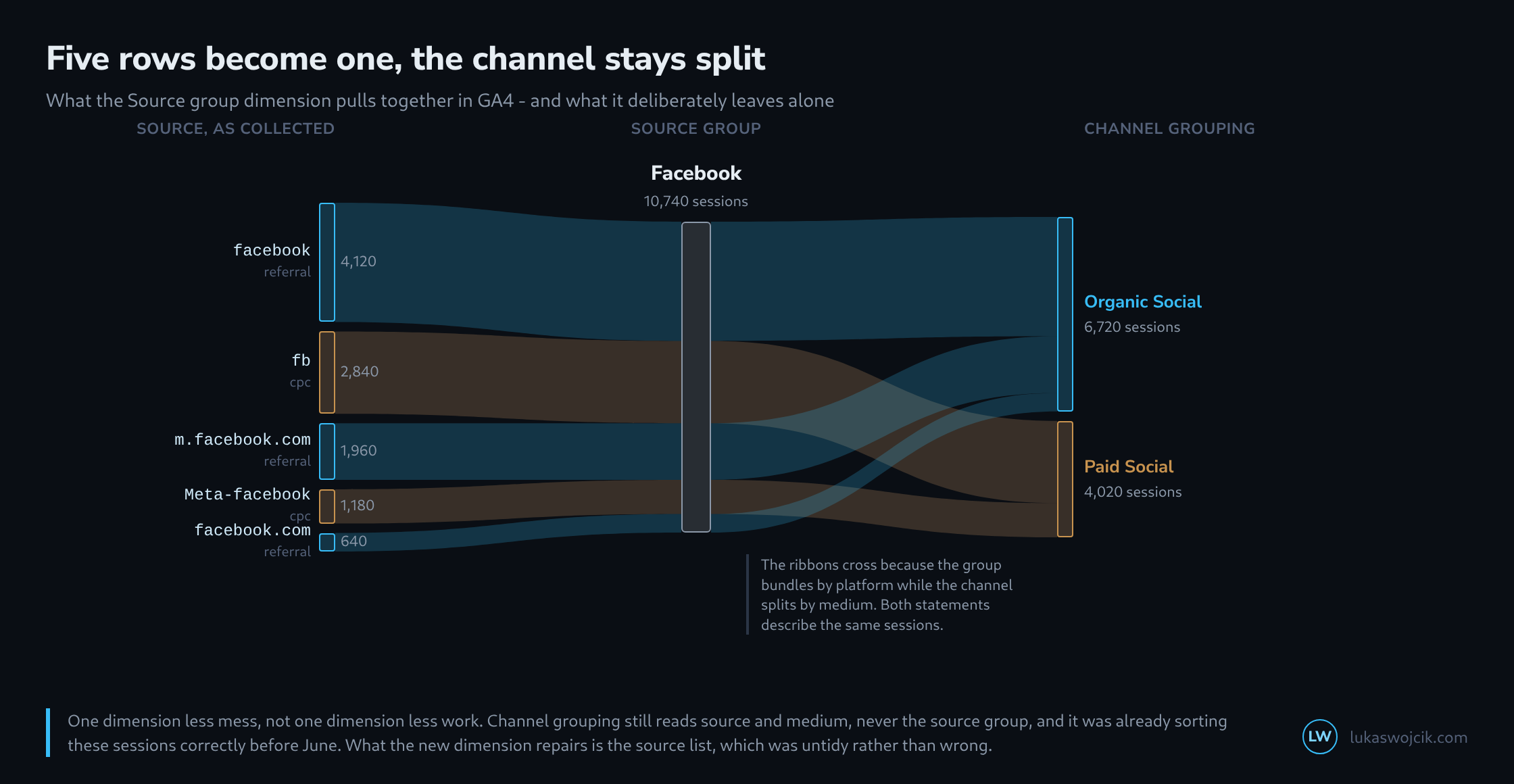
What Source group pulls together
Google’s note describes it as a new dimension concept that consolidates source values for common online platforms, naming Facebook, Instagram and TikTok as examples. Beyond those, the dimension recognises Pinterest, Amazon, YouTube, Google Search and Google Maps, along with ChatGPT and Perplexity. Google maintains the mapping table. No custom list can be supplied, and no unwanted mapping can be switched off.
The dimension is formed at query time, not at collection time. That is the reason it applies retroactively across the whole period: what remains stored is m.facebook.com, and the group only comes into being on reading. A year-over-year comparison therefore has no break anywhere in it, which sets Source group apart from almost every other change ever made to a mapping.
Why the channel report was already right
The obvious expectation is that five source rows also mean five scrambled channels. That was never the case. Channel grouping does not read source literally but through a source category maintained by Google. Both facebook and fb carry SOURCE_CATEGORY_SOCIAL, and whether that becomes Organic Social or Paid Social is decided by the medium alone.
So even before June there were two Google-maintained naming lists stacked on top of each other, and since then there are three: the source category for the channel, the source group for the display, and the collected raw values underneath. The three are not reconciled with one another, because they answer different questions. Treating them as one thing means looking for the fault in the wrong place later on.
What stays fragmented
Google’s list knows platforms, not in-house spellings. Everything originating in a company’s own campaigns remains exactly as inconsistent as it was created.
source values from an ordinary property

  facebook          fb                              -> Facebook
  m.facebook.com    Meta-facebook   facebook.com    -> Facebook
  chatgpt.com       chat.openai.com                 -> ChatGPT

  newsletter        Newsletter      nl              -> three rows
  email             e-mail          E-Mail          -> three rows
  partner-a.com     Partner-A       partnera        -> three rows

  Google maintains the upper half. The lower half is created
  in-house, and there Source group changes nothing.
The remedy is the same as before: a fixed spelling for utm_source and utm_medium, written down in a table and looked up whenever a campaign is created. A dimension that tidies up other people’s platform names does not take that work away.
Where the new dimension can get in the way
A saved exploration filtering on source exactly matching facebook still filters on the raw value and leaves the other four spellings outside. Two reports covering the same period can now show different row counts without either being broken – one reads the group, the other the raw value.
The BigQuery export continues to write the collected values. Analysis done there still has the five rows and has to reproduce the grouping by hand. Wherever interface reports and export queries are used side by side, this creates a new place where two numbers legitimately disagree.
The rollout is gradual. A dimension present in one property and not yet in another is not a fault at the moment, it is the current state.
The filter from the same day, working the other way round
A second change appeared on 11 June that reads well beside the first: hostname filters, a new kind of data filter in the admin section that excludes events based on their hostname. They are meant against hits from unfamiliar domains and against figures from a staging environment.
Both changes concern data cleanliness, but they act in opposite directions in time. Source group applies retroactively to everything already collected. A data filter acts only forward and leaves the past untouched. Switching both on the same day produces a tidied source list across the entire period and a data set that is filtered differently from precisely that day onward.
What can be checked
Three steps are enough to establish the local situation. First, a look at a report with the Source group dimension alongside: if it is offered, the rollout has arrived. Second, a comparison of the session total per group with the total of the matching raw values – if they disagree, a spelling is present that Google does not recognise. Third, a pass through the saved explorations looking for filters that point at raw values.
What remains afterwards is the old task in new light. Source group tidies the part of the list nobody in the building was responsible for anyway. The part somebody is responsible for stands exactly where it stood.
Questions and answers
Does Source group appear automatically in Looker Studio charts built on the GA4 connector, or does it have to be selected as a field first?
Source group has to be selected. The native GA4 connector in Looker Studio only supplies a dimension once a chart explicitly adds it as a field. An existing chart keeps reading the dimension it was built on, usually the raw session source, and does not switch by itself. The fact that Source group is available in the property therefore changes nothing in an existing report; the switch remains a manual step for each chart.
Charts built on the BigQuery export do not have the dimension at all, because the export writes the collected raw values. There the grouping has to be reproduced by hand.
Related articles




One comment
Update: When this article appeared, the hostname filter could only exclude. Since 21 September 2026 it has a second mode, “Include”: the list then names the permitted domains, and events with any other hostname, or an empty one, are dropped; events sent through the Measurement Protocol are exempt. What stays the same is the timing: this filter, too, applies only from the moment it is created. The rules in detail are covered in a separate article: GA4 Hostname Include Filter.