English
 Deutsch
 Polski
WordPress.org plugin guidelines: why submissions get rejected

Management Summary
The WordPress.org directory reviews more than whether a plugin works. Plugins, extensions that add website functions, must also meet rules on licensing, honest descriptions, paid offers and external data transfers. Clear choices about statistics and developer links help preserve control over a website. The overview explains why hidden transfers or payment locks on included features can prevent acceptance, and why automated checks cannot replace the directory team’s review.
Contents
- The 18 rules at a glance
- Licensing and readable code
- What must remain free and what can be paid
- A clear choice before external requests
- Example: reading time, statistics button and credit link
- Explain the transfer in the readme
- The name and permanent address
- From submission to publication
- What these checks cannot establish
- Questions and answers
- Sources
A working plugin can still fail review for the WordPress.org directory. The team checks the licence, external data transfers and name as well as code. Hidden statistics collection or a payment lock on an included feature can therefore matter as much as a programming error.
Checked on 25 October 2026. The Detailed Plugin Guidelines contain 18 rules. This overview explains what those rules mean for a finished plugin. The example separates two choices: allowing statistics to be sent and displaying a link to the developer’s website. Both start switched off.
Plugin Check, security functions and readme files and plugin headers have separate articles. Examples of finished plugins include Lite Page Cache and WP Admin Captcha.
The 18 rules at a glance
The numbers match the official guidelines. The groups connect related topics; the order does not rank reasons for rejection.
| Topic | Rules | Practical consequence |
|---|---|---|
| Licence and source | 1, 4, 13 | Every file needs a suitable licence. Readable source must be available. Libraries already supplied by WordPress are not bundled again. |
| Paid offers | 5, 6, 8 | Features included in the package cannot be unlocked by payment. Documented services are allowed; external code has specific limits. |
| Consent and interface | 7, 10, 11 | External contacts must be explained and authorized. Developer credits are optional. Advertising must not take over the administration area. |
| Publication and conduct | 2, 3, 9, 12, 14–18 | Complete, current packages, honest descriptions, suitable names and version numbers; no spam descriptions or unnecessary SVN changes. |
Responsibility includes bundled libraries and the terms of external services. The team can change rules, grant exceptions or remove a plugin. This overview therefore does not replace the current guideline page.
Licensing and readable code
GPL-compatible means that a licence must be compatible with the GNU General Public License. WordPress recommends “GPLv2 or later”. The requirement covers bundled images, data files and third-party libraries as well as original PHP code. Conflicting declarations in the plugin header and readme need resolving before submission.
Minified files are program files made smaller for distribution. Readable source and build tools must be publicly accessible, either in the package or through a readme link. For Composer projects, composer.json helps describe the build. WordPress already provides libraries such as jQuery and PHPMailer; plugins should use those copies. Unneeded test, demonstration and development folders do not belong in a release package.
What must remain free and what can be paid
A directory plugin cannot unlock included features only after payment or disable those features after a trial period. This is the trialware restriction. A paid external service is allowed when the service provides real functionality and the readme explains the dependency. Checking a licence key for functionality that otherwise lives entirely in the plugin is not enough.
Rule 5 also allows a separate paid add-on plugin hosted outside WordPress.org. Premium code then remains outside the free package. The directory plugin cannot download and install its own premium replacement. This keeps the free functionality, external service and additional product distinct.
Rule 8 is not a blanket ban on external code. Code from documented services is permitted under the stated security conditions. Without that service connection, JavaScript and CSS belong in the local package. External update sources, installing the premium version and embedding remote administration pages in iframes are restricted. The rule also permits management services that distribute software through their own domain rather than inside the WordPress dashboard.
Upgrade notices may fit the current task or appear on the plugin settings page. Notices across the administration area must be dismissible. The plugin cannot misrepresent capabilities or suggest that already included functions require additional payment.
A clear choice before external requests
An opt-in is an active choice, such as checking an initially empty box. Rule 7 requires explicit, authorized consent for external contacts and documentation of data use. The service exception concerns the recognizable purpose of an established service: installation, activation, registration and configuration can express the required consent under the directory rule. That is not permission for unrelated statistics collection or a general legal approval of every data use.
A developer link on the public website is a separate choice. Rule 10 requires the link to start disabled and forbids making the plugin depend on displaying the credit. A hidden clause in terms does not replace that choice.
Example: reading time, statistics button and credit link
The example estimates reading time locally, assuming 200 whitespace-separated words per minute. The estimate does not suit every language equally and always shows at least one minute. Two independent settings allow statistics sharing and the developer link.
Saving the statistics setting sends nothing. The separate “Send statistics once” button triggers one attempt. The saved opt-in, manage_options permission and form check must still be valid at that point. A nonce helps resist requests triggered through another site; the permission check separately decides whether the account may perform the action.
stats.example.com is a placeholder. Real use needs an actual service endpoint and accurate information about data use. The demonstration code remains outside a production website.
/**
* Plugin Name: Reading Time Badge
* Description: Shows the estimated reading time above posts. Usage statistics and a credit link are opt-in.
* Version: 1.0.0
* Requires at least: 6.5
* Requires PHP: 7.4
* License: GPLv2 or later
* License URI: https://www.gnu.org/licenses/gpl-2.0.html
* Text Domain: reading-time-badge
*
* @package ReadingTimeBadge
*/
if ( ! defined( 'ABSPATH' ) ) {
exit;
}
define( 'RTBADGE_VERSION', '1.0.0' );
define( 'RTBADGE_STATS_URL', 'https://stats.example.com/v1/ping' );
/**
* Returns the settings merged with defaults. Every outgoing feature is off by default.
*
* @return array
*/
function rtbadge_get_settings() {
$defaults = array(
'share_stats' => false,
'show_credit' => false,
);
return wp_parse_args( (array) get_option( 'rtbadge_settings', array() ), $defaults );
}
/**
* Stores exactly two booleans, whatever the form sends.
*
* @param mixed $input Raw option value.
* @return array
*/
function rtbadge_sanitize_settings( $input ) {
$input = is_array( $input ) ? $input : array();
return array(
'share_stats' => isset( $input['share_stats'] ) && in_array( $input['share_stats'], array( true, '1' ), true ),
'show_credit' => isset( $input['show_credit'] ) && in_array( $input['show_credit'], array( true, '1' ), true ),
);
}
add_action( 'admin_init', 'rtbadge_register_settings' );
/**
* Registers the option with a sanitize callback.
*/
function rtbadge_register_settings() {
register_setting(
'rtbadge',
'rtbadge_settings',
array(
'type' => 'array',
'sanitize_callback' => 'rtbadge_sanitize_settings',
'default' => array(
'share_stats' => false,
'show_credit' => false,
),
)
);
}
add_action( 'admin_menu', 'rtbadge_add_settings_page' );
/**
* Adds the settings page below Settings.
*/
function rtbadge_add_settings_page() {
add_options_page(
__( 'Reading Time Badge', 'reading-time-badge' ),
__( 'Reading Time Badge', 'reading-time-badge' ),
'manage_options',
'rtbadge',
'rtbadge_render_settings_page'
);
}
/**
* Renders two unchecked-by-default opt-in checkboxes.
*/
function rtbadge_render_settings_page() {
if ( ! current_user_can( 'manage_options' ) ) {
return;
}
$settings = rtbadge_get_settings();
<div class="wrap">
<h1> echo esc_html( get_admin_page_title() ); </h1>
<form action="options.php" method="post">
settings_fields( 'rtbadge' );
<p>
<label>
<input type="checkbox" name="rtbadge_settings[share_stats]" value="1" checked( $settings['share_stats'] ); >
esc_html_e( 'Allow sending plugin, WordPress and PHP versions to stats.example.com with the separate Send statistics button.', 'reading-time-badge' );
</label>
</p>
<p>
<label>
<input type="checkbox" name="rtbadge_settings[show_credit]" value="1" checked( $settings['show_credit'] ); >
esc_html_e( 'Show a link to the plugin website next to the reading time on the public site.', 'reading-time-badge' );
</label>
</p>
submit_button();
</form>
<form action="<?php echo esc_url( admin_url( 'admin-post.php' ) ); ?>" method="post">
<input type="hidden" name="action" value="rtbadge_send_stats">
wp_nonce_field( 'rtbadge_send_stats' );
submit_button( __( 'Send statistics once', 'reading-time-badge' ), 'secondary' );
</form>
</div>
}
add_action( 'admin_post_rtbadge_send_stats', 'rtbadge_send_stats' );
/**
* Sends one request after a deliberate action by an authorized administrator.
*/
function rtbadge_send_stats() {
if ( ! isset( $_SERVER['REQUEST_METHOD'] ) || 'POST' !== $_SERVER['REQUEST_METHOD'] ) {
wp_die( esc_html__( 'POST is required.', 'reading-time-badge' ) );
}
if ( ! current_user_can( 'manage_options' ) ) {
wp_die( esc_html__( 'Permission denied.', 'reading-time-badge' ) );
}
check_admin_referer( 'rtbadge_send_stats' );
$settings = rtbadge_get_settings();
if ( true !== $settings['share_stats'] ) {
wp_die( esc_html__( 'Statistics sharing is disabled. Save the setting before sending.', 'reading-time-badge' ) );
}
$response = wp_safe_remote_post(
RTBADGE_STATS_URL,
array(
'timeout' => 5,
'redirection' => 0,
'user-agent' => 'reading-time-badge/' . RTBADGE_VERSION,
'body' => array(
'plugin_version' => RTBADGE_VERSION,
'wp_version' => get_bloginfo( 'version' ),
'php_version' => PHP_VERSION,
),
)
);
if ( is_wp_error( $response ) ) {
wp_die( esc_html__( 'The request failed. No automatic retry is scheduled.', 'reading-time-badge' ) );
}
$status = wp_remote_retrieve_response_code( $response );
if ( $status < 200 || $status >= 300 ) {
wp_die( esc_html__( 'The service did not return a successful HTTP response.', 'reading-time-badge' ) );
}
wp_die( esc_html__( 'The service returned a successful HTTP response. This does not verify storage.', 'reading-time-badge' ) );
}
add_filter( 'the_content', 'rtbadge_prepend_reading_time' );
/**
* Prepends the reading time. The credit link appears only after opt-in.
*
* @param string $content Post content.
* @return string
*/
function rtbadge_prepend_reading_time( $content ) {
if ( ! is_singular( 'post' ) || ! in_the_loop() || ! is_main_query() ) {
return $content;
}
$words = preg_split( '/\s+/u', trim( wp_strip_all_tags( $content ) ), -1, PREG_SPLIT_NO_EMPTY );
if ( false === $words ) {
return $content;
}
$minutes = max( 1, (int) ceil( count( $words ) / 200 ) ); // Assumes 200 words per minute.
$badge = '<p class="rtbadge">' . esc_html(
sprintf(
/* translators: %d: estimated reading time in minutes */
_n( '%d minute read', '%d minutes read', $minutes, 'reading-time-badge' ),
$minutes
)
);
$settings = rtbadge_get_settings();
if ( true === $settings['show_credit'] ) {
$badge .= ' · <a href="' . esc_url( 'https://example.com/reading-time-badge/' ) . '">'
. esc_html__( 'Reading Time Badge', 'reading-time-badge' ) . '</a>';
}
return $badge . '</p>' . $content;
}The request contains three version fields. A custom user agent replaces the WordPress HTTP API default, which also includes the site URL. The recipient can still see the server’s source IP address. Redirects are disabled. An HTTP response from 200 to 299 confirms a successful server response, not storage of the data. Another click can trigger another attempt; no automatic retries or weekly lock are included.
The two forms have different jobs: saving changes stores the choices, while the second button sends once. Clearing the checkbox also needs saving before further sends are disabled. The confirmation page is intentionally simple; a finished plugin could display an appropriate notice on the settings page instead.
Explain the transfer in the readme
Documentation states the purpose, trigger, data and recipient. Links to the service, terms and privacy information must lead to actual pages in a finished plugin. The following English section is a template for the same manual workflow:
== Privacy and external services ==

Reading Time Badge calculates reading time locally and works without an external service.
Statistics sharing and the public credit link are disabled by default.

Saving the statistics opt-in does not send a request. After that setting is saved,
an administrator can press "Send statistics once" to send one request to
https://stats.example.com/v1/ping. Each additional click can send another request.
Clearing the opt-in and saving the setting prevents further sends by this feature.

The example request body contains plugin, WordPress and PHP versions.
The example does not add site content or the site URL to that body or its custom user agent.
The receiving service can see the server's source IP address.
No automatic retry or weekly schedule is implemented.

The example addresses below are placeholders and must be replaced with actual service details.
* Service: https://stats.example.com/
* Terms of use: https://stats.example.com/terms/
* Privacy policy: https://stats.example.com/privacy/
The name and permanent address
The slug is the short name in the address, such as wordpress.org/plugins/reading-time-badge. The plugin folder, SVN address and translation text domain also use this value. The initial proposal comes from Plugin Name in the main file header.
The official pages describe name collisions differently: the submission page mentions an appended number, while the developer FAQ mentions an upload warning. The confirmed slug therefore matters. An original name avoids depending on automatic numbering.
The submission page permits one self-service slug change before review starts. During review, changes are discussed in the existing email thread. The team can still change the slug before approval; after approval, renaming the slug is no longer available. The displayed plugin name can change later.
Another brand cannot be the sole or first term in a slug without confirmed ownership or authorized representation. “Delivery Dates for WooCommerce” illustrates a feature followed by a brand; “WooCommerce Delivery Dates” can imply official origin. The first pattern is not automatic legal approval for every specific use of a name.
/**
* Plugin Name: Delivery Dates for WooCommerce
* Description: Lets customers pick a delivery date at checkout.
* Version: 1.0.0
* License: GPLv2 or later
* Text Domain: delivery-dates-for-woocommerce
*
* @package DeliveryDatesForWooCommerce
*/
// Main file: delivery-dates-for-woocommerce/delivery-dates-for-woocommerce.php
// Slug proposed on submission: delivery-dates-for-woocommerce
if ( ! defined( 'ABSPATH' ) ) {
exit;
}From submission to publication
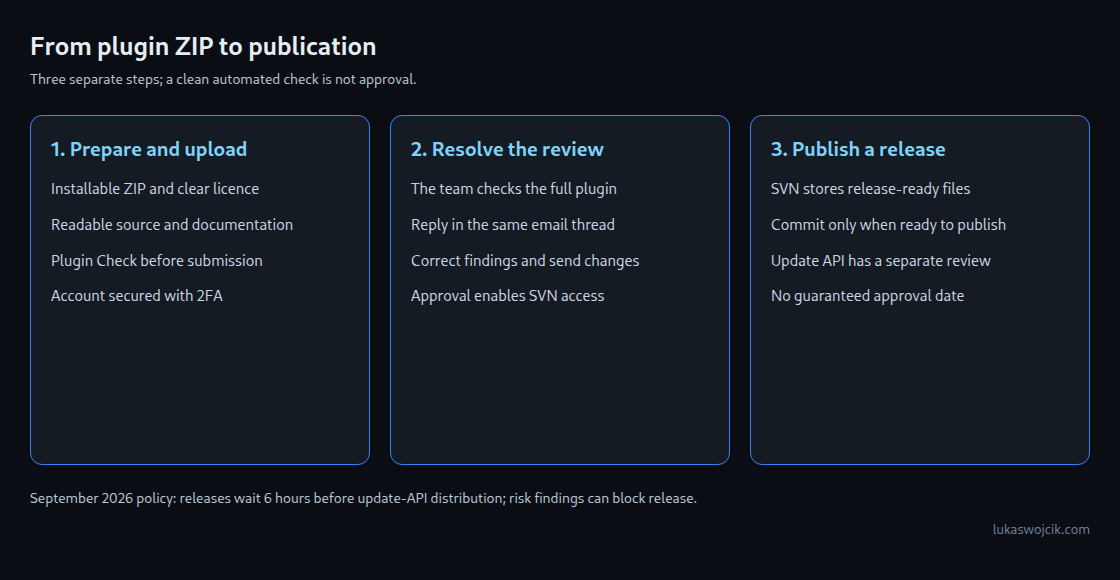
The ZIP must install as a plugin. The FAQ identifies a 10 MB size limit; unnecessary development files increase package size. Since October 2024, accounts with submission or commit access require two-factor authentication: an additional sign-in factor beyond the password. SVN has a separate password feature.
The 1 October 2024 announcement describes Plugin Check as a pre-check: errors in the Plugin Repo category block submission. That is the documented starting point; the current checks can evolve. A clean automated result does not replace review by the team.
Findings are addressed in the same email thread. After rejection because a review remains unfinished after three months, the FAQ calls for resubmission and a reply to the old email. Other rejection reasons call for discussion in the existing thread, not a new submission.
Approval provides SVN access. SVN is a store for release-ready versions, not every development step. trunk/ holds the current code, tags/ named versions and assets/ directory images. A commit transfers changes to the repository and can trigger publication.
Distribution through the update API is separate. The 9 September 2026 announcement states a six-hour cooldown and an automated security review. High risk scores can block a release. This distribution is distinct from merely storing files in SVN.
What these checks cannot establish
Historical queue counts describe a backlog, not an individual waiting time. A small number of unreviewed submissions does not guarantee a quick decision. The submission page states a five-business-day target and a range of one to ten days, depending on complexity. These figures are not a deadline commitment.
The example was tested in isolation for access checks, consent, request failures and output. Such tests replace neither a full WordPress run nor Plugin Check or the directory team’s decision.
Questions and answers
Can a free plugin promote a Pro offer?
Yes, within the limits of rules 5, 8 and 11 described above. Included functions remain usable. A separate add-on or an actual external service can be paid.
Is a clean Plugin Check run enough?
No. Licensing, service purpose, presentation and naming rights are not settled by that result. Review by the team remains necessary.
Does the absence of a request error prove storage?
No. Even a successful HTTP response does not establish that the recipient saved the data. Without consent or valid form and permission checks, the example makes no request.
How many plugins can be in review at once?
The developer FAQ normally permits one submission. Authors with more than one million active plugin installations have a higher limit of up to ten. Extra accounts cannot be used to bypass the limit.
Sources
- Detailed Plugin Guidelines
- Common issues
- Plugin Developer FAQ
- Plugin submission
- Planning, Submitting, and Maintaining Plugins
- How to Use Subversion
- Plugin Check and 2FA Now Mandatory For New Plugin Submissions
- Plugins Team: 28 Sep 2026
- Plugins Team: 7 Sep 2026
- Update on the status of the team – June 2026
- A Year in the Plugins Team – 2025
- Automated security review for plugin releases
- class-wp-http.php (default user agent)
- WordPress Transients API
- WordPress: wp_safe_remote_post
- WordPress: Nonces
Related articles