English
 Deutsch
 Polski
Settings pages with the Settings API and register_setting

Management Summary
Settings pages let WordPress administrators change how an extension behaves without editing its program files. The article explains this using a notice bar with a message, position and on/off switch. WordPress supplies standard building blocks for these forms and their saved values. Their purpose is convenient, consistent administration. Reliability still matters: only authorised people should make changes, and saving one choice should not accidentally erase another.
Contents
- What each function does
- Grouping related values while separating forms
- Autoload: when WordPress loads an option in advance
- The plugin and its input checks
- Why registration is separate from form layout
- What happens when the form saves
- Rules for /wp/v2/settings
- A REST button without a stale form
- Test scope and limits
- Questions and answers
- Sources
A plugin settings page needs form fields, permission checks and a safe way to save values. The WordPress Settings API provides building blocks for these tasks. This example manages a notice bar with three values: enabled or disabled, message text and position on the page.
These values share the option lwsd_settings. An option is a named entry in the WordPress wp_options table. The plugin provides a normal form and a second button that uses the REST API, an interface for reading and writing settings through HTTP requests. The explanation refers to WordPress 7.1; the original example was tested with 7.1.2 and PHP 8.4.
What each function does
WordPress runs functions at defined points called hooks. For example, admin_menu is the appropriate point for adding a menu item. The following division separates visible fields from data registration and storage.
| Function | Execution point | Task |
|---|---|---|
add_options_page() | admin_menu | Menu entry and required permission |
register_setting() | init | Registers option, cleaning function, default and REST rules |
add_settings_section(), add_settings_field() | admin_init | Headings and fields in the admin form |
settings_fields(), do_settings_sections() | In the page callback | Hidden verification fields and visible sections and fields |
A capability is an individual user permission. The required permission here is manage_options. add_options_page() uses it for the menu and page access. The page callback, the function that produces the output, also checks it with current_user_can(). During saving, options.php checks permission again.
Three names have different jobs: lwsd_settings is the stored option; lwsd_notice_bar is the form’s option group; lwsd-notice-bar identifies the admin page. The group name in register_setting() must match settings_fields(). The page name connects sections and fields to their output.
Grouping related values while separating forms
An array groups several named values. The switch, message and position then occupy one database row, which is written together when changed. This is not an additional transaction covering arbitrary read and write steps, and it does not prevent conflicts between browsers editing at the same time.
Independently saved forms need separate option groups. options.php processes every option in the submitted group. A missing option is passed to its storage function as null. For example, form A sends only option A, but both A and B belong to the same group. Option B’s cleaning callback can then reset B’s values. One array option per form does not prevent this; the groups must also be separate.
The array is automatically serialized: stored as one combined string. Its individual values are therefore not separate SQL columns with suitable indexes. Data that needs frequent database searches by individual properties is better served by other data models. WordPress Database: Performance Limits of wp_postmeta and How to Build Custom Tables.
Autoload: when WordPress loads an option in advance
Autoload means WordPress loads an option early alongside other options, before an individual call requests that value. This suits the small notice-bar configuration because every normal front-end page needs it. false is usually more suitable for infrequently used admin settings.
In add_option(), true explicitly sets the database value on, while false sets off. Since WordPress 6.6, the default null leaves the decision to automatic rules. The result can be auto, auto-on or auto-off. Without an explicit choice, WordPress normally disables autoload when the serialized value exceeds 150,000 bytes. Filters can change the threshold or decision; this size rule does not override an explicit true.
Activation creates a missing option with add_option( …, true ). It does not change an existing option. Later, options.php passes no separate autoload value. When an existing option value actually changes, explicit on/off values remain; automatic values may be reconsidered.
wp_set_option_autoload(), available since WordPress 6.4, changes autoload without changing the option value. In contrast, update_option() returns early when the value has not changed. The old API arguments yes/no have been deprecated since 6.7 but remain understood for compatibility. Autoload in WordPress: Values, Queries and Memory Usage.
The plugin and its input checks
The main file can be placed at lw-settings-demo/lw-settings-demo.php. The JavaScript shown later belongs in the adjacent js/settings-rest.js path. The lwsd_ prefix separates these function names from those used by other plugins.
The sanitizing callback is the function that produces an allowed stored value. Here it removes HTML from the message, limits the message to 200 characters and permits only top or bottom for the position. An empty message disables the bar. Only true, the number 1 and the form value "1" enable it; the string "false" does not accidentally enable it.
/**
* Plugin Name: LW Settings Demo
* Description: Notice bar with a settings page built on the Settings API, also available via /wp/v2/settings.
* Version: 1.0.0
* Requires at least: 6.6
* Requires PHP: 7.4
* Author: Lukas Wojcik
* License: GPL-2.0-or-later
* License URI: https://www.gnu.org/licenses/gpl-2.0.html
* Text Domain: lw-settings-demo
*
* @package LW_Settings_Demo
*/
if ( ! defined( 'ABSPATH' ) ) {
exit;
}
const LWSD_OPTION = 'lwsd_settings'; // Row in wp_options.
const LWSD_GROUP = 'lwsd_notice_bar'; // Option group, sent as option_page.
const LWSD_PAGE = 'lwsd-notice-bar'; // Menu slug and settings page ID.
/**
* Default values of the bundled option.
*
* @return array
*/
function lwsd_default_settings() {
return array(
'enabled' => false,
'message' => '',
'position' => 'bottom',
);
}
/**
* Returns the stored settings merged with the defaults.
*
* @return array
*/
function lwsd_get_settings() {
$settings = get_option( LWSD_OPTION );
if ( ! is_array( $settings ) ) {
$settings = array();
}
return wp_parse_args( $settings, lwsd_default_settings() );
}
/**
* Registers the option on init, so admin screens and REST requests both know it.
*/
function lwsd_register_setting() {
register_setting(
LWSD_GROUP,
LWSD_OPTION,
array(
'type' => 'object',
'label' => __( 'Notice bar', 'lw-settings-demo' ),
'description' => __( 'Visibility, text and position of the notice bar.', 'lw-settings-demo' ),
'sanitize_callback' => 'lwsd_sanitize_settings',
'default' => lwsd_default_settings(),
'show_in_rest' => array(
'schema' => array(
'type' => 'object',
'properties' => array(
'enabled' => array(
'type' => 'boolean',
),
'message' => array(
'type' => 'string',
'maxLength' => 200,
),
'position' => array(
'type' => 'string',
'enum' => array( 'top', 'bottom' ),
),
),
),
),
)
);
}
add_action( 'init', 'lwsd_register_setting' );
/**
* Sanitizes the whole settings array.
*
* Runs for options.php and for REST writes, because both end in update_option().
* Repeated sanitizing must leave the result unchanged; a new row can cause two passes.
*
* @param mixed $input Raw value.
* @return array
*/
function lwsd_sanitize_settings( $input ) {
$defaults = lwsd_default_settings();
if ( ! is_array( $input ) ) {
return $defaults;
}
$message = isset( $input['message'] ) ? sanitize_text_field( $input['message'] ) : '';
$position = isset( $input['position'] ) ? sanitize_key( $input['position'] ) : '';
$output = array(
'enabled' => in_array( $input['enabled'] ?? false, array( true, 1, '1' ), true ),
'message' => mb_substr( $message, 0, 200 ),
'position' => in_array( $position, array( 'top', 'bottom' ), true ) ? $position : $defaults['position'],
);
if ( $output['enabled'] && '' === $output['message'] ) {
$output['enabled'] = false;
// add_settings_error() lives in wp-admin/includes/template.php,
// which a REST request does not load.
if ( function_exists( 'add_settings_error' ) ) {
add_settings_error(
LWSD_OPTION,
'lwsd_empty_message',
__( 'The notice bar stays off until a message is entered.', 'lw-settings-demo' ),
'warning'
);
}
}
return $output;
}
/**
* Adds the page below Settings and loads its script only there.
*/
function lwsd_add_settings_page() {
$hook_suffix = add_options_page(
__( 'Notice bar', 'lw-settings-demo' ),
__( 'Notice bar', 'lw-settings-demo' ),
'manage_options',
LWSD_PAGE,
'lwsd_render_settings_page'
);
if ( $hook_suffix ) {
add_action( 'load-' . $hook_suffix, 'lwsd_load_settings_page' );
}
}
add_action( 'admin_menu', 'lwsd_add_settings_page' );
/**
* Runs only when the settings page is requested.
*/
function lwsd_load_settings_page() {
add_action( 'admin_enqueue_scripts', 'lwsd_enqueue_admin_script' );
}
/**
* Enqueues the REST demo script.
*/
function lwsd_enqueue_admin_script() {
wp_enqueue_script(
'lwsd-settings-rest',
plugins_url( 'js/settings-rest.js', __FILE__ ),
array( 'wp-api-fetch', 'wp-i18n' ),
'1.0.0',
array( 'in_footer' => true )
);
wp_set_script_translations( 'lwsd-settings-rest', 'lw-settings-demo' );
}
/**
* Declares section and fields. Only needed on admin screens.
*/
function lwsd_register_fields() {
add_settings_section(
'lwsd_section_main',
__( 'Display', 'lw-settings-demo' ),
'lwsd_render_section',
LWSD_PAGE
);
add_settings_field(
'lwsd_enabled',
__( 'Show notice bar', 'lw-settings-demo' ),
'lwsd_render_enabled_field',
LWSD_PAGE,
'lwsd_section_main',
array( 'label_for' => 'lwsd_enabled' )
);
add_settings_field(
'lwsd_message',
__( 'Message', 'lw-settings-demo' ),
'lwsd_render_message_field',
LWSD_PAGE,
'lwsd_section_main',
array( 'label_for' => 'lwsd_message' )
);
add_settings_field(
'lwsd_position',
__( 'Position', 'lw-settings-demo' ),
'lwsd_render_position_field',
LWSD_PAGE,
'lwsd_section_main',
array( 'label_for' => 'lwsd_position' )
);
}
add_action( 'admin_init', 'lwsd_register_fields' );
/**
* Section intro.
*/
function lwsd_render_section() {
echo '<p>' . esc_html__( 'All three values are stored together in one option.', 'lw-settings-demo' ) . '</p>';
}
/**
* Checkbox field.
*/
function lwsd_render_enabled_field() {
$settings = lwsd_get_settings();
printf(
'<input type="checkbox" id="lwsd_enabled" name="%1$s[enabled]" value="1" %2$s />',
esc_attr( LWSD_OPTION ),
checked( $settings['enabled'], true, false )
);
}
/**
* Text field.
*/
function lwsd_render_message_field() {
$settings = lwsd_get_settings();
printf(
'<input type="text" class="regular-text" id="lwsd_message" name="%1$s[message]" value="%2$s" maxlength="200" />',
esc_attr( LWSD_OPTION ),
esc_attr( $settings['message'] )
);
}
/**
* Select field.
*/
function lwsd_render_position_field() {
$settings = lwsd_get_settings();
$choices = array(
'top' => __( 'Top of the page', 'lw-settings-demo' ),
'bottom' => __( 'Bottom of the page', 'lw-settings-demo' ),
);
printf( '<select id="lwsd_position" name="%s[position]">', esc_attr( LWSD_OPTION ) );
foreach ( $choices as $value => $label ) {
printf(
'<option value="%1$s" %2$s>%3$s</option>',
esc_attr( $value ),
selected( $settings['position'], $value, false ),
esc_html( $label )
);
}
echo '</select>';
}
/**
* Settings page. The form posts to options.php, not to this page.
*/
function lwsd_render_settings_page() {
if ( ! current_user_can( 'manage_options' ) ) {
return;
}
<div class="wrap">
<h1> echo esc_html( get_admin_page_title() ); </h1>
<form id="lwsd-settings-form" action="options.php" method="post">
settings_fields( LWSD_GROUP );
do_settings_sections( LWSD_PAGE );
submit_button();
</form>
<p>
<button type="button" class="button" id="lwsd-rest-toggle"> esc_html_e( 'Toggle via REST API', 'lw-settings-demo' ); </button>
<span id="lwsd-rest-status" aria-live="polite"></span>
</p>
</div>
}
/**
* Prints the notice bar on the front end.
*
* @param string $position Where the calling hook prints: top or bottom.
*/
function lwsd_print_notice( $position ) {
$settings = lwsd_get_settings();
if ( ! $settings['enabled'] || $position !== $settings['position'] || '' === $settings['message'] ) {
return;
}
printf(
'<div class="lwsd-notice lwsd-notice-%1$s" role="status">%2$s</div>',
esc_attr( $position ),
esc_html( $settings['message'] )
);
}
/**
* Top position, needs a theme that calls wp_body_open().
*/
function lwsd_print_top_notice() {
lwsd_print_notice( 'top' );
}
add_action( 'wp_body_open', 'lwsd_print_top_notice' );
/**
* Bottom position.
*/
function lwsd_print_bottom_notice() {
lwsd_print_notice( 'bottom' );
}
add_action( 'wp_footer', 'lwsd_print_bottom_notice' );
/**
* Creates the option with an explicit autoload value.
*/
function lwsd_activate() {
// Read on every front-end request, so autoload it on purpose.
add_option( LWSD_OPTION, lwsd_default_settings(), '', true );
}
register_activation_hook( __FILE__, 'lwsd_activate' );Why registration is separate from form layout
register_setting() runs on init here. This hook runs in the admin area, on normal page requests and during REST requests. Registration only on admin_init would suffice for the admin form but not for an ordinary REST request. The registered default should also be available on the front end. Sections and fields remain on admin_init, because these elements are needed only in the admin area.
Both the form and REST write paths reach update_option() and therefore the registered sanitizing callback. The REST schema additionally checks the API request. For example, a REST message longer than 200 characters is rejected. The sanitizing callback instead truncates a longer message submitted through the form to 200 characters. The HTML maxlength attribute alone would not provide server-side validation.
Repeated cleaning must produce the same value. For a missing option, update_option() and then add_option() can both sanitize it. However, if the new value already equals the registered default, the first call can return early without creating a row. Two passes are therefore possible, but not guaranteed on every first save.
add_settings_error() is not loaded during an ordinary REST request. function_exists() prevents a call to a missing function. On a page under Settings, WordPress already displays notices through options-head.php. Another settings_errors() call in the page callback would duplicate notices. A sanitizing warning can replace the general success notice even when other values were saved.
What happens when the form saves
The form submits to options.php. settings_fields() adds four hidden fields: option group, the update action, a nonce and the return address. A nonce here is a time-limited verification value tied to an action and a logged-in session. It helps protect against requests triggered by another site but replaces neither authentication nor permission checks.
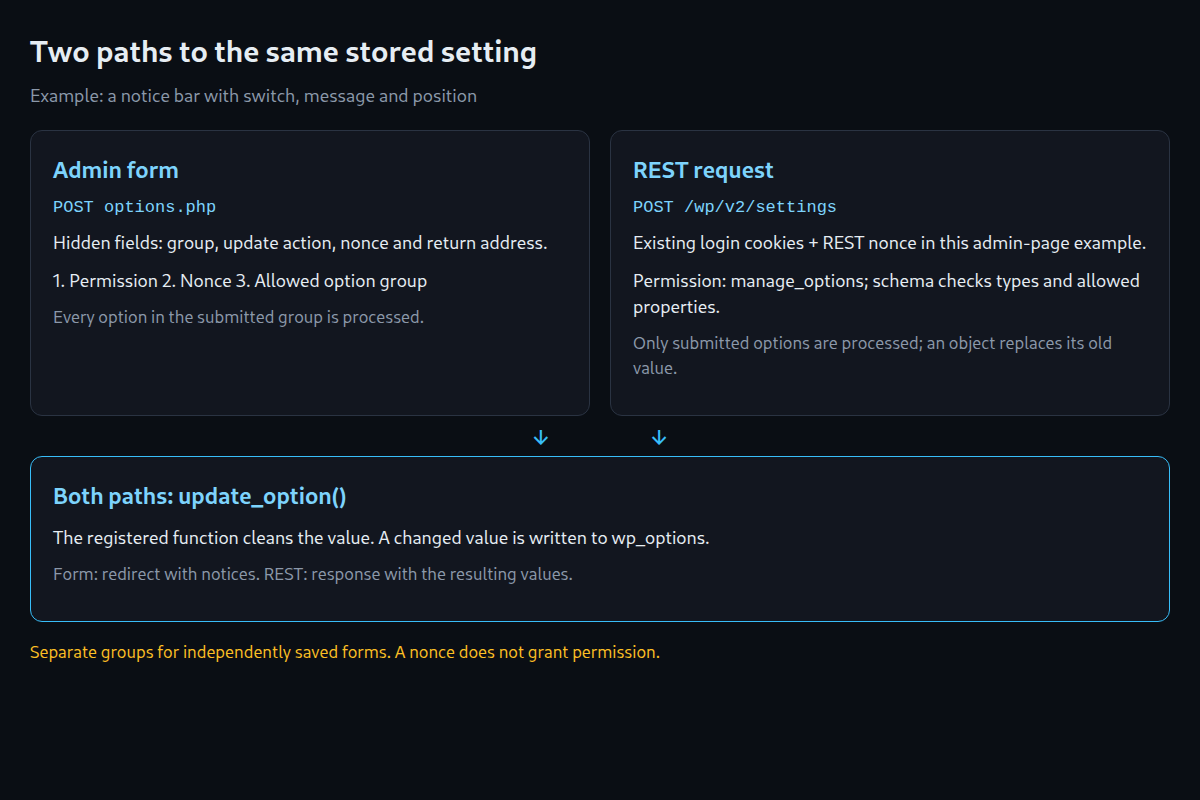
options.php checks permission first, then the nonce and allowed option group. WordPress then reads the registered options, removes transport-related escape characters and calls update_option(). After cleaning and pre-update filters, only a changed value is written. Notices are stored briefly, followed by a redirect back to the settings page.
The menu, page callback and storage path need compatible permissions. A menu requiring edit_pages is insufficient when options.php still requires manage_options. The filter option_page_capability_lwsd_notice_bar controls this form permission. Changing it does not automatically change the REST endpoint’s permission. Sanitizing, Escaping, Nonces, Capabilities in Plugin Review.
Rules for /wp/v2/settings
show_in_rest exposes a registered option through this REST endpoint. For an object, properties describes allowed properties; for an array, items describes its elements. The schema is therefore a set of rules for types and allowed values. Unless an explicit different rule exists, the controller adds additionalProperties: false to objects, rejecting unknown properties.
Reading and writing both require manage_options in the standard controller. The response key matches the option name unless show_in_rest.name specifies another name. Publicly accessible values would need a separate route with deliberately limited output and its own permission function.
A whole option omitted from a request remains unchanged. However, a submitted object is not automatically merged with its old value. If enabled is missing inside lwsd_settings, this example’s cleaning function supplies false; a missing position becomes bottom. A partial object can therefore reset other properties.
An invalid stored value appears as null in GET results. One possible reason is an old property that the schema no longer permits. A POST value of null deletes a valid option, allowing its default to apply. If the stored value is invalid, the controller rejects this deletion with rest_invalid_stored_value and status 500. A migration or an appropriately corrected schema must resolve the mismatch.
A REST button without a stale form
The script loads only on this settings page. The wp-api-fetch dependency provides the REST address and nonce support there. It does not create a login: valid login cookies, the matching REST nonce and the required permission are still necessary.
The button reads the stored object, reverses the switch and submits the complete object. Unsaved form changes prevent the request from starting. Form controls remain disabled during the request. After success, the form adopts the values actually returned by the server. This prevents a later save of a stale form from immediately reverting the switch.
If the write result is uncertain after submission, the form remains disabled until reload. A lost response does not prove that saving failed. Reading and then writing the whole object also does not protect against concurrent changes in another browser. Such cases need server-side conflict detection. For example, the browser read version 4, but version 5 now exists. The server rejects the outdated change instead of overwriting the newer values.
/* global wp */
( function () {
    'use strict';
    const { __ } = wp.i18n;
    const form = document.getElementById( 'lwsd-settings-form' );
    const button = document.getElementById( 'lwsd-rest-toggle' );
    const status = document.getElementById( 'lwsd-rest-status' );
    const enabled = document.getElementById( 'lwsd_enabled' );
    const message = document.getElementById( 'lwsd_message' );
    const position = document.getElementById( 'lwsd_position' );
    if ( ! form || ! button || ! status || ! enabled || ! message || ! position ) {
        return;
    }
    const readForm = () => JSON.stringify( [ enabled.checked, message.value, position.value ] );
    let baseline = readForm();
    let busy = false;
    form.addEventListener( 'submit', ( event ) => {
        if ( busy ) {
            event.preventDefault();
        }
    } );
    button.addEventListener( 'click', async () => {
        if ( busy ) {
            return;
        }
        if ( readForm() !== baseline ) {
            status.textContent = __( 'Unsaved form changes: saving the form is required before REST toggling.', 'lw-settings-demo' );
            return;
        }
        busy = true;
        button.disabled = true;
        const controls = Array.from( form.elements );
        const disabledBefore = controls.map( ( control ) => control.disabled );
        controls.forEach( ( control ) => { control.disabled = true; } );
        status.textContent = __( 'Request in progress.', 'lw-settings-demo' );
        let writeStarted = false;
        let uncertain = false;
        try {
            const settings = await wp.apiFetch( { path: '/wp/v2/settings' } );
            const current = settings.lwsd_settings;
            if ( ! current || typeof current.enabled !== 'boolean' ) {
                throw new Error( __( 'Stored value does not match the schema.', 'lw-settings-demo' ) );
            }
            writeStarted = true;
            const saved = await wp.apiFetch( {
                path: '/wp/v2/settings',
                method: 'POST',
                data: { lwsd_settings: { ...current, enabled: ! current.enabled } },
            } );
            const value = saved.lwsd_settings;
            if ( ! value || typeof value.enabled !== 'boolean' ||
                typeof value.message !== 'string' || ! [ 'top', 'bottom' ].includes( value.position ) ) {
                throw new Error( __( 'Unexpected response. Reloading is required to verify the stored state.', 'lw-settings-demo' ) );
            }
            enabled.checked = value.enabled;
            message.value = value.message;
            position.value = value.position;
            baseline = readForm();
            status.textContent = value.enabled
                ? __( 'Notice bar is on.', 'lw-settings-demo' )
                : __( 'Notice bar is off.', 'lw-settings-demo' );
        } catch ( error ) {
            uncertain = writeStarted;
            status.textContent = uncertain
                ? __( 'Save result uncertain. Reloading is required before further changes.', 'lw-settings-demo' )
                : ( error && error.message ? error.message : __( 'Request failed.', 'lw-settings-demo' ) );
        } finally {
            if ( ! uncertain ) {
                controls.forEach( ( control, index ) => { control.disabled = disabledBefore[ index ]; } );
                button.disabled = false;
                busy = false;
            }
        }
    } );
} )();
Test scope and limits
Archived tests of the original example on WordPress 7.1.2 and PHP 8.4 document form and REST writes. The revised cleaning function was tested with WordPress helpers. The new JavaScript was tested with simulated success, unsaved changes, invalid data and lost responses. These checks do not replace a new complete browser and installation test of the plugin.
The top position needs the theme to call wp_body_open(); the bottom position needs wp_footer(). The example has no uninstall routine that deletes its data and was not tested for Multisite network settings. Activation, deactivation, uninstall: the plugin lifecycle.
Questions and answers
Is registration on admin_init sufficient?
For the admin form, yes. Ordinary REST requests and registered defaults on the front end need registration there as well. This example therefore uses init.
Why does the REST API return null?
The stored value can contradict the schema, for example through a property that is no longer allowed. In that case, null indicates a problem in the result; it is not a request to send that value back without checking.
Can one object property be changed?
The standard controller does not automatically merge a submitted partial object with old properties. A complete read and write preserves the other values but can still conflict with concurrent changes. A custom route can explicitly implement partial changes and conflict detection.
Does a nonce provide protection on its own?
No. Authentication and user permissions are checked separately. A valid verification value does not grant additional permissions.
Sources
- Plugin Handbook: Settings API, retrieved 29.09.2026
- Plugin Handbook: Using Settings API, retrieved 29.09.2026
- Plugin Handbook: Custom Settings Page, retrieved 29.09.2026
- Plugin Handbook: Options API, retrieved 29.09.2026
- Code Reference: register_setting(), retrieved 29.09.2026
- Code Reference: settings_fields(), retrieved 29.09.2026
- Code Reference: add_option(), retrieved 29.09.2026
- Code Reference: wp_set_option_autoload(), retrieved 29.09.2026
- REST API Handbook: Settings, retrieved 29.09.2026
- Block Editor Handbook: @wordpress/api-fetch, retrieved 29.09.2026
- WordPress Developer Blog: How to use WordPress React components for plugin pages, retrieved 29.09.2026
- Make WordPress Core: Settings registration in WordPress 4.7, retrieved 29.09.2026
- Make WordPress Core: New option functions in 6.4, retrieved 29.09.2026
- Make WordPress Core: Options API: Disabling autoload for large options, retrieved 29.09.2026
- wordpress-develop: wp-admin/options.php (branch 7.1), retrieved 29.09.2026
- wordpress-develop: wp-admin/options-head.php (branch 7.1), retrieved 29.09.2026
- wordpress-develop: wp-includes/option.php (branch 7.1), retrieved 29.09.2026
- wordpress-develop: class-wp-rest-settings-controller.php (branch 7.1), retrieved 29.09.2026
- wordpress-develop: wp-admin/includes/plugin.php (branch 7.1), retrieved 29.09.2026
- wordpress-develop: wp-admin/includes/template.php (branch 7.1), retrieved 29.09.2026
- wordpress-develop: wp-includes/script-loader.php (branch 7.1), retrieved 29.09.2026
Related articles