English
 Deutsch
 Polski
Custom REST Endpoints in WordPress: Validation, Output and Performance

Management Summary
A custom data interface lets a WordPress page or application request exactly the information needed for a particular feature. Such an interface is a defined address for exchanging data, rather than a complete web page. It can simplify responses and limit unnecessary work when the standard interfaces do not fit. The design also determines who may obtain or change information. Its value comes from a clear purpose, controlled access and reliable behaviour, not merely a smaller response.
Contents
- A small endpoint with clearly defined response fields
- 1. Existing API or custom route
- 2. Request registration, validation and limits
- 3. The endpoint URL generated by WordPress
- 4. Data displayed as text
- 5. Separate decisions about caching and authentication
- 6. Correctness and actual cost
- Questions and answers
- Sources
A small endpoint with clearly defined response fields
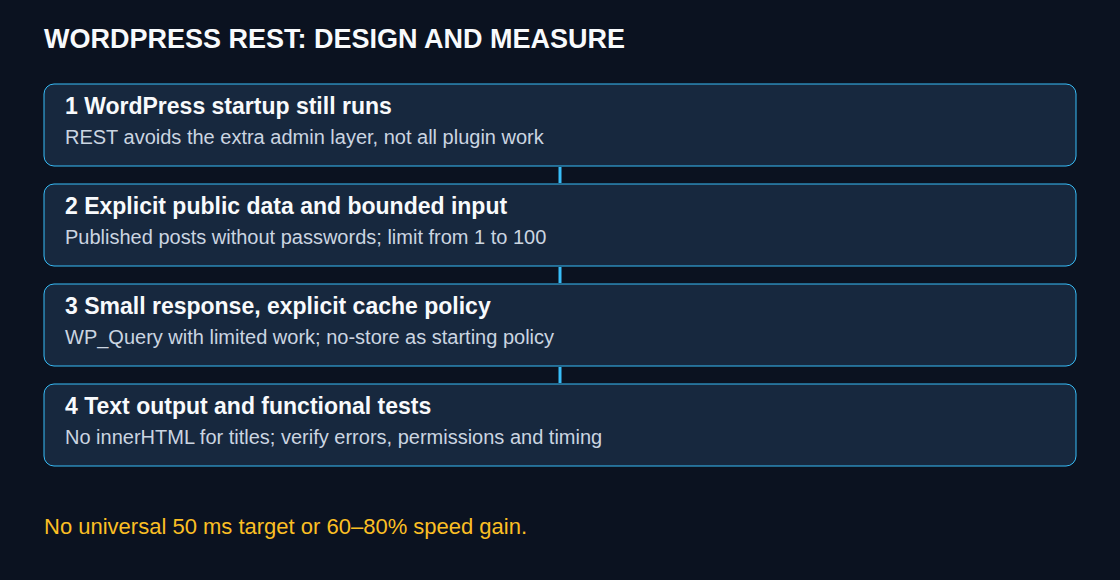
A REST endpoint is an address that a program can call to request data. A custom WordPress endpoint can expose exactly the fields needed by a page component, such as a list of recent posts. The benefit is a predictable interface and a bounded workload. A switch from admin-ajax.php does not by itself guarantee a particular response time.
Both request paths load WordPress and relevant plugin and theme code. admin-ajax.php additionally loads administration code and runs admin_init. The cost depends on the installed callbacks, database, cache and server load. “400–600 ms versus under 50 ms” and “60–80% faster” require measurements; those numbers are not properties of REST.
1. Existing API or custom route
For a normal list of posts, wp/v2/posts already provides a maintained endpoint. A limited per_page and selected _fields can reduce the response. A custom route is useful when the existing contract does not fit. Extra routes also need access rules, tests and maintenance.
The example below returns recent post metadata, not logs. It is a demonstration for a site where the selected published, non-password-protected post titles and dates are intentionally public. Membership restrictions, language selection and other visibility rules need integration-specific checks before public exposure. Neither WP_Query nor a successful permission callback automatically implements every plugin’s access policy.
2. Request registration, validation and limits
Registration belongs on rest_api_init. A namespace such as lw-toolbox/v1 separates the route from other plugins. Registering elsewhere is unsupported usage and can trigger a warning; an automatic 404 in every such case is not guaranteed.
The limit rule accepts only ordinary decimal integers from 1 through 100. Fractions, scientific notation, arrays, zero and negative values are rejected. Validation decides what is accepted; conversion then produces an integer. Validation is not authorization or a substitute for parameterized SQL.
add_action( 'rest_api_init', function () {
    register_rest_route( 'lw-toolbox/v1', '/latest-posts', array(
        'methods' => WP_REST_Server::READABLE,
        // Public data only: no private logs or membership content.
        'permission_callback' => '__return_true',
        'args' => array(
            'limit' => array(
                'default' => 10,
                'validate_callback' => function ( $value ) {
                    return ( is_string( $value ) || is_int( $value ) )
                        && preg_match( '/\A(?:[1-9][0-9]?|100)\z/', (string) $value ) === 1;
                },
                'sanitize_callback' => function ( $value ) {
                    return (int) $value;
                },
            ),
        ),
        'callback' => function ( WP_REST_Request $request ) {
            $query = new WP_Query( array(
                'post_type' => 'post',
                'post_status' => 'publish',
                'has_password' => false,
                'posts_per_page' => $request->get_param( 'limit' ),
                'orderby' => array( 'date' => 'DESC', 'ID' => 'DESC' ),
                'ignore_sticky_posts' => true,
                'no_found_rows' => true,
                'update_post_meta_cache' => false,
                'update_post_term_cache' => false,
            ) );
            $items = array();
            foreach ( $query->posts as $post ) {
                $items[] = array(
                    'id' => (int) $post->ID,
                    'title' => (string) $post->post_title,
                    'date_gmt' => (string) $post->post_date_gmt,
                );
            }
            $response = new WP_REST_Response( $items, 200 );
            $response->header( 'Cache-Control', 'no-store' );
            return $response;
        },
    ) );
} );
The code belongs in a small site-specific plugin or an appropriate child-theme file; a new PHP file needs its opening PHP tag. The public permission callback is a deliberate access decision. Private logs, account data and restricted content require an appropriate capability or object-level check instead.
no_found_rows avoids an unnecessary total-count query; metadata and term-cache priming are disabled because the response does not use those fields. Ordinary query caching remains available. WP_Query is not inherently slow, and direct SQL is not inherently faster. Direct SQL can bypass query filters and plugin visibility rules; where a custom table genuinely requires SQL, values belong in $wpdb->prepare() placeholders and identifiers must come from trusted configuration.
The example supplies a compact success response, including an empty list when no posts match. It is not a complete monitoring system: database failures must be observable through restricted server monitoring and a deliberate error policy. Error responses must not expose database statements or credentials. A rejected REST parameter prevents this callback’s query, not all database work performed while WordPress starts.
3. The endpoint URL generated by WordPress
A hard-coded host and root-level /wp-json/ path can fail on a subdirectory installation or another permalink configuration. The following container belongs in a PHP template, not an ordinary HTML block in the editor. rest_url() derives the URL; esc_url() escapes the HTML attribute. The three visible state messages should match the page language.
<div id="lw-fast-data-box" role="status"
     data-endpoint="<?php echo esc_url( rest_url( 'lw-toolbox/v1/latest-posts' ) ); ?>"
     data-loading="Loading..." data-empty="No posts."
     data-error="Posts could not be loaded."></div>
4. Data displayed as text
The JavaScript can be loaded once as an external frontend script. It handles loading, empty results, HTTP errors, malformed data and a ten-second client timeout. The public request intentionally omits credentials. No request body is sent, so a JSON Content-Type request header is unnecessary.
async function loadLatestPosts() {
    const box = document.getElementById('lw-fast-data-box');
    if (!box) return;
    const controller = new AbortController();
    const timeout = setTimeout(() => controller.abort(), 10000);
    box.textContent = box.dataset.loading;
    try {
        const url = new URL(box.dataset.endpoint, document.baseURI);
        url.searchParams.set('limit', '5');
        const response = await fetch(url, {
            method: 'GET', credentials: 'omit', cache: 'no-store',
            headers: { Accept: 'application/json' },
            signal: controller.signal
        });
        if (!response.ok) throw new Error('HTTP ' + response.status);
        const items = await response.json();
        if (!Array.isArray(items) || items.length > 5 || items.some(item =>
            !item || !Number.isInteger(item.id) ||
            typeof item.title !== 'string' || typeof item.date_gmt !== 'string'
        )) throw new Error('Invalid response');
        if (!items.length) {
            box.textContent = box.dataset.empty;
            return;
        }
        const list = document.createElement('ul');
        for (const item of items) {
            const li = document.createElement('li');
            const title = document.createElement('strong');
            title.textContent = item.title;
            li.append(title, document.createTextNode(' (' + item.date_gmt + ' UTC)'));
            list.append(li);
        }
        box.replaceChildren(list);
    } catch (error) {
        box.textContent = box.dataset.error;
    } finally {
        clearTimeout(timeout);
    }
}
if (document.readyState === 'loading') {
    document.addEventListener('DOMContentLoaded', loadLatestPosts, { once: true });
} else {
    loadLatestPosts();
}
textContent treats a title as text, including angle brackets. Interpolating a database title into innerHTML would instead create an HTML injection boundary. Input validation of limit cannot make database titles safe for HTML interpretation. The raw title format is deliberate here; HTML entities stored in a title can appear literally and need a separate, tested display policy if decoding is desired.
5. Separate decisions about caching and authentication
The example uses no-store consistently for successful empty and non-empty responses. That is a cautious starting policy, not a performance optimization. Shared caching is an additional design step: public, max-age=60 is suitable only for an intentionally shared representation with correct keys and invalidation. Cookies, authorization, language, query parameters and proxy configuration can affect that decision. private forbids shared-cache storage but still permits browser storage; no-store instructs caches not to store the response. Neither header supplies access control.
For WordPress cookie authentication, a valid wp_rest nonce accompanies the login cookie, normally in X-WP-Nonce. The protected route must still check the required capability. A nonce is not an API password or a replacement for authorization. External clients can use supported authentication such as application passwords over HTTPS; credentials belong outside browser code.
6. Correctness and actual cost
- The tests cover the default limit, 1, 100, 0, 101, fractions, scientific notation and arrays. Rejected inputs should produce 400 before the endpoint callback runs.
- Further tests cover empty data, titles containing markup, malformed JSON, HTTP errors and client timeout, using the actual subdirectory and permalink configuration.
- Access tests cover unpublished, password-protected and membership-restricted content, all supported languages and authenticated versus anonymous behavior.
- Headers are checked at the origin and through the real proxy. Measurements cover repeated cold and warm requests, server duration, query counts, memory, time to first byte (TTFB) and typical numbers of simultaneous requests. Comparisons use identical payloads and access policies.
A useful performance report states the test environment and the spread of response times. The median is the middle measured value; 95% of the measured response times are at or below the 95th percentile. A single fast response or a smaller JSON payload does not establish a general latency guarantee.
Questions and answers
Why can a logged-in browser fail a permission check?
Cookie-based REST authentication also requires the REST nonce. Without the nonce, WordPress treats that cookie-authenticated request as anonymous. Invalid nonces and insufficient capabilities are distinct failures; the final status also depends on the authentication method and permission callback.
Does REST avoid all plugin work?
No. Expensive work attached to normal WordPress startup can affect REST too. Profiling identifies the relevant callbacks before a replacement architecture is justified.
Does the permission callback make public data safe automatically?
No. Returning true explicitly allows access. The selected fields and records still need a deliberate publication policy, including rules supplied by other plugins.
Related articles