

 English
 Deutsch
 Polski
Regular Expressions: The Greedy Dot, Missing Anchors and Nested Repetition

Management Summary
Regular expressions are compact rules for finding or checking text patterns, such as a required format in a form. They are useful in websites and data processing because one rule can describe many possible inputs. However, a pattern may accept only a valid fragment, capture too much text or take excessive time on difficult input. The article explains these common traps and why clear boundaries matter when a search rule is also used to decide whether information is acceptable.
Jump to the interactive example ↓
Contents
A regular expression describes a text pattern. The engine is the software that interprets this pattern; flags change options such as whether upper- and lower-case letters are treated alike. Correctness depends on the engine, flags and calling method as well as the pattern itself. Finding a substring is a different operation from validating the complete input.
A successful example alone does not establish either correct boundaries or acceptable running time. The examples below use JavaScript unless another language is named.
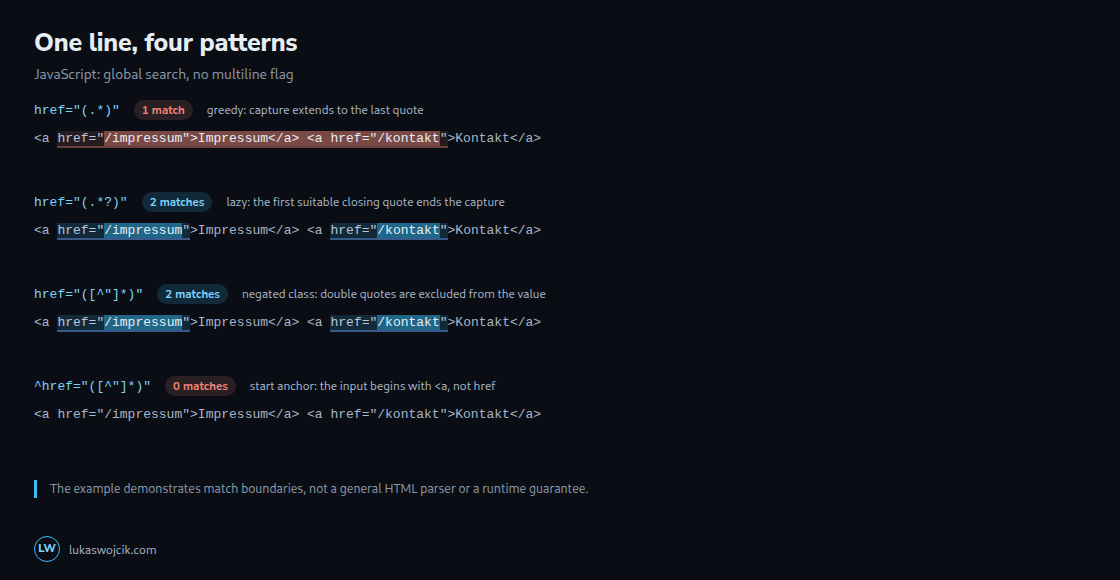
Greediness belongs to the quantifier
A quantifier specifies how often part of a pattern may repeat. Greedy repetition first tries as much matching text as possible; lazy repetition starts with as little as possible. Either may adjust that choice to match the rest of the pattern.
The dot . matches a character; * repeats that match greedily. In JavaScript, the dot excludes line terminators unless s enables dotAll. A literal period is written \.. In a line with two double-quoted links, href="(.*)" can capture from the first opening quote to the last closing quote, including intervening markup.
href="(.*?)" tries shorter captures first. href="([^"]*)" instead explicitly excludes double quotes from the captured value. Both yield two matches in the illustrated input when the API searches for all matches. Neither pattern is a general HTML parser: alternative quoting, entities and document structure require an HTML parser for robust extraction.
A negated class is not a general guarantee of zero backtracking. For example, [^,]+a can give back an already consumed character to satisfy the final a. The useful property in the link example is the explicit quote boundary.
The multiline flag does not constrain character classes
[^&] includes line breaks because those characters are not ampersands. The m flag changes anchors, not the set of characters consumed by that class. The first expression below therefore produces one match spanning both lines. Explicitly excluding CR and LF produces two matches:
const text = 'utm_source=newsletter\nutm_medium=email';
const broad = [...text.matchAll(/^utm_([a-z_]+)=([^&]+)$/gm)];
const bounded = [...text.matchAll(/^utm_([a-z_]+)=([^&\r\n]+)$/gm)];
console.log(broad.length);   // 1
console.log(bounded.length); // 2
console.log(broad[0][2] === 'newsletter\nutm_medium=email'); // true
console.log(/^[0-9]+$/.test('123\n')); // false (JavaScript, no m)
console.log(/^[0-9]+$/m.test('bad\n123\nbad')); // true: one valid line
The bounded example describes a deliberately small line format with a nonempty value. Spaces remain allowed; [^&\s]+ would also reject spaces and other whitespace, which is a different rule. CRLF handling and allowed empty values need explicit tests. Actual URL query strings are better read with a URL parser and URLSearchParams, including decoding and repeated keys.
Validation requires checking the complete input
A search for [0-9]+ succeeds inside abc123def. JavaScript /^[0-9]+$/ without m restricts the complete value to ASCII digits. Adding m permits a valid line inside an otherwise invalid input. Alternatives also need grouping: ^(?:yes|no)$ applies both anchors to both alternatives.
Anchors check a position, such as the start or end of the input, without consuming a character. Anchor rules vary. Python $ also accepts a position before a final newline; re.fullmatch(r"[0-9]+", value) explicitly checks the whole string. PCRE2/PHP can use \A[0-9]+\z. Ruby ^ and $ are line anchors even without a flag; complete-input validation uses \A and \z. Ruby’s m controls dotAll, unlike JavaScript’s multiline-anchor flag.
Ambiguous repetition can cause excessive work
Backtracking means returning to an earlier matching choice when the remaining pattern fails, then trying another choice. Backtracking engines may explore many ways to partition the same text. ^(a+)+$ on a run of a characters followed by ! is a classic risky structure. Removing the redundant outer repetition gives ^a+$ for the same accepted language. Exact duration depends on engine, optimisations, input and limits; no universal thirty-character threshold exists.
Nesting alone is neither proof of exponential behaviour nor the only cause of slow matching. An unanchored search for a+$ may retry many starting positions on a long failing input, so removing nesting does not justify a general linear-time claim. Overlapping alternatives and an expensive failed branch before a successful branch also matter.
Patterns such as (.*,)*$ allow zero repetitions and can return an empty match at the end during a search. Describing every input as either a successful fast match or a slow total failure misses that behaviour. A lazy quantifier changes search order; it does not generally remove ambiguous partitions.
Tests and limits are part of the design
Useful cases include valid input, two occurrences, invalid prefixes and suffixes, empty input, CR/LF, Unicode digits, missing delimiters and long near-matches. Expected results should include captured values and match spans, not just a boolean. Three examples are a starting point, not a completeness proof.
Potentially expensive patterns belong in isolated tests with small initial inputs and a strict external deadline or supported engine timeout. Input and pattern-size limits remain useful. A timeout is an error to handle, not proof that the text is invalid.
Questions and answers
Do atomic groups or possessive quantifiers solve every problem?
No. Support depends on the engine; Python added both in 3.11. Preventing backtracking can change the accepted language: a greedy possessive part may consume text needed by the following token. Equivalence needs tests.
What does a linear-time engine guarantee?
RE2 and Go regexp document linear matching in input length for fixed patterns. Rust regex documents an O(m × n) bound for one search, where m reflects pattern size and n input length; repeated-match iterators can have a quadratic bound in n. Unsupported features, pattern compilation, size limits and the selected API still matter. These libraries do not support arbitrary backreferences or lookaround.
Does \d always mean ASCII digits?
JavaScript \d matches 0–9. Python string patterns and default .NET behaviour also include Unicode decimal digits; Python’s ASCII flag and .NET’s ECMAScript option change relevant behaviour. [0-9] expresses an ASCII-only requirement explicitly.
Sources
- MDN: Regular expressions
- MDN: Quantifiers
- MDN: Input boundary assertions
- MDN: Character class escapes
- Python: re
- PCRE2: Pattern syntax
- Ruby: Regexp
- Microsoft: .NET character classes
- Google: RE2
- Go: regexp
- Rust regex: Complexity and untrusted inputs
- V8: Backtracking and an alternative engine
- MDN: URLSearchParams
Learn by trying
Which names does your regex let through?
The target is exactly error.log. Add anchors and escape the dot: which unwanted names stop matching?
Fixed, single-line JavaScript examples with no flags. A dot matches any character except line terminators; \. matches a literal dot. No custom patterns or regex performance or security testing.
This module runs in your browser and does not send or store your input.
Learn by trying
One minute: can you spot the mistake?
Why does ^error.log$ also match errorXlog?
^ and $ constrain the match position, but do not change the meaning of the dot. Only ^error\.log$ requires a literal dot in this example.
Code step by step
Explore
Code step by step
One fixed JavaScript function, five steps. Choose a name and watch when each variable receives its value.
function validate() {}
inputpatternmatchvalidreturn
Fixed single-line examples, JavaScript with no flags. No freely executable code is editable here. Other regex flavours and multiline input are outside this exercise.
PNG with settings, result and article link. Created locally only when you click.
These exercises calculate in your browser. The learning module does not send your answers.
Related articles


