English
 Deutsch
 Polski
Laptop, Mini PC, GPU Tower or AI Workstation: Which Devices Suit Local LLMs?

Management Summary
The article compares computers for language models, AI systems that work with text and answer questions. Answers are produced on owned hardware instead of by an external service. Laptops, mini PCs and larger workstations offer different levels of portability, memory and expansion. Choosing around the intended tasks helps avoid unnecessary spending: more memory alone guarantees neither speed nor good answers. Electricity use, noise and everyday workload also matter.
Contents
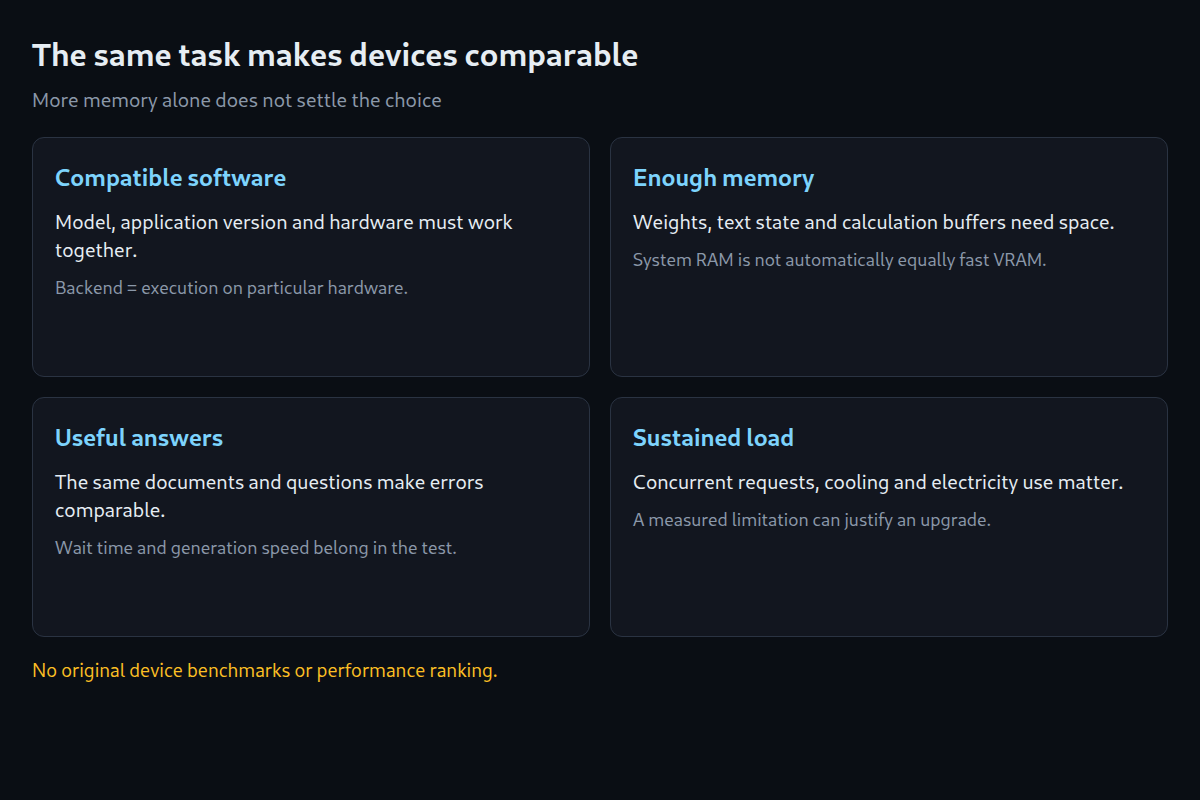
A local LLM is a language model that answers on a local computer. The suitable device depends on the task: occasional summaries, repeated coding assistance and simultaneous requests place different demands on hardware. More memory may allow a larger model, but does not guarantee fast or correct answers.
This comparison interprets manufacturer specifications and supported software. No original device measurements are available. Wait time, electricity use and fan noise therefore still need testing for the specific device, model and application.
Device classes by workload
| Class | Suitable scenario | Common constraint |
|---|---|---|
| CPU laptop / mini PC | Introduction and small models | Response speed and RAM |
| Apple Mac mini / Studio | Compact desktop with shared memory | Configuration and later upgrades |
| AMD Ryzen AI Max+ system | Memory-rich compact computer | Software support for the particular graphics processor |
| GPU tower | Flexible development and expansion | VRAM, power supply and space |
| NVIDIA DGX Spark | Compact CUDA workstation | Compatible Arm software and measured answer speed |
RAM, VRAM and unified memory
RAM is system memory. Here VRAM means the separate memory on a dedicated graphics card. Supported execution software can keep some model parts in RAM and others in VRAM. Adding 32 GB of RAM does not turn a 16 GB graphics card into a card with 48 GB of equally fast graphics memory. CPU calculations and data transfers can delay answers.
With unified memory, the CPU and graphics processor share the same memory. The operating system and other applications also use part of it. Memory bandwidth measures data transferred per second; capacity measures only how much fits. Two 128 GB devices can therefore answer at different speeds. A backend is the software component that performs calculations on particular hardware, for example through Metal, CUDA or Vulkan.
Compact devices: the configuration matters
Apple lists Mac Studio with M5 Max or M5 Ultra and Mac mini with M6 or M5 Pro. Memory capacity depends on the chosen version. A model may fit into a large configuration and still answer slowly. Selection therefore requires the exact device configuration and a test of the same task, not just the Mac Studio name.
AMD specifies up to 128 GB of shared memory for Ryzen AI Max+ 395 devices, with up to 96 GB assigned to graphics depending on configuration. That is not an additional 96 GB. The device, firmware and software determine the usable split. NVIDIA specifies 128 GB of shared memory and an Arm processor for DGX Spark. Applications and containers must support that processor architecture and GPU; a package for a typical x86 PC does not automatically work. Ollama documents different hardware paths for NVIDIA, AMD and Apple. Support must match the operating system and version.
Tower expansion depends on the system
A tower can be easier to expand: a suitable graphics card, additional RAM or another power supply may be replaceable. Slots, connectors, case dimensions and cooling must fit first; prebuilt PCs may have their own restrictions. Electricity and possible power-supply or cooling upgrades add to the purchase price. Fan noise and sustained answer speed need testing under a longer workload.
Two 16 GB graphics cards do not automatically appear to a model as one 32 GB card. Software must support distributing weights or calculations. Intermediate results also need space, and transfers between cards can take time. One sufficiently large card may be simpler. Whether two cards run faster or allow larger models depends on the specific split.
A workload decides more than a brand
A small model on existing hardware may suffice for an initial trial. A meaningful comparison uses the same model revision, number format and input texts. Records include time to the first text piece, generation speed, memory use and incorrect answers. Another run with a long document and simultaneous requests can expose bottlenecks. Coding assistance also requires appropriate tests of the generated code.
A Raspberry Pi can run small learning experiments or forward requests to another computer. In the latter case, the model runs on the other computer, not locally on the Pi. Model size, Pi version, memory and cooling constrain operation. A memory calculator supports shortlisting but does not replace a trial. A concrete reason to upgrade could be that the required model fails to start, an agreed waiting-time limit is exceeded or simultaneous requests build up in a queue.
Memory planning for model selection: LLM VRAM estimator.
Related tools
Questions and answers
Is a Raspberry Pi suitable for local LLMs?
A small model may support learning experiments on a suitable Pi. Memory use and wait time need testing. If requests are forwarded to another computer, the model does not run on the Pi.
Is an AI mini PC with plenty of RAM automatically better than a GPU?
No. More memory may allow a larger model. Fast and correct answers also depend on software, data transfers and the task. A comparison needs the same texts and settings.
Sources
- Apple: Mac Studio M5 Max / M5 Ultra – technical specifications
- Apple: Mac mini and Mac Studio availability
- NVIDIA: DGX Spark Hardware Overview
- Ollama: Hardware support
- llama.cpp: project and hardware support
- AMD: Ryzen AI Max+ 395 and unified memory
Sources checked again: 25 October 2026. No original device measurements or ranking of answer speed.
Related articles