English
 Deutsch
 Polski
GA4 Hostname Filters: Testing, Spam Limits and Historical Analysis

Management Summary
A hostname identifies the website address associated with recorded activity. Filtering by that name can help separate known test environments from the public website in GA4, keeping routine testing out of future business reports. It does not establish that a visit is genuine or block every kind of spam. The distinction matters because active collection filters permanently discard affected events. Filtering an existing report only changes the view of data still available; it cannot restore previously excluded activity.
Contents
A GA4 hostname filter can exclude unwanted web traffic before processing. It is useful for known test domains or a deliberately maintained list of approved hostnames. A hostname is not proof of an authentic visit, however, and Google explicitly exempts Measurement Protocol events from hostname Include filters.
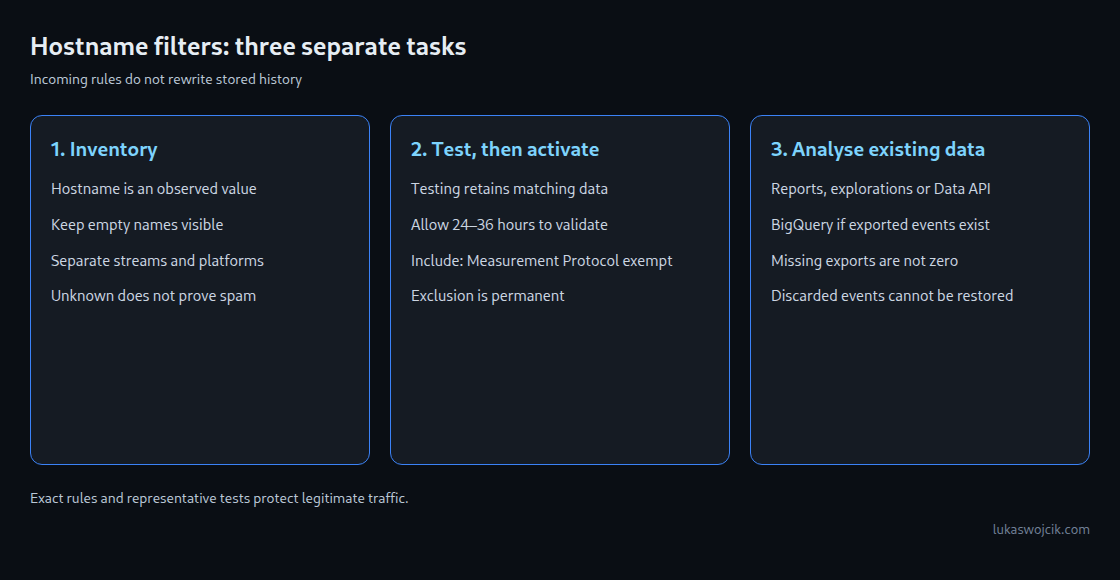
Three tasks need separate controls: preventing unwanted incoming data, testing a filter before activation, and analysing data already collected. Combining those tasks into a promise to remove all spam risks losing valid events.
A hostname describes the event, not the sender’s identity
The hostname dimension contains a domain and any subdomain, such as shop.example.com. It is distinct from the referrer, which describes a previous page or referring source. A missing hostname is also possible; a mixed web-and-app property does not contain a usable web hostname on every event.
The public measurement ID is not a secret credential. The documented Measurement Protocol additionally requires api_secret, which belongs on the server. Exposure of that secret needs rotation and correction of the leaking log or configuration. A hostname rule does not replace credential protection.
An unexpected hostname is a reason to investigate, not an automatic spam verdict. Campaign sites, checkout domains, translation proxies and development systems may require different treatment. Conversely, an approved hostname alone does not establish that an event represents genuine activity.
Staging and internal traffic are different questions
A staging system can be identified by a dedicated hostname. Keeping production tags out of that environment, or using a separate test property, avoids contaminating production data at the source. A hostname exclusion can provide an additional boundary for appropriately named test systems.
Internal visits often use the same production hostname as ordinary visits. Google documents separate internal-traffic rules based on IP addresses or ranges, with a traffic_type marker and a matching data filter. A broad shared-network rule may also capture legitimate traffic. Hostname alone cannot distinguish an employee from another visitor to the same page.
Exclude, Include only and the boundaries of both
Google introduced hostname Exclude filters on 11 June 2026 and Include filters on 21 September 2026. Exclude removes matching incoming data. Include only retains matching data within its applicable scope. Active Include filters form a union first; active Exclude filters are then applied sequentially. An event permitted by an Include rule can therefore still be excluded by another rule.
The release notes specify two important Include behaviours: events with empty hostnames are blocked, and Measurement Protocol events are exempt. This exemption concerns the documented Include operation; it is not evidence that every filtering mechanism treats Measurement Protocol traffic identically. More setup detail appears in the article on Include mode.
Exact hostname matching is easier to audit than a broad substring. For example, contains example.com can also match example.com.unrelated.test. A suffix without a domain boundary can admit notexample.com. Required root domains and subdomains need deliberate rules and tests; a familiar-looking string is not domain validation.
Testing before activation
- The inventory groups hostnames by stream, platform, event name and date. Missing values remain visible; checkout, campaign and test domains are checked.
- The intended web hostname filter is created in Testing mode. Google requires an Editor role or higher. The documented matching options are exact, begins with, ends with and contains.
- Validation starts after 24–36 hours. A free-form exploration compares Test data filter name, Hostname and Event name with Event count. The comparison also includes unfiltered data, especially for an Include rule.
- The test covers both accepted and rejected cases: main site, checkout, campaign domain, staging and missing hostname. Measurement Protocol traffic needs its own check.
- The test period covers a representative operating cycle. A week is a useful starting point, but does not cover every monthly campaign or release.
- After successful validation, activation follows with a record of the settings and date. Google states that activation takes effect within 24–36 hours; an immediate, precisely timed drop is not guaranteed.
Testing labels matching data instead of discarding it. Inactive stops evaluation. An active exclusion permanently removes affected data from processing, including availability in BigQuery. Later deactivation stops future filtering; it does not restore the discarded events.
Historical analysis remains possible
A new incoming-data filter does not rewrite existing reports. Historical data that remains available can still be analysed with report filters, explorations or the Data API. For a compatible detail report, a hostname filter changes the chart and table without deleting the underlying data. Available dimensions, retention and reporting limits still apply.
BigQuery provides another route when the event export exists. The following inventory keeps web and app streams separate, normalises hostname case and whitespace, and preserves missing names as an explicit group. It counts events, not sessions or users.
WITH observed AS (
  SELECT
    platform,
    stream_id,
    NULLIF(LOWER(TRIM(device.web_info.hostname)), '') AS host
  FROM `project.analytics_XXXXXXXXX.events_*`
  WHERE _TABLE_SUFFIX BETWEEN '20260901' AND '20260930'
)
SELECT
  platform,
  stream_id,
  host,
  CASE
    WHEN host IS NULL THEN 'missing_hostname'
    WHEN host IN ('www.example.com', 'shop.example.com') THEN 'approved_hostname'
    ELSE 'other_hostname'
  END AS hostname_group,
  COUNT(*) AS events
FROM observed
GROUP BY platform, stream_id, host, hostname_group
ORDER BY events DESC;
The project, dataset, dates and approved hostnames are placeholders. The static date bounds select daily September tables rather than intraday tables. The query reads existing compatible export tables; missing days do not become zero-event days, and an inventory does not prove export completeness. A BigQuery dry run and a suitable bytes-billed limit should precede execution.
For a deliberately restricted web analysis, selecting hostname_group = 'approved_hostname' in a surrounding query retains only the chosen names. That also excludes the missing-hostname group. Server events and app data therefore need an explicit separate policy rather than silent removal. Group labels classify observed names; an approved label does not prove an event is genuine.
The native event export does not provide an on-demand reconstruction of all data from before export began. A reporting-API backfill is a different dataset of summary values rather than individual events and cannot recreate absent raw events. Events already discarded by active data filters are unavailable in both Analytics and the native export.
Questions and answers
Does an unfamiliar hostname prove spam?
No. Ownership, deployment history, event patterns and legitimate third-party delivery need checking. A translation proxy or a new checkout domain can represent valid activity. The same caution applies to missing values.
Does a hostname filter always lower session counts?
No. The effect depends on which events are excluded and how the chosen metric is calculated. A filter can change the total used to calculate a rate, the number of key events and the assignment of results to traffic sources at the same time. Before-and-after comparisons need the activation window and the filter configuration recorded.
Can BigQuery recover events removed by an active data filter?
No. The native export is not a backup of events rejected before processing. Exported data can be queried differently only when those events are actually present.
Is a hostname allowlist sufficient against Measurement Protocol abuse?
No. Google explicitly excludes Measurement Protocol events from hostname Include filters. Secret management, controlled server-side senders and reconciliation with source-system records remain necessary.
Sources
- Google Analytics release notes
- Filter web hostname traffic
- Data filters
- Filter out internal traffic
- Apply filters to detail reports
- Data API dimensions and metrics
- Data API FilterExpression
- BigQuery Export schema
- BigQuery Export
- Google Analytics 4 data transfer
- Query wildcard tables
- Measurement Protocol reference
Related articles