English
 Deutsch
 Polski
GA4 Hostname Include Filter: Allowlist, Empty Hostnames Blocked, Measurement Protocol Exempt

Management Summary
The GA4 hostname Include filter limits website measurement to a list of approved domains, helping keep unwanted sources out of business reports. A hostname is the website name within a page address. The list must cover every intended shop or booking site: forgotten entries can permanently remove real purchases from the data. The filter has exceptions, including the Measurement Protocol route for direct system submissions, and checking a supplied website name does not prove that a visit was genuine.
Contents
Since 21 September 2026, Google Analytics 4 has offered Include only for hostname filtering: only matching hostnames pass this filter. A hostname is the domain part of a page address, such as shop.example.com. Previously, only Exclude had been available since 11 June 2026 to remove matching hostnames. The following rules concern active filters; Measurement Protocol events are exempt from the hostname Include filter.
An approved-hostname list can require less upkeep than a continually growing blocklist. Approved partner sites also belong on the list if the same measurement runs there. A forgotten shop domain can nevertheless cost real purchase events. Data discarded by an active data filter cannot later be restored in GA4 or its BigQuery export.
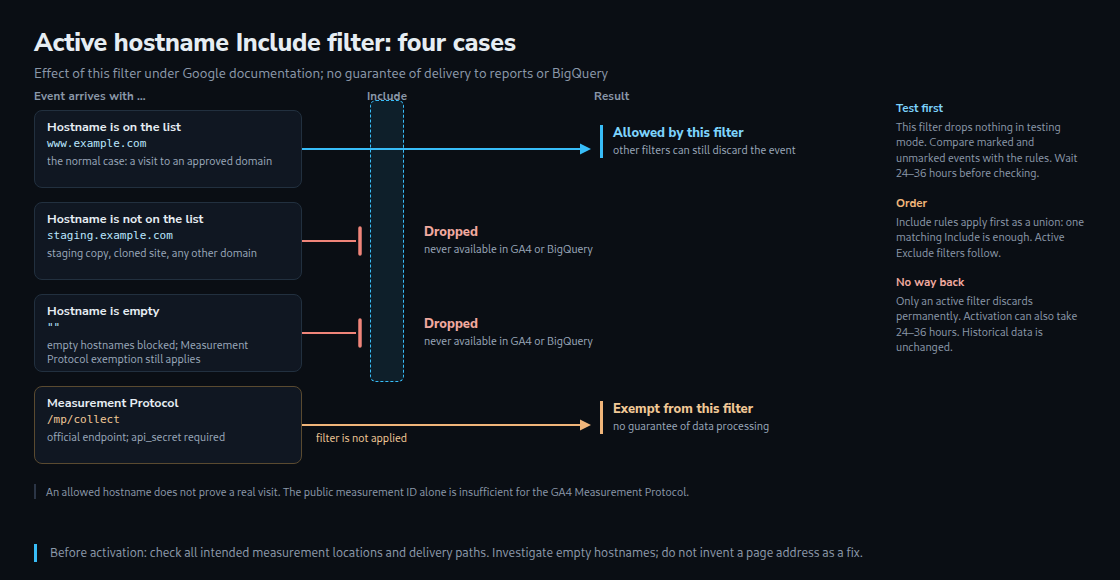
What the release note defines
The Google announcement and current guide distinguish the following rules and filter states:
- Include. Only events with a matching hostname pass this active filter.
- Empty hostname. Blocked by Include; the Measurement Protocol exemption still applies.
- Measurement Protocol. This delivery route is exempt from the hostname Include filter. Other requirements for valid data still apply.
- Order. Active Include filters apply together first: one matching Include rule is enough. Active Exclude filters can still remove events afterwards.
- State. Testing labels matching data but discards nothing through this filter. Active discards permanently; Inactive performs no evaluation. Historical data remains unchanged.
What this means in practice
An allowlist does not prove authenticity. The filter checks the hostname supplied with the event. This does not guarantee that a visit to that website actually occurred. The official GA4 Measurement Protocol is an interface for sending events directly, for example from an order system. It requires a private api_secret in addition to the publicly visible measurement ID. Reading the ID alone is therefore insufficient for that endpoint. Exemption from the Include filter also does not guarantee that arbitrary data will be processed.
Every intended measurement location needs consideration. Besides the main domain, this might include shop.example.com, a booking site or an external checkout. The question is whether that location sends wanted events to this GA4 property, meaning this collection of analytics data. A link or a redirect back from a payment provider alone is not enough.
An empty hostname needs investigation. The browser tag uses the current page address as the default page_location. The unclear gtag.js parenthesis in the release note therefore does not establish that ordinary gtag.js page views generally arrive without a hostname. Missing or overridden page addresses and custom delivery paths need checking in the actual setup.
How hostname matching works
The current guide explicitly defines the text comparisons. For a small set of known hosts, exact matching is usually easier to check than a broad substring rule.
- Exactly matches. The whole hostname must match. An entry for
example.comtherefore does not automatically allowwww.example.com. - Contains, begins with, ends with. These comparisons check a substring, prefix or suffix.
contains example.comalso matchesexample.com.other.example. Such rules need checking with both wanted and unwanted examples. - Multiple rules and app data. Combining Include filters as a union is documented. An additional Include rule must not quietly widen the intended restriction. A web-hostname rule should not be assumed to filter native app events without verification.
Check the filter before activation
Include filter: before activation

1. Collect hostnames from existing reports and the current list
   of websites/partners; add planned domains.
2. Separate intended measurement sites from test and foreign hosts.
3. Choose exact matching or a deliberately checked text rule.
4. Create in Testing state. Check after 24–36 hours; also test
   infrequent purchases and booking paths deliberately.
5. Free-form exploration: Hostname, Test data filter name, Event
   name and Event count. Compare marked AND unmarked data.
6. Check allowed hosts, foreign hosts, empty values and important
   purchases against the selected rule.
7. Switch to Active only after discrepancies are resolved. Record
   the time; activation can also take 24–36 hours.

A testing label is not automatically a deletion list.
A purchase event alone does not prove that a domain is missing.
Include or Exclude
| Aspect | Exclude | Include |
|---|---|---|
| List meaning | discard matching hostnames | allow only matching hostnames |
| New foreign or own domain | passes unless an Exclude rule matches | discarded unless an Include rule matches |
| Empty hostname | no general rule asserted here | blocked; MP exemption still applies |
| Measurement Protocol (MP) | Include exemption cannot simply be assumed | exempt from this filter |
| Incorrect rule | can permanently discard real data too | can permanently discard real data |
| Testing state | this filter discards nothing | this filter discards nothing |
Assessment
For a few stable websites, maintaining an allowlist can be part of launching a new domain: check the filter before a new shop or campaign site starts. With many changing partner sites, a named team needs to own this task. The filter does not replace checking event sources and protecting private Measurement Protocol credentials.
The information was checked against Google documentation on 25 October 2026. No filter was activated in a real property. The examples explain the documented rules; actual delivery paths and testing labels need verification in the relevant setup before activation.
Questions and answers
Does a server container’s subdomain need to go on the list of approved hostnames?
A receiving address such as sgtm.example.com does not belong on the list merely because it receives requests. For an event from www.example.com, page_location remains the relevant page address if the server container passes that value on unchanged. A server container receives measurement data and forwards processed events; the receiving host and the visited website are separate pieces of information.
For purchases sent by an order system, the complete path needs checking: from the order system through the server container to Google. Google states that the documented Measurement Protocol client in the server container sends events through the same mechanism as other server-container events, not to the Measurement Protocol endpoint. An incoming Measurement Protocol format therefore does not guarantee exemption from the hostname filter.
An actual page address associated with the event can be passed as page_location. Inventing a confirmation-page address would not be a sound repair. An empty hostname on a purchase first indicates missing or differently processed context; it does not identify the exact cause. The preview and outbound request need to show where the value is missing.
Does the list of unwanted referrals replace a hostname filter?
No. The unwanted referrals list controls source attribution without discarding events through that mechanism. For example, a payment provider should not become a new marketing source when a customer returns to the shop. An active hostname filter instead determines whether events may be processed based on their own hostname.
A payment domain is a candidate for unwanted-referral settings if returns from that domain would misattribute the source. It belongs on the hostname allowlist only when wanted events for the same property actually originate there. The two lists therefore perform different tasks.
Are hits from local development and test systems dropped as well?
For events subject to the active Include filter, unapproved test hosts, including localhost, are discarded. The Measurement Protocol exemption still applies. A separate property and measurement ID are advisable for development measurement; otherwise test purchases can alter the real figures.
Sources
- What’s new in Google Analytics – Analytics Help
- Data filters – Analytics Help
- Google Analytics Adds Include Filters For Hostnames – Search Engine Journal
- Google Analytics filter blocks data from domains not on an approved list – PPC Land
- Google: Filter web hostname traffic
- Google: Measurement Protocol reference
- Google: Send data to server-side Tag Manager
- Google: page_location configuration
- Google: Identify unwanted referrals
Related articles