English
 Deutsch
 Polski
gtag(‘set’) in practice: handing a User ID to a Google tag that has already loaded

Management Summary
After a website login, an analytics identifier can connect measurements to the signed-in account. An existing Google tag, the site’s Google measurement code, can receive this identifier without loading the same software again. The article explains how this works across sign-in, sign-out and account changes. The purpose is consistent account-related measurement without mistakenly counting a restored session as another login. Signing in does not itself grant consent for advertising measurement.
Contents
A User ID may become available only after a successful sign-in. The Google Analytics guide explicitly recommends gtag('set', {user_id: ...}) for setting or updating the identifier after initialization. The library does not need to load again. This article describes an already installed, standalone Google tag; a GTM container needs the corresponding supported container configuration.
Scope and parameter support are separate questions
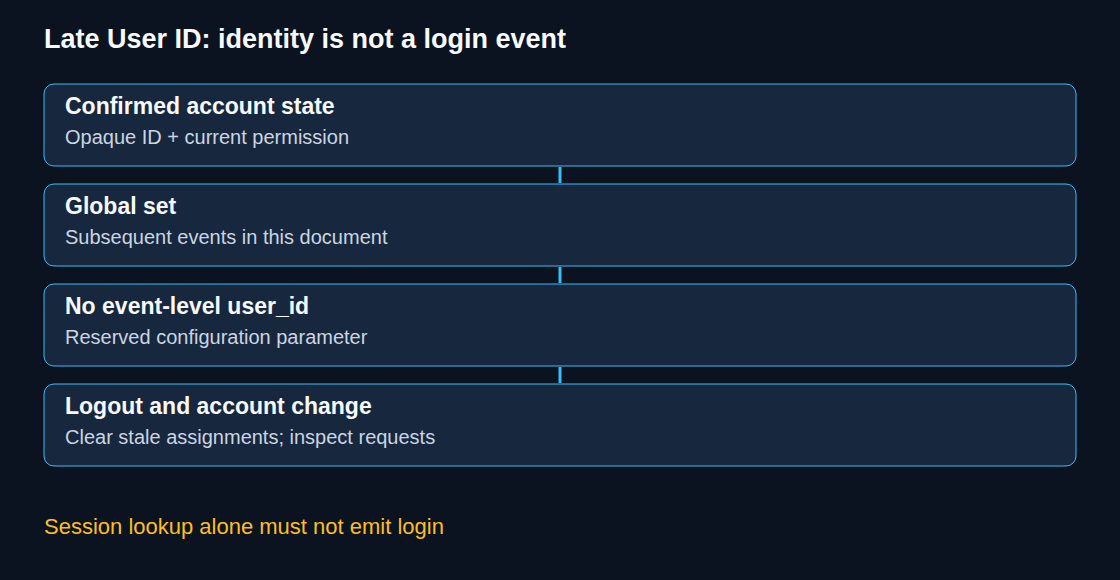
The general parameter precedence is event > config > set. Assignments in one scope do not erase assignments in another. However, that rule does not make every parameter valid at every scope: Google defines user_id as a reserved configuration parameter and explicitly prohibits sending it as an event parameter or custom user property. It must not be registered as a custom dimension either.
A consistent implementation avoids competing identity assignments. An identifier permanently placed in the initial config must not be assumed to disappear merely because a later global value changes. Account-switch and logout tests must inspect actual outgoing requests. If an existing higher-priority assignment remains, the configuration path needs correction; moving user_id into each event is not the solution.
Five commands, different purposes
configinitializes/configures a Google tag. One tag can have multiple associated IDs and destinations; another call does not necessarily create a distinct destination. The configuration guide recommends one call per Google tag.setchanges supported global parameters for subsequent events in the current document.eventsends a named event with supported event parameters and optional routing throughsend_to.getrequests a supported field asynchronously. Field availability depends on the destination;gclidis not a universal GA4 field.consentsupplies default or updated consent signals. A parameter update does not establish consent.
Separate session restoration from a real login
The example assumes that the existing standalone tag is initialized, consent handling already exists and the application has an authenticated account state. It adds no loader or config call. The identifier must be an analytics ID assigned for this purpose by the authenticated application. Its characters must not directly reveal personal details such as a name or email address. An email address, telephone number, session cookie or bearer token is unsuitable.
function syncAnalyticsIdentity(analyticsId, permitted) {
  const valid = typeof analyticsId === 'string' &&
    /^[A-Za-z0-9_-]{16,128}$/.test(analyticsId);
  const nextId = permitted === true && valid ? analyticsId : null;
  gtag('set', { user_id: nextId });
  return nextId !== null;
}

function recordConfirmedLogin(analyticsId, method, permitted) {
  const attached = syncAnalyticsIdentity(analyticsId, permitted);
  if (!attached || !['password', 'sso', 'passkey'].includes(method)) return;
  gtag('event', 'login', {
    send_to: 'G-XXXXXXXXXX',
    method: method
  });
}
The allowed length of 16–128 characters and the character set are rules for this example, not Google’s complete identifier specification; Google allows up to 256 characters. A matching string does not prove authorization or anonymity. permitted must come from the application’s current approved identity-measurement policy, not directly from an untrusted request.
Session restoration calls only syncAnalyticsIdentity. A confirmed, current login transition can call recordConfirmedLogin once with the actual method. The application must reject stale authentication responses and prevent duplicate transition notifications. The placeholder measurement ID requires replacement. The example’s method names are an explicit application allowlist.
Logout, account changes and withdrawal require immediate synchronization. syncAnalyticsIdentity(null, false) clears this global assignment; it does not withdraw consent, clear competing configuration values or delete data already collected. The application’s consent and measurement controls must stop disallowed collection separately. An unidentified first visit does not require sending a fake ID.
Browser requests and Analytics reporting
A global update applies within the current document. A full navigation needs the current identity state again; an SPA needs updates when account state changes. Previously transmitted requests are not rewritten. Google’s reporting example associates earlier unsigned events in the same session with a later User ID, then stops associating subsequent events after logout. That does not promise retrospective rewriting of raw exports or historical data collected before implementation.
Blended or Observed reporting identity includes User-ID; Device-based uses device identity for reporting. Changing that reporting choice does not repair an incorrectly collected identifier.
GTM and the October 2026 changes
The 8 October release notes describe container initialization on load and visible gtag.config processing events. Such an event can match broad Custom Event triggers but is not proof that a GA4 page view was sent. The 12 October release introduces optional optimization that sends Google measurements directly from GTM without the additional Google-tag library. Configuration remains installation-specific.
GTM settings and current variables belong in the supported container setup. A second standalone loader solely for identity updates risks a duplicate installation. Global context can reach multiple Google tags; Google’s guidance limits that option to non-sensitive data.
For custom templates, gtagSet has a documented queue guarantee within the current container: processing follows the current event and its tags, or their processing timeout, before already queued data-layer items. The API needs write permission for the specified keys. This is neither immediate modification of tags already processing nor evidence that every identity use case is supported. Destination rules, consent and identity scope still apply. Consent templates use setDefaultConsentState and updateConsentState.
Consent and SPA page views
Standalone consent defaults belong before measurement commands. A later update must reflect the actual choice for each consent type; a login is not permission to grant all advertising purposes. wait_for_update: 500 is a bounded delay for asynchronous consent handling, not a wait-until-consent guarantee. Basic mode blocks Google tags until consent, while advanced mode can send restricted cookieless pings before consent. The CMP must retain and restore the decision.
A deliberately controlled SPA measurement path sends one page_view per intended route with current page parameters, while excluding competing automatic history measurement. Other events also need correct page context. Repeated config with update: true is not a generally documented substitute.
Questions and answers
Does an HTTP-successful session request prove a new login?
No. A session response can describe an existing session or an anonymous visit. A login event belongs to a confirmed authentication transition, not every session lookup.
Is global null enough after sign-out?
Only for the global assignment controlled by this implementation. Higher-priority identity settings must also be removed through a supported configuration path. The next actual request is the decisive check.
Can get return client_id synchronously?
No. The API calls a supplied function later with the result; this function is the callback. An undefined field differs from a callback that never arrives because the library is blocked. Dependent interface behavior needs a timeout and a defined path without an identifier.
Sources
- gtag.js reference
- Google tag: gtag.js configuration
- Google Tag Manager: release notes, 8 and 12 October 2026
- Google tag and Tag Manager: unified configuration
- Google tag: supported installation methods
- Google tag in Tag Manager: setup and initialization
- Google Analytics: page views
- Google Analytics: single-page applications
- Google Analytics: Send user IDs
- Google Analytics: Measure activity across platforms with User-ID
- Google Tag Manager: gtagSet custom template API
- Google tag: Set up consent mode on websites
Related articles