English
 Deutsch
 Polski
WP-CLI Delete Commands: Which Tables Each One Touches and What It Leaves Behind

Management Summary
Deleting WordPress content can affect more than the visible post: related information and sometimes uploaded media also belong to it. WP-CLI is a text-based administration tool that uses WordPress's own deletion routines to handle these relationships. This matters during large cleanups, where deleting database rows directly can leave related records behind. The chosen content and recoverable copies need to be clear first. A database copy alone does not include uploaded files, and later failures do not reverse earlier deletions.
Contents
Deleting WordPress data means more than removing a table row. Application functions account for relationships, counts, caches and extensions. Direct SQL bypasses these workflows. The important questions are the selected objects, side effects and a backup that can actually be restored.
wp post delete and wp comment delete have no built-in --dry-run. Other WP-CLI commands do provide one. A preliminary list shows the selected objects, but does not simulate hooks or file changes and does not count every affected database row.
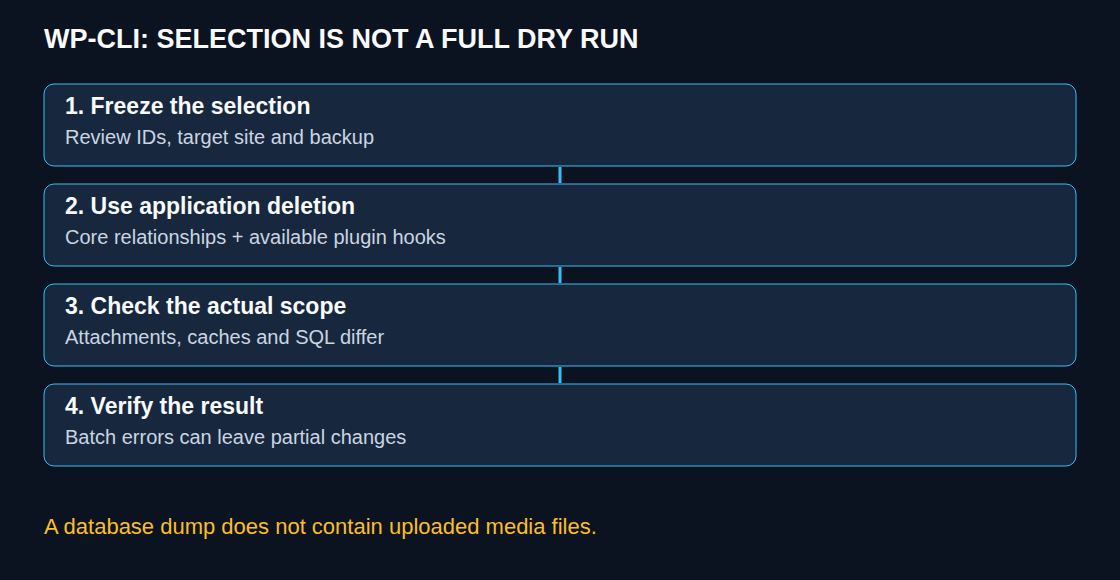
A saved and reviewed selection before deletion
This Bash example exports the database and saves a fixed list of all revisions with status inherit. The installation path, site URL and private backup directory are placeholders requiring adaptation. The backup directory must be outside the webroot and any public web-server alias.
#!/usr/bin/env bash
set -euo pipefail
umask 077
wp_path=/srv/www/example-wordpress
site_url=https://example.invalid
backup_dir=/srv/private/wp-backups
mkdir -p -- "$backup_dir"
run_dir=$(mktemp -d "$backup_dir/revisions.XXXXXXXX")
wp --path="$wp_path" --url="$site_url" db export "$run_dir/database.sql"
wp --path="$wp_path" --url="$site_url" post list \
  --post_type=revision --post_status=inherit --posts_per_page=-1 \
  --orderby=ID --order=ASC --format=ids > "$run_dir/revision-ids.txt"
wc -w < "$run_dir/revision-ids.txt"
printf 'Review directory: %s\n' "$run_dir"
The next step requires reviewing the IDs and associated posts, a successful export and a tested restore. An SQL dump contains no media files: media deletion also requires an uploads backup and, where relevant, external-storage backups. Consistency on a live system depends on table engines and ongoing writes. Successful export alone does not prove complete recoverability.
The following separate deletion step uses only the reviewed file. run_dir must identify the directory created earlier. Revisions are permanently removed; the selection can include autosaves.
wp_path=/srv/www/example-wordpress
site_url=https://example.invalid
run_dir=/srv/private/wp-backups/revisions.REVIEWED
xargs -r -n 100 wp --path="$wp_path" --url="$site_url" \
  post delete --force < "$run_dir/revision-ids.txt"
xargs -n 100 limits IDs per invocation; GNU xargs -r prevents execution with empty input. An oversized single argument list normally fails at process startup. Multiple batches, however, may succeed only partially: the batches are not one all-or-nothing operation. A later failure does not automatically undo earlier deletions. Exit status, logs and remaining objects require checking. A saved list prevents reselection, but not concurrent system changes; larger cleanups benefit from a controlled maintenance window.
What application functions handle
Permanent deletion of an ordinary post removes related post metadata, comments and their metadata, revisions and taxonomy relationships. The terms themselves normally remain. Attachments are not automatically deleted together with the post; parent relationships may change. Hooks are predefined points at which plugins can run their own code. These allow extensions to perform cleanup, but do not guarantee complete cleanup by every extension. Skipping plugins may also omit their hooks.
A direct SQL DELETE of the post row does not execute these WordPress workflows. Without custom database triggers or relationships, dependent records and potentially stale cache entries remain. Such rows are still queryable. Later reuse of the same ID can create incorrect associations, but is not an inevitable result of every import.
| Command | Effect and limit |
|---|---|
wp post delete 123 --force | Permanent application-level deletion; an ordinary post does not automatically take attached media with it. |
wp post delete 456 --force, when 456 is an attachment | Deletes the attachment and files/sizes known to WordPress. External copies, plugin variants and filesystem failures need separate checks; content links may break. |
wp comment delete 789 --force | Deletes the comment and metadata; core updates the post count for approved comments and adjusts child relationships. |
wp transient delete --expired | Removes expired database transients; values without expiration remain. |
wp db optimize | Invokes mysqlcheck for table optimisation; does not clean up WordPress content. |
The numbers are illustrative IDs. Spam selection uses wp comment list --status=spam --format=ids; wp comment delete --status=spam does not replace an ID list. A targeted repair for a demonstrated count discrepancy is, for example, wp comment recount 123, using a post ID. Ordinary core deletion does not inherently require a recount.
Trash and caches have different limits
Without --force, WP-CLI moves eligible posts into enabled trash. Already trashed entries, revisions or disabled trash can still result in permanent deletion. Trashing changes related administrative data as well as status and is not an independent backup.
Transients are disposable cache values and may disappear before their nominal expiry. --all also includes database values without expiration. Rebuilding may cause load or reveal plugin failures; “nothing can break” is not a defensible guarantee.
With persistent object caching, individual and bulk deletion differ. wp transient delete KEY uses the WordPress API and can remove a key in the active cache. In the reviewed WP-CLI implementation, --all and --expired instead operate on database records and warn about external caching. A supported backend allows group flushing through wp cache flush-group; the correct group and scope must be established. A complete wp cache flush affects much more and may reach other sites depending on the backend.
Assessment of OPTIMIZE TABLE
MySQL generally rebuilds ordinary InnoDB tables online for OPTIMIZE TABLE. Exclusive locks occur particularly during preparation and commit; some settings or FULLTEXT indexes require a different procedure. MariaDB, engine and version need separate assessment. A continuous write lock is not a universal InnoDB rule.
Deleted space can be reused internally. Returning space to the filesystem depends on factors including tablespace layout and rebuilding, not on whether any writes occurred after deletion. Planning needs to account for runtime, temporary space, I/O and lock waits. This does not justify an indiscriminate nightly job.
Questions and answers
How can orphaned metadata be investigated?
A read-only query can find metadata whose referenced post no longer exists. This comparison is called an anti-join and provides an initial finding. The wp_ prefix must match the selected site:
wp db query 'SELECT COUNT(*) FROM wp_postmeta pm LEFT JOIN wp_posts p ON p.ID = pm.post_id WHERE p.ID IS NULL'Cleanup requires samples, backup, cache-impact assessment and checking possible plugin usage. The pattern must not be applied blindly to taxonomy relationships: objects may also be links, users or plugin objects. An execution plan helps with large tables; no particular access strategy is guaranteed.
Does WP_POST_REVISIONS immediately cap existing revisions?
No. A numeric limit takes effect in the regular revision workflow when further revisions are created, subject to filters and autosave exceptions. false disables regular revisions without automatically removing existing records. Autosaves need separate consideration.
What changes with multisite?
Post commands operate on the selected site; --url makes the target explicit. Configuration and aliases may supply defaults. Not all tables are separate per site: user and network tables are shared structures. Network transients need the appropriate --network context. Without table filters, wp db export covers the configured database, not just the site selected by --url.
Sources
- WP-CLI: wp post delete
- WP-CLI: wp comment delete
- WordPress: wp_delete_post
- WordPress: wp_delete_comment
- WordPress: wp_delete_attachment
- WP-CLI: wp comment recount
- WP-CLI: Transient command source
- WP-CLI: Cache group flushing
- WP-CLI: Database export
- WP-CLI: Database optimisation
- MySQL 8.4: OPTIMIZE TABLE
- MariaDB: OPTIMIZE TABLE
- WordPress: Revision creation and retention
- WP-CLI: Post deletion implementation
- WP-CLI: Post selection
- WordPress: Transients API
- WP-CLI: Command reference
Related articles