English
 Deutsch
 Polski
Ask Advisor in GA4: Language, Data Scope and Result Checks

Management Summary
Ask Advisor is an AI assistant inside Google Analytics that answers questions about website performance in a conversation. It can help locate figures, explain changes and suggest further analysis, making reporting more approachable. The article explains the language setting, the data available to the assistant and the limits of its answers. A helpful explanation is still a proposal to examine: figures need a matching report, and a change in one marketing channel does not by itself establish why the business result changed.
Contents
Ask Advisor helps explore GA4 data through conversation. The useful questions are practical: which language setting applies, which data enters an answer, and how can a result be checked? The current documentation answers these more precisely than the original launch announcement.
From Analytics Advisor to Ask Advisor
On 12 November 2025, Google announced a rollout of Analytics Advisor to English-language accounts in early December, including Standard and Analytics 360. That announcement describes a rollout plan; it does not establish the activation date of every account.
On 20 May 2026, Google introduced Ask Advisor as a unified experience across marketing products, with further capabilities rolling out during 2026. The current GA4 help page uses that name and still marks the feature Beta. The two names therefore reflect product development. An announcement about cross-product capabilities does not establish unrestricted access to every GA4 property.
The language preference is personal
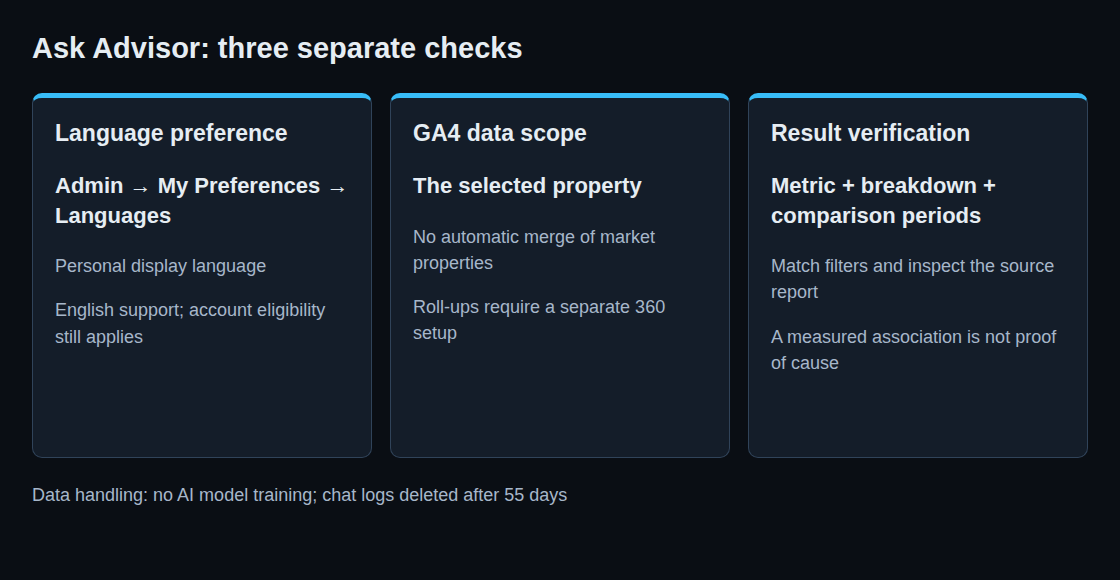
The GA4 help page names English as the supported selected language. Crucially, its language link opens Personal user settings: Admin → My Preferences → Languages. This controls the display language of reports and the interface for the account user, not a shared property language for the entire team. Google requires signing out and back in after a change.
Changing that preference is no reason to create a duplicate property, rename events or change the measured website. The documentation also makes account eligibility a condition, so a language change is not a guarantee of access.
Questions that produce useful checks
The Gemini-based assistant supports performance summaries, questions about particular metrics, explanations of changes, product guidance, configuration lookups and optimization suggestions. Access is available through the top-right icon or search, and through supported chart cards. The report icon is absent while a report is being customized.
A useful analytical question specifies the metric, breakdown and comparison periods. For example: Purchase revenue by session source/medium, 1–7 October compared with 24–30 September, in the property time zone. A vague request about performance leaves these choices open.
One property is the documented GA4 data scope
GA4 data used in generated answers comes from the specific property. A property holds the measurements collected for a particular website, app or group of data sources. Several market properties in one account are not automatically a combined dataset. A market comparison therefore needs an explicit aggregation design, consistent metrics and compatible measurement settings.
Analytics 360 offers roll-up properties for combining eligible source properties. Data starts accumulating when each source is added; this is not a retrospective copy of the entire history. External reporting is another architectural option. Availability of Ask Advisor in a proposed setup needs its own check.
Chat data: specific promises and remaining caution
The product-specific data page states that prompts and generated answers are not used to train, fine-tune or evaluate AI models. It also specifies deletion of chat logs after 55 days. These are more precise claims than a general statement about product improvement.
The linked Chat AI Privacy Hub separately describes possible human review of conversations, after separation from the Google Account. “No model training” therefore should not be read as “no storage or review.” Unnecessary client names, personal data and confidential plans add avoidable exposure. Relevant analytical context still matters; removing context does not guarantee the same answer.
Separate checks for the number and the explanation
Beta answers may contain mistakes. Verification starts with the underlying report and explicit comparison settings. A decline concentrated in one channel establishes where the measured change occurred. It does not by itself prove why the change happened: tracking changes, campaign changes and other explanations still require evidence.
Questions and answers
Is an additional English property necessary?
No. The linked language setting is personal. Duplicating the measurement setup would introduce extra maintenance without resolving account eligibility.
Should a report reproduce the answer exactly?
Not automatically. Besides metric, dimension and dates, filters and segments must match. Reports and explorations can differ because of supported fields, retention, thresholds, modeling or processing time. Recent data is particularly sensitive to processing differences. A discrepancy needs investigation rather than an assumption that either number is correct.
What makes an answer actionable?
An identifiable data source, clear settings and a calculation that produces the same result when repeated with the same data. A causal explanation additionally needs evidence beyond the observed association. Missing details are a reason for a more precise follow-up and a report check before a decision.
Sources
- Ask Advisor in Google Analytics (Beta)
- Personal user settings
- How Ask Advisor in Google Analytics uses data
- Chat AI Privacy Hub
- Analytics Advisor: rollout announcement, 12 November 2025
- Ask Advisor: announcement, 20 May 2026
- About roll-up properties
- Data differences between reports and explorations
- Google Analytics 4 developer guide
Related articles