English
 Deutsch
 Polski
GA4 Form Tracking: How form_start and form_submit Are Counted and What Their Ratio Does Not Show

Management Summary
GA4 can record when a website form is started and submitted, helping explain where enquiries may be lost. A recorded submission is not necessarily an accepted enquiry or a new customer. Dividing submission counts by starts can even produce more than 100 percent when retries or unmatched records are included. A meaningful completion rate follows the same form from a recorded beginning to its later successful outcome. This keeps activity at the form separate from the business result the form is intended to produce.
Contents
A form event records a technical interaction. It does not automatically establish a valid enquiry, a confirmed subscription or a customer. A useful GA4 form report therefore separates event counts, sessions and confirmed outcomes.
What Google documents
Google describes form_start as the first interaction with a form in a session and form_submit as a submission. These events belong to enhanced measurement and require an active, correctly configured Google tag and the relevant measurement options. The documentation does not justify assuming that every implementation sends exactly one start across every form, page and custom tag in a session. Actual behaviour needs checking.
Google’s lead-generation tutorial discusses people who start and submit a form. It does not explicitly prescribe dividing raw event counts. The earlier criticism of a supposedly recommended event-count quotient went beyond the source.
Why 150% is not a completion rate
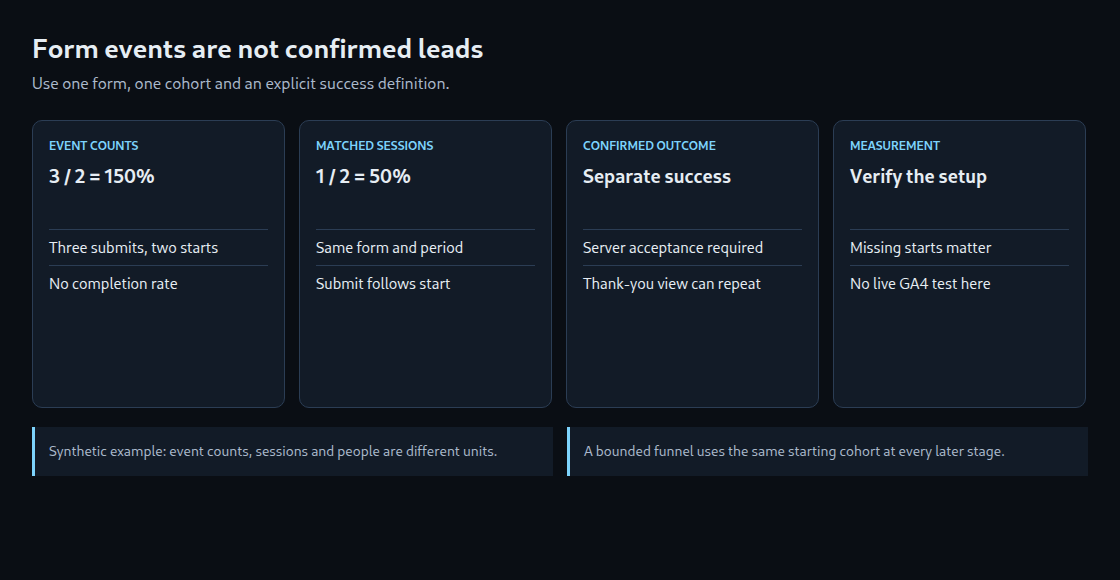
A deliberately constructed event log for one form illustrates the issue: session A has one recorded start and three recorded submissions; session B has one start and no submission. Three divided by two gives 150%. This is submissions per recorded start, not the percentage of people or sessions that completed the process.
One of the two sessions contains a submission: 50%. That still does not establish a valid lead. The three submissions could include retries, and the example does not specify a confirmed server outcome. Two sessions also need not represent two different people.
A denominator alone does not fix the funnel
Dividing all sessions with submissions by all sessions with starts can still exceed 100% when the two sets differ. A submit-only session may have a missing start, a different form or a start outside the reporting window.
For a start-based funnel, the denominator is sessions with a recorded start for the selected form. The numerator includes only those same sessions with a later matching submission or confirmed outcome. Form identity, time window and event order must match. This defines a bounded rate; it also excludes successful submissions without an observed start, which should be reported separately.
Submission and success are separate signals
Browser validation can prevent a native submit event before a request leaves the page. Direct form.submit() does not dispatch that native event, while requestSubmit() follows validation. These browser rules do not by themselves specify every detail of GA4’s detection; AJAX forms send data without reloading the whole page. These forms and third-party embeds require practical checks.
An automatically detected form_submit is not a server receipt or a guarantee of CRM acceptance. A success event should follow the application’s defined acceptance point. A confirmation page view alone can be repeated or opened directly. Duplicate callbacks and reloads also need controlling. generate_lead is a recommended event name; qualification, confirmed subscription and a completed sale remain distinct business stages.
The right context
The form parameters describe ID, name, destination and, for submissions, button text. Availability depends on the form and collected event. An event-scoped custom dimension can make a selected parameter usable in reports; Google describes a processing delay of 24–48 hours. Registration is not evidence that the parameter was previously sent.
Existing collected parameters can appear in BigQuery without custom-dimension registration. Debugging and export inspection therefore need not wait for a new report dimension. Form values, email addresses and personal information must not be copied into analytics parameters.
Page views and sessions are different
A page_view of the form page does not prove that the form was visible or used. A hidden or off-screen form illustrates the gap. Counting page_view events also counts repeated views, not unique sessions.
Automatic page views can be controlled: send_page_view:false disables the configuration-time view, while history-based enhanced measurement has a separate setting. The earlier absolute claim that page-view collection cannot be disabled was incorrect.
A practical verification
Useful checks include an ordinary success, browser validation failure, server rejection, retry, a second form, AJAX submission, an embedded form and a direct confirmation-page visit. The emitted events and parameters need verification before the report is used. Measurement settings, consent and delivery failures can change the observed dataset.
For export analysis, user_pseudo_id and ga_session_id form a combined identifier, with a stream discriminator when needed; ga_session_id alone is insufficient. Missing identifiers need explicit handling, and event ordering must be preserved. A session segment selects sessions that meet specified conditions; two independent segments do not automatically create an ordered funnel. The example here is arithmetic with synthetic data, not a test of a live GA4 property.
Sources
- Enhanced measurement: setup and form parameters
- Lead tutorial: people, not an explicit raw-event quotient
- Disabling configuration and history page views
- Custom dimensions and processing delay
- Native submit and validation
- Session identifiers and estimated report counts
- Exported event parameters
- Recommended lead stages
Related articles