English
 Deutsch
 Polski
GA4 Task Assistant: The Six Categories and the Roles the Help Page Names for Access

Management Summary
GA4 Task Assistant is an organised list of setup and improvement tasks for website analytics. Its six categories help keep configuration work visible and easier to assign, rather than relying on scattered reminders. This is useful when maintaining an analytics installation over time. Access depends on the permissions actually granted, and the Marketer role allows changes rather than viewing alone. Completing the list supports organisation but does not certify that collected data and business reports are correct.
Contents
Task Assistant groups setup and improvement tasks for a Google Analytics property. Google announced the feature on 29 April 2026; the Setup Assistant help page now says that Task Assistant has replaced it. The documented entry point is Tasks at the bottom of the left menu.
The list can help organize work, but is not a complete audit of measurement quality. A task status does not establish that an event represents the intended business action or that data collection works correctly across every page and consent state.
The six documented categories
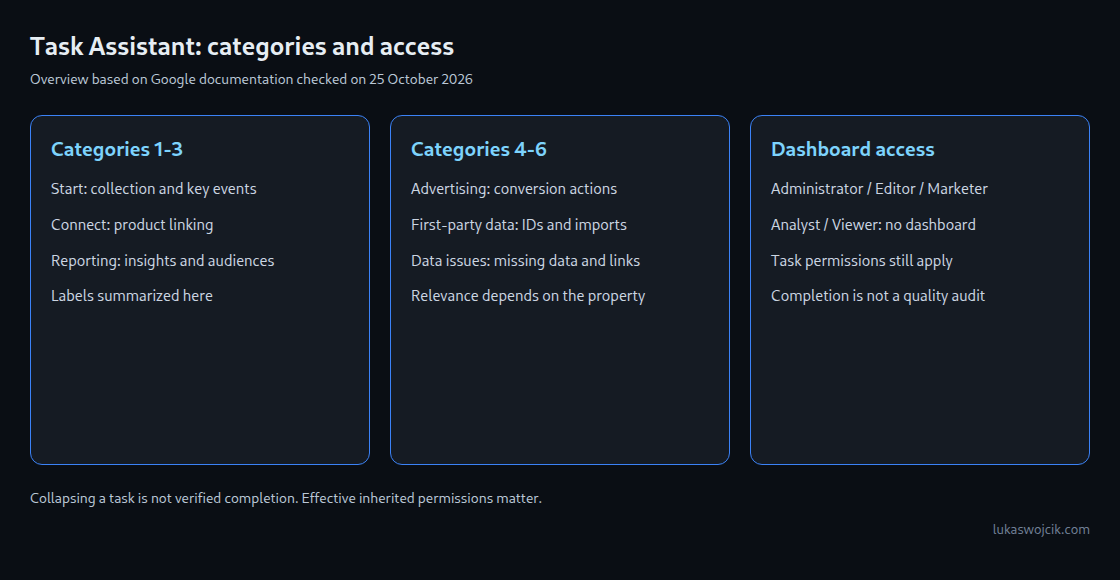
The following English interface labels follow the order of Google’s help page. The examples summarize tasks, not a promise that every task is relevant to every property.
Get started: Collection, signals, key events and consent settings.Connect your accounts: Google Ads linking.Enhance your reporting: Custom insights and audiences.Optimize your advertising: Conversion actions and audience activation.Add first-party data: User-ID, Measurement Protocol and imports.Fix data issues: Missing data, app deep links and unwanted traffic.
Dashboard access and editing rights are different
The help page explicitly permits Administrator, Editor and Marketer roles to use Task Assistant. It explicitly states that Analyst and Viewer roles cannot view or access the dashboard. Effective permissions matter: access can also be inherited from an account or group, so a directly assigned property role is not always the complete picture.
Opening the dashboard does not authorize every linked operation. For example, custom insights require Editor or Administrator permissions. Product links can require permissions in the other product too. The task’s destination and its prerequisites still govern the change.
Marketer is not a read-only role. The role includes Analyst permissions and allows changes to audiences, events, key events and attribution-model settings. Granting it solely for dashboard visibility also grants those capabilities. A documented process can instead pass findings from report analysts to staff who already have the required configuration permissions.
What skipping and completion mean
The help page describes skipping a task by collapsing the expanded item. That is not evidence of a permanently dismissed recommendation or a completed technical check. The page separately describes marking tasks complete after configuration.
A useful internal record distinguishes relevant work, completed and verified work, and deliberately unused features. Advertising features or app deep links may be irrelevant to a particular implementation. An empty or completed list alone does not prove that nothing important is missing.
Data issues need evidence beyond the task list
The documented category includes resolving missing data, correcting app deep links and excluding unwanted traffic. The help page’s first item has an inconsistent heading about missing deep links, while its explanation concerns missing session_start data. The linked troubleshooting guidance is the relevant starting point; missing sessions and incorrect app links should not be treated as the same fault.
Report observations can help prioritize investigation, but do not automatically map to a Task Assistant finding:
Unassignedmeans that the traffic does not match a default channel rule. Source, medium and the dimension’s scope need examination; a missing campaign parameter is not the only possible explanation.- An unexpected hostname is a clue to investigate. Hostname values in collected events are not independent proof of the actual source or of spam.
- A falling key-event rate can reflect collection changes, traffic composition, the total number of users or sessions used to calculate the rate, or actual behavior. An unchanged campaign does not isolate the cause.
A practical handoff contains the property, reporting period, affected metric or event, expected result and reproducible observation. Configuration changes should then be verified with relevant collection tests and reports. Not every repair happens inside the assistant itself.
Questions and answers
Is a second account needed to resolve the Analyst access question?
No. The current documentation explicitly excludes Analyst and Viewer from dashboard access. If observed access differs, checking effective inherited permissions and the selected property is more useful than assuming a different rule.
Does a completed checklist certify the property?
No. Intended event meaning, duplicated collection, consent behavior and actual reporting outcomes need their own checks. The assistant organizes tasks; it is not a certification of business or technical correctness.
When is reviewing the tasks useful?
After changes to streams, product links or measurement requirements, and as part of periodic maintenance. This is a practical working recommendation, not a guarantee that every change creates a task or that completing tasks recovers missing historical data.
Related articles