English
 Deutsch
 Polski
Five DAWs in 2026: FL Studio, Ableton Live, Logic Pro, Cubase and Bitwig Compared

Management Summary
A DAW is a music production program combining recording, instruments, editing and mixing. FL Studio, Ableton Live, Logic Pro, Cubase and Bitwig can all produce complete songs, but differ in working methods, included tools and supported computers. The comparison explains which differences matter for recording, live performance and sound creation. Required features, compatibility with existing equipment and later update costs provide a more useful basis for choosing than the longest feature list.
Contents
- The differences that matter in practice
- FL Studio: patterns, Piano Roll and edition limits
- Ableton Live: clip launching and a second playback view
- Logic Pro: recording and included instruments on Mac
- Cubase: MIDI editing, notation and edition-dependent tools
- Bitwig Studio: parameter movement and Linux
- A practical comparison
- Prices: edition and update costs belong together
- Other relevant options
- Choosing by the actual project
- Questions and answers
- Sources
A digital audio workstation (DAW) brings recording, instruments, editing and mixing into one program. This comparison covers FL Studio 2026, Ableton Live 12, Logic Pro 12, Cubase 15 and Bitwig Studio 6. The selection focuses on music production; it is not a market-share ranking or a measured speed test.
Manufacturer documentation was checked on 26 October 2026. Features depend on the edition, operating system and installed version. Shop prices can change with region, tax and promotions. The comparison therefore separates the purchase model from the feature set instead of declaring a universal winner.
The differences that matter in practice
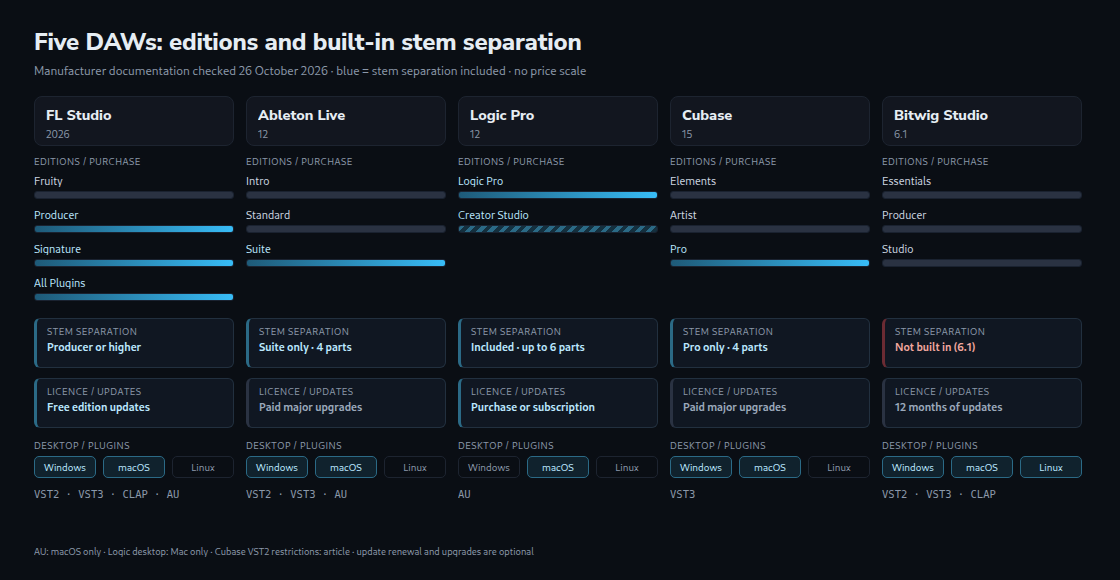
Stem separation estimates individual parts from a finished mix, for example vocals, drums and bass. These estimates can contain remnants of other instruments or audible processing errors. More output stems do not automatically mean better separation. FL Studio includes the function from Producer Edition, Live in Suite and Cubase in Pro. Logic Pro offers up to six parts; Bitwig Studio 6.1 has no comparable built-in separator.
Assistants perform different jobs. Gopher can change supported FL Studio project settings after project access is approved; its control features remain experimental. Logic’s Session Players generate musical parts, while Chord ID identifies chords from audio or MIDI note data. MIDI stores instructions such as pitch and note length rather than recorded sound. Cubase’s Omnivocal Beta synthesizes singing from notes and lyrics. These functions do not establish which DAW produces the best music.
FL Studio: patterns, Piano Roll and edition limits
A pattern stores a musical passage, such as a drum rhythm or bass line. FL Studio’s Channel Rack and Piano Roll create those passages; the Playlist places them along the song. Audio clips can sit beside patterns. This is a concrete reason to consider FL Studio for repeated musical sections, rather than evidence that every beat is faster to make there.
The 2026 release adds a rebuilt FLEX preset instrument, a Chord Panel that identifies overlapping notes, and Audio Logger, which retains the last 60 seconds of Master output, the combined signal at the main mixer output. Cloud project backups are also available. FL Cloud’s free tier and paid services are separate from the FL Studio edition licence.
Fruity Edition supports up to eight Audio Clips. It does not include audio recording or stem separation. Producer Edition adds these functions; Signature and All Plugins expand the bundled tools. A trial may expose plugins outside the edition eventually purchased. Edition choice therefore depends on the actual recording and plugin requirements.
FL Studio runs on Windows and macOS and supports VST2, VST3 and CLAP plugins, plus Audio Units on macOS. Lifetime Free Updates apply to the purchased edition. Higher editions and separately sold services are not automatically included. Image-Line also offers region-dependent Rent-to-Own Plus: after twelve payments the FL Studio licence is permanent, while FL Cloud continues until cancelled.
Ableton Live: clip launching and a second playback view
Session View launches short audio or MIDI clips from a grid. Arrangement View lays out the song on a timeline. A launched Session clip takes over its track until playback returns to the arrangement. Understanding this interaction is more useful than describing Live simply as easy or difficult.
Warping adjusts the timing of audio, for example to match a drum loop to the project tempo. The result depends on the material, algorithm and amount of stretching. Live 12.4 adds Link Audio for streaming between compatible devices over a local network. Network delay remains relevant: Live provides a latency slider, and larger settings may be necessary to avoid dropouts.
Intro allows sixteen audio and MIDI tracks. Standard and Suite allow unlimited tracks, subject to computer capacity. Suite includes four-part stem separation and Max for Live. Max for Live connects visual programming blocks to make instruments or effects; it is also sold as an add-on for Standard. That add-on does not turn Standard into Suite or add Suite’s stem separation.
Live supports VST2 and VST3, plus Audio Units on macOS; it does not host CLAP. Suite is available through rent-to-own. This spreads the licence purchase over payments; a normal subscription merely provides access while active. Major-version upgrades are a separate purchase decision, not a requirement to keep using a paid-up version.
Logic Pro: recording and included instruments on Mac
Logic combines timeline editing with the Live Loops clip grid. Comping means selecting the preferred passages from several recorded takes. The Score Editor displays musical notation. Included instruments and effects cover many production tasks without choosing between several desktop feature editions.
Session Players create accompaniment that follows the chord track. Version 12 adds synth-oriented performances. Sample Alchemy received Granular Sync in 12.3: granular processing builds sound from short pieces of an audio sample. This is not the first appearance of granular synthesis in the separate Alchemy instrument.
The current product page specifies Apple silicon and macOS 15.6 or later. There is no Windows version. Third-party plugins need a compatible Audio Units version. A Windows collaborator cannot open the native Logic project in Logic, but exported audio and MIDI can still be exchanged.
The German Apple store lists Logic Pro for Mac at EUR 229.99, or Apple Creator Studio at EUR 12.99 monthly / EUR 129 yearly. Logic’s subscription and standalone editions currently have the same features. Creator Studio includes other creative apps and iPad versions; the standalone Mac purchase does not include that whole bundle. Past free updates do not constitute a published lifetime guarantee.
Cubase: MIDI editing, notation and edition-dependent tools
Cubase combines a timeline with dedicated editors. The Logical Editor applies rules to selected events, such as changing notes within a defined pitch range. Expression Maps connect musical articulations, such as sustained or short string notes, with the required instrument commands. These specialised tools can reduce repeated work once configured.
In Cubase 15, stem separation, UltraShaper and modulators belong to Pro. VariAudio, which edits the pitch of recorded vocals, is available in Artist and Pro. The edition comparison is therefore more informative than an undifferentiated list of everything Cubase can do.
Cubase supports VST3 on Windows and macOS. VST2 is disabled by default and no longer officially supported. The optional VST2 scanner is unavailable when Cubase runs natively on Apple silicon; the manufacturer’s documented workaround uses Rosetta. A compatible VST3 version is the more direct migration path.
Bitwig Studio: parameter movement and Linux
Bitwig combines a clip launcher with a timeline. Modulation changes a parameter over time: a low-frequency oscillator (LFO), a repeating control signal, can open and close a filter, while an envelope can follow a note’s duration. Essentials includes ten modulators, Producer eighteen and the full Studio edition forty-three. The full edition adds The Grid, where connected blocks form instruments and effects.
Version 6 adds automation clips and clip aliases. Automation stores movements of controls, such as a volume rise. An alias shares a clip’s underlying pattern, so editing that pattern updates linked clips; independent clip settings need not change. Version 6.1 expands the Sampler, including ways of dividing recordings into playable sections.
Windows, macOS and Linux are supported. Plugins use VST2, VST3 or CLAP; a Linux installation needs compatible Linux plugins. Hosting modes can isolate plugins in separate processes. The degree of isolation depends on the selected mode; it is not a guarantee against every application or system failure.
Each new licence includes twelve months of updates. Versions covered by that entitlement remain usable after the plan ends; renewing is optional. This differs from an access subscription. Modulation and The Grid are optional routes into sound design, not prerequisites for making a first recording.
A practical comparison
| Task | Relevant distinction |
|---|---|
| Audio recording in FL Studio | Producer or higher; Fruity allows eight Audio Clips but no audio recording |
| Built-in stem separation | FL Producer+, Live Suite, Logic Pro, Cubase Pro; absent in Bitwig 6.1 |
| Custom visual devices | Max for Live in Suite or as a Standard add-on; The Grid in full Bitwig Studio |
| Native Linux application | Bitwig is the Linux option among these five |
| Existing plugin collection | Both plugin format and operating-system compatibility matter |
A useful trial task is one short production with a recorded part, a MIDI instrument, several edits, automation and an audio export. The relevant observations are missing functions, repeated work and unfamiliar concepts. No timed usability study was performed for this article, so the programs are not ranked by learning speed.
Prices: edition and update costs belong together
The verified shop examples use different currencies: Ableton’s retrieved shop showed USD 99 / 349 / 749 for Intro / Standard / Suite; Bitwig showed EUR 99 / 199 / 399 for Essentials / Producer / Studio. These are dated regional examples, not directly comparable bar lengths. A purchase comparison requires the same currency, tax treatment and required features. The linked manufacturer shops provide the current checkout price.
For ongoing costs, the distinction is between keeping an existing licence and buying newer functionality. FL Studio includes future updates to the purchased edition; Bitwig includes a twelve-month update window; Live and Cubase sell major-version upgrades. Optional cloud services, extra plugins and edition upgrades can add costs. None of this proves that one program is cheapest for every five-year project.
Other relevant options
Fender Studio Pro continues the Studio One product line. Version 8.1 adds Vocal Tune and Moises integration; Studio Assistant was introduced as a public beta for Pro+ subscribers. Moises functions have monthly allowances. A perpetual licence includes a year of feature updates, while Pro+ offers additional subscription models. These conditions matter more than treating every advertised function as unlimited.
Pro Tools is another option for audio editing and post-production. Avid includes SpectraLayers Go with subscriptions and active perpetual upgrade plans; ARA 2 integration requires Pro Tools 2024.10 or later. Go can extract vocals, which is narrower than arbitrary multi-instrument separation. No comparative measurement here establishes that its editing is more precise than other DAWs.
REAPER offers a USD 60 discounted licence and a USD 225 commercial licence, before applicable taxes. The discount also covers commercial use when yearly gross revenue does not exceed USD 20,000, plus qualifying education and nonprofit use. The same program is supplied in both cases; the difference is licence eligibility.
Choosing by the actual project
FL Studio merits consideration for pattern-based work and its update entitlement. Live offers clip-based performance; Logic combines recording tools and instruments on Mac; Cubase supplies specialised MIDI and notation workflows; Bitwig offers flexible modulation and Linux support. These are reasons to test a program, not exclusive uses: each can produce complete music.
The best-fitting edition contains the required tools, runs the existing plugins and supports the intended exchange with collaborators. A smaller familiar setup can be more useful than an extensive package whose main features are unnecessary.
Questions and answers
What survives a change of DAW?
Audio preserves the rendered sound; MIDI preserves note and control information but not the instrument sound or every effect setting. Exported tracks starting at a common position simplify alignment. Separate unprocessed and processed versions retain more editing options.
DAWproject can transfer more structure between supporting applications, including Bitwig, Cubase and Fender Studio Pro. The format can carry clips, automation and plugin states, but the destination still needs compatible plugins and must interpret the imported features. A successful import is not proof of identical playback. Built-in instruments are not automatically converted into another DAW’s instruments.
What can a trial actually show?
Trials reveal whether the intended recording, plugin and export workflow works on the actual computer. Restrictions differ. The standard FL Studio trial saves and exports, but cannot reopen saved projects until purchase. Its included trial plugins may also exceed the purchased edition. This matters before using a trial for a long-running project.
When is standalone Logic cheaper than Creator Studio?
Using the German prices above and ignoring trials, discounts and future price changes, eighteen monthly payments total EUR 233.82. Two annual payments total EUR 258, with the second due at the start of year two. Both exceed EUR 229.99 for standalone Logic on Mac. This arithmetic compares payments for Logic alone; other included apps and iPad access may change the value of the subscription.
Sources
- FL Studio: editions
- FL Studio 2026: new functions
- Gopher: experimental project controls
- FL Studio: purchase models and shop
- FL Studio: trial restrictions
- Live: shop and edition comparison
- Live 12: release notes and stem separation
- Max for Live: Standard add-on
- Link Audio: network and latency
- Logic Pro: features, requirements and German prices
- Logic Pro: release notes
- Logic Pro: Stem Splitter
- Cubase: editions and shop
- Cubase: VST2 restrictions
- Bitwig: editions, prices and update plan
- Bitwig 6: automation and aliases
- Bitwig 6.1: Sampler
- Bitwig: plugin hosting modes
- Fender Studio Pro 8.1: functions and conditions
- Pro Tools: SpectraLayers Go
- REAPER: licence eligibility and prices
- DAWproject: exchange format and scope
Related articles