English
 Deutsch
 Polski
Sidechain Ducking in FL Studio: Routing, Three Control Methods and a Measured Example

Management Summary
Kick drum and bass can compete for space in a music mix. Sidechain ducking briefly lowers the bass whenever the kick hits, either to separate the sounds or to create a rhythmic pumping effect. FL Studio offers three ways to control this movement. The depth and recovery time shape both sound and measured level; a longer reduction does not necessarily lower the largest peak further. The simulated example explains these differences without promising the same result for every song.
Jump to the interactive example ↓
Contents
- What ducking changes in the measured example
- Assigning kick and bass separately
- Creating the sidechain connection
- Option 1: Fruity Limiter’s COMP tab
- Option 2: Fruity Compressor with sidechain input
- Option 3: Fruity Peak Controller
- Ghost kick: control without an audible kick
- Tempo as a guide to return time
- Possible causes of unexpected behaviour
- Assessing the finished export
- Questions and answers
- Sources
Kick and bass can contain strong low frequencies at the same time. Their signals may reinforce or partly cancel each other, depending on timing and phase. Sidechain ducking briefly lowers the bass when the kick plays. A sidechain is an additional control signal: the kick determines the gain reduction while the compressor processes the bass. This can reduce overlap or create deliberate audible pumping.
This article describes three FL Studio options: Fruity Limiter, Fruity Compressor and Fruity Peak Controller. The first two use an additional audio signal to control compression. Peak Controller instead drives a linked parameter. Operating details follow Image-Line’s online manual; the measurement example is a separate simulation, not a test of these plugins.
What ducking changes in the measured example
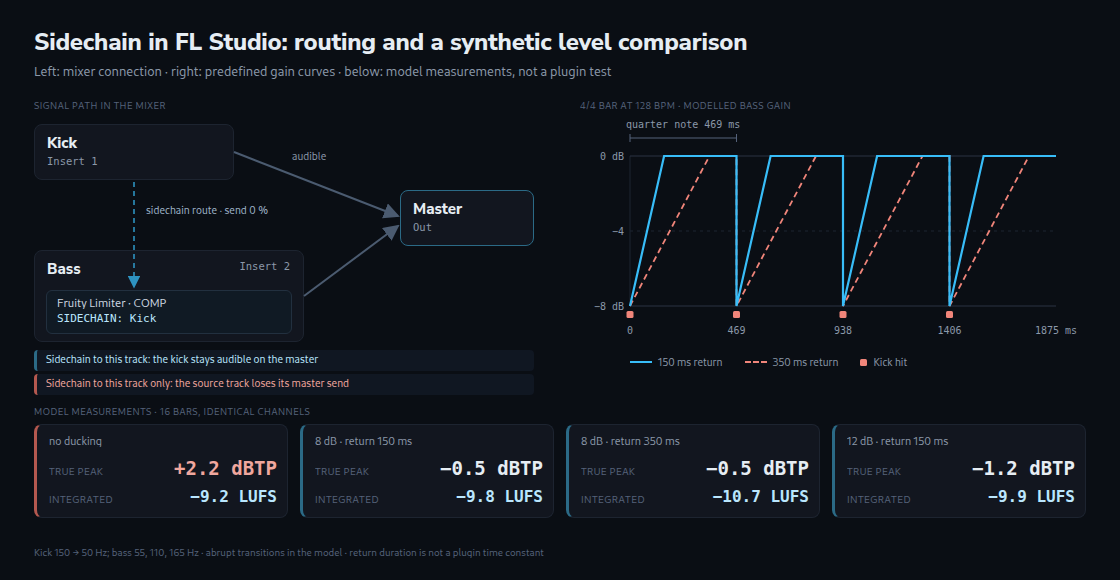
The example contains sixteen 4/4 bars at 128 BPM: 30 seconds at 48 kHz. Both channels are identical. A sine-based kick falls from 150 to 50 Hz; the continuous bass contains 55, 110 and 165 Hz. On every beat, bass gain jumps to the selected reduction and returns linearly in dB. This return duration is called “release” here, but does not reproduce a plugin time constant. The linked meter’s archived calculation core supplies readings using the BS.1770 method. True peak also estimates peaks between stored samples; 0 dBTP is the full-scale reference. LUFS describes measured loudness, and LU its change. PLR is true peak minus integrated loudness, calculated from unrounded values. Related: LUFS and True Peak Meter
| Variant | True peak | Integrated loudness | Peak to loudness ratio (PLR) |
|---|---|---|---|
| no ducking | +2.2 dBTP | −9.2 LUFS | 11.4 dB |
| 8 dB reduction, return 150 ms | −0.5 dBTP | −9.8 LUFS | 9.4 dB |
| 8 dB reduction, return 350 ms | −0.5 dBTP | −10.7 LUFS | 10.3 dB |
| 12 dB reduction, return 150 ms | −1.2 dBTP | −9.9 LUFS | 8.7 dB |
Without ducking, true peak is +2.16 dBTP; with 8 dB reduction and a 150 ms return it is −0.45 dBTP, a decrease of about 2.6 dB. Loudness falls by 0.59 LU. At 350 ms, the peak remains the same to one decimal place, while loudness falls by 1.52 LU overall. Audibility was not tested. The direction is not universal: other signals and phase relationships may behave differently. The model stores floating-point values above 0 dBFS and contains abrupt changes at beat boundaries; a fixed-point export of the unducked version would clip without prior level adjustment.
Assigning kick and bass separately
The mixer setup described here places kick and bass on separate insert tracks. This keeps the kick available as a control signal while the effect processes only the bass. A routing field showing “—” in the Channel Rack indicates a direct master assignment.
- The channel selector in the Channel Rack marks the kick channel.
- A right-click on the intended mixer track opens its context menu. Channel routing › Route selected channels to this track assigns the selected channel there. The listed shortcut is Ctrl+L; its action depends on the active window.
- The bass receives another mixer track in the same way. Names such as “Kick” and “Bass” make later sidechain selection easier. F2 opens renaming for the selected track.
Creating the sidechain connection
The connection supplies the kick signal to a sidechain input on the bass track. Its ordinary audible send level is 0%. This does not mute the control signal: audible send and sidechain are separate paths. A plugin could explicitly monitor the sidechain audio; normal compression control does not mix the kick into the bass output.
- The kick track is selected in the mixer first.
- A right-click on the send switch at the bottom of the bass track opens the routing menu.
- Sidechain to this track creates the connection from the selected kick track to the bass track.
This choice preserves the kick’s existing master route. Sidechain to this track only additionally disables the direct master route and suits an inaudible control track. Other audible routes through other tracks may still exist. An ordinary send also becomes a sidechain-only path when its audible send level is 0%.
Option 1: Fruity Limiter’s COMP tab
Fruity Limiter contains a compressor, limiter and gate. The sidechain controls compression; the other stages can still affect the bass.
- Fruity Limiter occupies a free effect slot on the bass track. Each mixer track provides ten slots.
- The COMP tab shows compression controls.
- A right-click on SIDECHAIN lists available source tracks. After “Kick” is selected, its signal controls compression of the bass.
- A THRESH setting below the detected kick level and a RATIO above 1:1 allow gain reduction. The depth reached also depends on timing and knee shape. The manual states that maximum THRESH disables compression.
The envelope describes gain changing over time. ATT controls the onset of compression and REL its recovery. Very short timings can cause distortion. CURVE changes the shape of these transitions; SUSTAIN affects averaging in level detection. RMS describes signal strength calculated across samples, rather than a single peak value. A release setting does not guarantee that the bass fully recovers after exactly that duration.
Show analysis & gain envelopes displays the analysis and gain curves; the white curve shows reduction. Lookahead delays the audio path so that an upcoming peak can trigger control in time. In Fruity Limiter, LIMIT-ATT sets this lookahead, not COMP-ATT. The manual describes maximum CEIL and minimum LIMIT-ATT as effectively bypassing the limiter stage; the gate and other controls still require separate consideration.
Option 2: Fruity Compressor with sidechain input
Fruity Compressor also provides a Sidechain Input. The feature already appears in the change log for beta 25.1.99 of 15 October 2025 and is included in the later 25.2 branch. Mixer routing stays the same, with “Kick” selected in the plugin’s sidechain menu. The following ranges come from the manual:
| Control | Range | Role in ducking |
|---|---|---|
| Threshold | 0 to −60 dB | the kick level at which the reduction starts |
| Ratio | 0.4:1 to 30:1 | how strongly the level above the threshold is reduced |
| Attack | 0 to 400 ms | Timing of the onset of gain reduction |
| Release | 1 to 4000 ms | Recovery after the detected level falls below threshold; signal-dependent |
| Gain | −30 to +30 dB | level compensation after compression |
| Type (Knee) | Hard, Medium, Vintage, Soft and one /R variant of each | transition at the threshold; the /R variants switch TCR on |
Type determines the transition into compression. The /R variants enable TCR, which automatically adjusts recovery time. This can reduce rapid gain changes and audible pumping, but does not prevent ducking altogether. Comparing /R and non-/R settings reveals which curve suits the intended sound. Vintage describes a particular transfer curve, not a complete replica of an analogue device.
Option 3: Fruity Peak Controller
Peak Controller converts input level into a control value for linkable parameters. Bass volume is one example; filter cutoff is another. No additional sidechain audio route is required. The connection uses an internal controller.
- Peak Controller sits on the kick track and receives the control signal there.
- According to the manual, MUTE is enabled by default and interrupts audio passing through the plugin. Control values are still generated. An audible kick requires MUTE to remain off.
- A right-click on the target parameter opens Link to controller. Peak Ctrl – Peak provides level-dependent control. Peak Ctrl – LFO instead supplies a freely oscillating signal that does not necessarily follow the kick hits.
- Negative VOL makes the control value fall as input peaks rise. BASE sets the resting value, DECAY the recovery and TENSION its shape. Mapping to the target determines actual reduction in dB. The bass’s resting level therefore needs checking after linking: a normalised control value of 100% does not automatically mean 0 dB gain on a mixer fader.
The manual specifies −50 dB as the lower input threshold for level detection. The relevant signal is the input at Peak Controller, including any earlier effects. The kick-track fader follows these effects and therefore does not change this input level. The controller’s Ramp function can also smooth rapid control changes if audible jumps occur.
Ghost kick: control without an audible kick
A ghost kick is a separate control track whose rhythm can differ from the audible kick. A short sample on its own mixer track drives the bass through Sidechain to this track only, removing the direct master route. A genuinely inaudible ghost kick must have no other audible outputs, such as bus routes; the source itself must continue playing.
Tempo as a guide to return time
BPM counts beats per minute. For quarter-note beats, 60,000 divided by BPM gives the spacing in milliseconds. The table lists note lengths, not ready-made compressor settings. In a real compressor, recovery begins and develops according to the control signal, threshold and processing model. A short numerical setting alone does not guarantee full recovery before the next beat.
| Tempo | Quarter note | Eighth note | Sixteenth note |
|---|---|---|---|
| 90 BPM | 667 ms | 333 ms | 167 ms |
| 100 BPM | 600 ms | 300 ms | 150 ms |
| 120 BPM | 500 ms | 250 ms | 125 ms |
| 128 BPM | 469 ms | 234 ms | 117 ms |
| 140 BPM | 429 ms | 214 ms | 107 ms |
| 150 BPM | 400 ms | 200 ms | 100 ms |
| 174 BPM | 345 ms | 172 ms | 86 ms |
The linked BPM calculator adds other tempos and dotted or triplet note lengths. These times provide a reference; the actual behaviour needs assessment from the gain curve and the sound. Related: BPM to Delay Time Calculator
Possible causes of unexpected behaviour
| Observation | Possible cause | Fix |
|---|---|---|
| No source in the sidechain menu | A suitable connection to the plugin track may be missing | Check of source, destination and connection |
| No visible gain reduction | Input, threshold, ratio or timing may be unsuitable | Check of selected input and displayed reduction |
| Kick inaudible after setup | The direct master path may be disabled by “only”, or another path interrupted | Check of master/bus connections and mute |
| Clicks or distortion | Rapid gain changes, clipping or other causes | Check of attack/release and levels; controller Ramp where relevant |
| Little audible pumping | TCR can smooth transitions; depth and timing also matter | Comparison of /R and non-/R types with suitable settings |
| Kick muted by Peak Controller | MUTE may interrupt the audio path | MUTE disabled for an audible kick |
| No Peak Controller movement | Low input, VOL=0 or incorrect source/link may be responsible | Check of input, Peak selection, BASE, VOL and target mapping |
Assessing the finished export
Ducking can change peaks, loudness and sound. Assessment should therefore cover the complete mix and exported audio. A LUFS and true-peak meter supplies level readings; loudness matching supports listening comparisons. A displayed streaming-normalisation result remains a model for particular settings, not a guarantee for every playback situation. Related: LUFS and True Peak Meter
Fruity Limiter and Fruity Compressor use the same kind of mixer connection, but switching plugins still requires input selection and suitable settings. Peak Controller drives a target parameter, making its mapping and resting value important too. The appropriate method depends on the intended reduction and workflow.
Questions and answers
Why does the longer return barely affect the peak here but change loudness?
The largest true peak in the reproduced model occurs very close to a beat boundary. Both 8 dB curves begin there with the same reduction. Their different recovery later barely changes that largest peak. This explains the specific result; another signal’s largest peak may occur later and respond differently to return time.
Integrated loudness combines frequency-weighted energy across measurement windows and excludes very quiet sections using thresholds. At 128 BPM a quarter note lasts 468.75 ms. The predefined 150 ms curve keeps bass gain below its original value for 32% of that interval; the 350 ms curve does so for about 75%. In this model, loudness falls by 0.59 and 1.52 LU respectively.
With 12 dB reduction and a 150 ms return, the model reaches −1.22 dBTP and −9.94 LUFS. Loudness is 0.13 LU below the 8 dB case with the same return time. In this example, deeper reduction affects the largest peak more than longer recovery.
Does ducking replace a final limiter?
Ducking does not automatically control every peak. Whether another limiter is needed depends on the rest of the mix and output target. For an example target of −1 dBTP, the 8 dB case still needs about 0.55 dB of extra margin. An equivalent global gain reduction can provide that too. These figures do not guarantee a particular limiter reduction or better sound.
Can the return duration be converted to another tempo?
The proportion of a quarter note can be converted: new time = old time × old BPM ÷ new BPM. A 150 ms duration at 128 BPM becomes about 110 ms at 174 BPM or 213 ms at 90 BPM. A 350 ms duration becomes about 257 ms at 174 BPM. This preserves the time proportion, not necessarily the sound or loudness.
With a kick on every other quarter note, the hit spacing doubles and the same recovery occupies half the proportion. This is only a timing calculation: signal duration, phase, notes and compressor behaviour can change the resulting levels.
Sources
- Image-Line: Mixer – assignments, audible sends and additional sidechain paths.
- Image-Line: Channel Rack – instrument channels and mixer destinations.
- Image-Line: Fruity Limiter – sidechain input, compression controls and separate LIMIT lookahead.
- Image-Line: Fruity Compressor – input, parameter ranges and TCR behaviour.
- Image-Line: Fruity Peak Controller – links, mute, input threshold and Ramp.
- Image-Line: Change log – sidechain input from beta 25.1.99 and subsequent versions.
- ITU-R BS.1770 – basis of loudness and true-peak measurement.
Learn by trying
What does the kick do to the bass level?
The kick controls the compressor. Change its level, threshold and ratio to see the bass attenuation.
- Gain reduction
- Bass after ducking
Static hard-knee model without attack, release or makeup gain. Bass before ducking: −12 dBFS. GR = max(0, kick − threshold) × (1 − 1/ratio). Graph shows GR versus kick level (−48 to 0 dBFS); not a listening test or an emulation of a specific plugin.
This module runs in your browser and does not send or store your input.
Learn by trying
One minute: can you spot the mistake?
Kick at −6 dBFS, threshold −18 dBFS, ratio 4:1. What gain reduction does the static model produce?
12 dB above threshold becomes 3 dB above threshold at 4:1. The difference is 9 dB of attenuation. With sidechain, this detector value controls bass attenuation.
Related articles