English
 Deutsch
 Polski
BigQuery Costs for the GA4 Export: Which Tables and Columns a Query Reads and the Free Dry Run

Management Summary
BigQuery analyses stored website data, including exports from Google Analytics. With usage-based pricing, costs depend on how much data a query reads, not simply on how short the final report looks. Selecting only needed dates and fields can therefore reduce expense. The article explains this connection and the value of estimating a query before running it. Reusable summaries can save repeated work, as long as their upkeep costs and later corrections to the original data are included.
Contents
A small query result does not necessarily mean a small BigQuery bill. With on-demand query processing, the relevant quantity is the data processed, not the number of returned rows. Selecting the required daily tables and fields can therefore save much more than adding a result limit.
This article concerns queries against the GA4 export. Capacity-based BigQuery pricing uses compute capacity instead of a direct per-query byte charge; storage and data ingestion have separate cost rules. A dry run helps estimate a query, but does not promise an exact final invoice.
LIMIT is not a reliable scan limit
Clustering groups stored data by selected columns so that suitable filters can skip unrelated blocks. For a non-clustered table, SELECT * ... LIMIT 10 does not reduce the bytes read from the selected columns. The ten returned rows can require a large scan. Table preview or bq head is better suited to an initial inspection without running a query.
There is an exception: a clustered table can sometimes stop scanning after enough blocks have supplied the limited result. That does not make LIMIT a general spending guard. Sorting with ORDER BY also requires computation and is not automatically free, even when the selected input columns remain unchanged.
Table selection and row filtering do different jobs
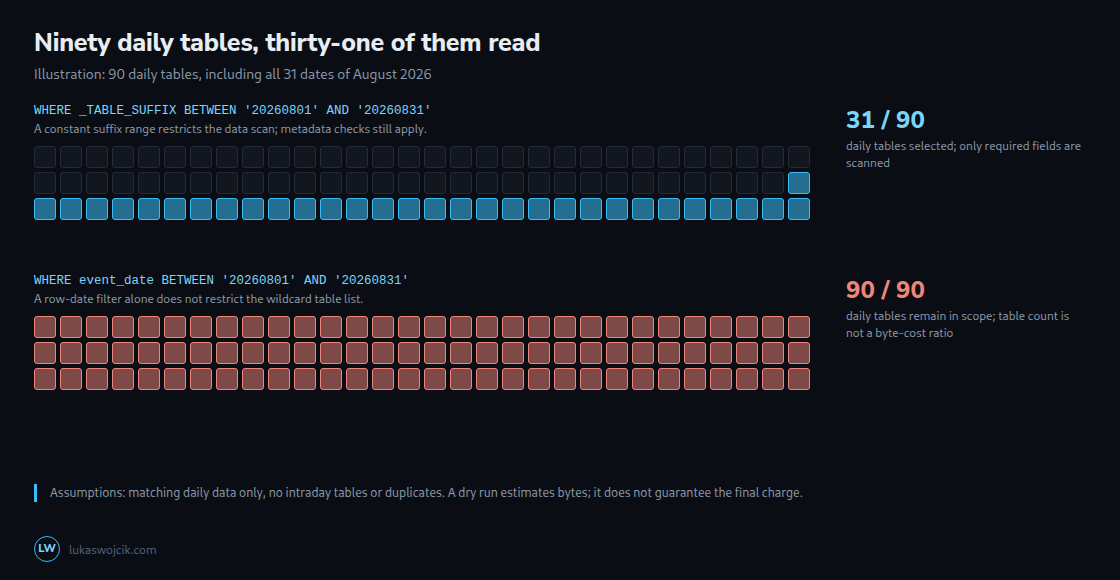
For events_*, _TABLE_SUFFIX contains the part after events_. A constant date range restricts the daily tables scanned. The following query selects August 2026; the project and dataset names are placeholders.
SELECT event_date, event_name, user_pseudo_id
FROM `project.analytics_12345.events_*`
WHERE _TABLE_SUFFIX BETWEEN '20260801' AND '20260831';
Replacing the suffix condition with event_date BETWEEN '20260801' AND '20260831' filters rows, but does not itself restrict the wildcard table list. The results coincide only when the matched tables contain the expected daily data and no extra matching sources introduce duplicates or other rows. The suffix range excludes intraday_...; the row-date condition alone does not.
A suffix filter derived dynamically from another table may fail to prune the scan. Suffix pruning also does not bypass all metadata checks: an incompatible schema or a view matched by the wildcard can still make the query fail. The shortest useful table list and a sufficiently specific prefix simplify this problem. Current-day streaming data belongs in a deliberately separate query.
Nested fields can be selected individually
event_params is an array of records with a key and typed value fields. It is not an indivisible block that every parameter query must read in full. The following example refers to key and value.string_value, rather than requesting every numeric value field and the whole record.
SELECT event_timestamp,
  (SELECT p.value.string_value
   FROM UNNEST(event_params) AS p
   WHERE p.key = 'page_location') AS page_location
FROM `project.analytics_12345.events_*`
WHERE _TABLE_SUFFIX BETWEEN '20260801' AND '20260831';
The scalar subquery assumes at most one page_location key per event. A missing key returns NULL; duplicate keys cause an error and require an explicit data-quality or selection rule. Filtering for a key does not create a separately stored page_location column: the relevant key and string-value data still have to be inspected.
Selecting individual fields also applies to device, geo, items and user_properties. These fields can be essential to an analysis. The useful rule is to read the required fields, not to discard entire structures as generally unnecessary. Filters, joins and sorting may require fields beyond the final output list.
A free estimate, not an exact bill
The query editor validates SQL and estimates processed bytes. The command-line equivalent runs without executing the query:
bq query --use_legacy_sql=false --dry_run < query.sqlquery.sql contains a complete query with the actual project, dataset and dates. No fixed byte result applies to every GA4 property. For clustered tables, the estimate can exceed the final scan because the skipped blocks are determined during execution. A dry run is not a guarantee of successful execution; scripts and dynamic SQL have additional validation limits.
The actual on-demand charge also depends on the applicable price, free allowance, rounding and minimum billed data. BigQuery documents a 10 MB minimum per referenced table and per query. Result-cache hits can avoid query charges, but queries across multiple wildcard tables do not support cached results. Slot-based capacity costs cannot be calculated precisely from the byte estimate.
Clustering and a reusable summary table
A table containing only the required fields and summaries can reduce repeated work when many reports use the same fields or aggregates. The saving must exceed the refresh and storage costs; there is no universal threshold of three manual executions. The example below creates an empty table for event counts grouped by date, event name and pseudonymous identifier. It does not populate the table or calculate user/session counts.
CREATE TABLE IF NOT EXISTS `project.analytics_12345.daily_user_metrics`
(
  event_date DATE,
  event_name STRING,
  user_pseudo_id STRING,
  total_events INT64
)
PARTITION BY event_date
CLUSTER BY event_name, user_pseudo_id
OPTIONS (require_partition_filter = TRUE);
Loading the table requires converting the exported event_date string with PARSE_DATE('%Y%m%d', event_date) and grouping by the intended date, event name and identifier to calculate total_events.
The dataset must exist in the appropriate location. IF NOT EXISTS does not repair a pre-existing table with a different schema or clustering. Partitions divide the table into sections by date. The partition-filter option requires subsequent queries to include a suitable condition on that date; an unnecessarily broad date range can still read substantial data.
Clustering can skip storage blocks for suitable filters. Up to four clustering columns are supported, and their order matters. Placing event_name first suits workloads that frequently filter by that field; identifier-only queries may need another order. Small tables or small daily partitions may gain little. These choices need measurements against the actual report workload.
Questions and answers
Can an expensive query be rejected before execution?
For on-demand queries, --maximum_bytes_billed sets a per-query bound on the estimated billed bytes. An estimate above that bound causes rejection without executing the query. A clustered query can be rejected even when its eventual scan would have been smaller. Project and user daily quotas provide additional controls, but Google describes custom quotas as approximate rather than an absolute spending guarantee.
How should late GA4 updates reach the summary table?
GA4 can update daily tables for up to three days after the event date. A daily refresh can rebuild the four completed dates before the current date in the property’s timezone. The oldest date is included again after the full three-day update window. This is different from merely appending yesterday or including today among four dates.
Before replacing existing summaries, the refresh must verify that all expected source tables are available and read the replacement data successfully. Missing tables are not evidence of zero events. A staging table holds the replacement data before the target changes. A transaction applies the deletion and insertion together, or leaves both unapplied on failure. A staging table followed by a transaction for the date-scoped DELETE and INSERT avoids leaving the target empty after a failed insert. An appropriately scoped MERGE also needs a rule for target rows that disappeared from the source.
A table’s existence does not prove that its export is complete. Export delays, historical corrections and deletions need separate monitoring and a repair path beyond the rolling window. Refresh jobs should also avoid overlapping executions. Neither partitioning nor a suffix filter supplies those correctness checks automatically.
Sources
- BigQuery pricing
- Google Analytics 4 developer guide
- Introduction to clustered tables
- Google: estimate and control costs
- Google: wildcard table queries
- Google: GA4 BigQuery export schema
- Google: nested and repeated fields
- Google: query computation
- Google: custom query quotas
- Google: multi-statement queries
Related articles