English
 Deutsch
 Polski
Tutorial: Finding the Container Version in Which a Tag Changed

Contents
A number in a report changes on a Tuesday. The container was published four times that month, and the version list says who did it and when – and nothing at all about what moved inside.
Opening four versions and reading them is possible. Opening forty is not, and forty is the usual number by the time somebody notices. What follows finds the version first and only then compares two.
What the Version List Shows and What It Hides
Every publication creates a version, and the version is a complete, immutable copy of the container at that moment. The list of them shows four things: a number, a name, who published it, and when.
What it does not show is the content. Two versions can differ in one character of one variable, and the list looks identical either way. The change count next to a version helps a little and misleads a lot, because it counts the changes made in the workspace rather than the difference to the previous version – a workspace that was edited and reverted contributes to the count without changing anything.
The one field that would answer the question directly is the version notes. It is free text, it is written at publication time, and it is empty in almost every container in existence. Filling it in is the cheapest possible improvement to this whole problem, and it only helps from now on.
Pulling the Versions Through the API
The Tag Manager API returns the same versions the interface shows, and the full content of each one. Read access is enough.
# Umfang: https://www.googleapis.com/auth/tagmanager.readonly

BASIS="https://tagmanager.googleapis.com/tagmanager/v2"
PFAD="accounts/6000000001/containers/7000000002"

# 1 die Liste der Versionen - kurz, ohne Inhalt
curl -s -H "Authorization: Bearer $TOKEN" \
  "$BASIS/$PFAD/version_headers" | jq -r \
  '.containerVersionHeader[] | [.containerVersionId, .name] | @tsv'

# 2 eine vollstaendige Version
curl -s -H "Authorization: Bearer $TOKEN" \
  "$BASIS/$PFAD/versions/41" > version-41.json
Two things about the first call are worth knowing. It returns headers rather than content, which makes it cheap and is the right way to enumerate. And it is paged: a container with many versions returns a nextPageToken, and a script that ignores it silently works with the most recent page only.
The second call is the expensive one, because it returns the entire container. That is the reason the next section exists: fetching forty full versions to compare one tag is a lot of data for one question.
The Fingerprint That Marks a Change
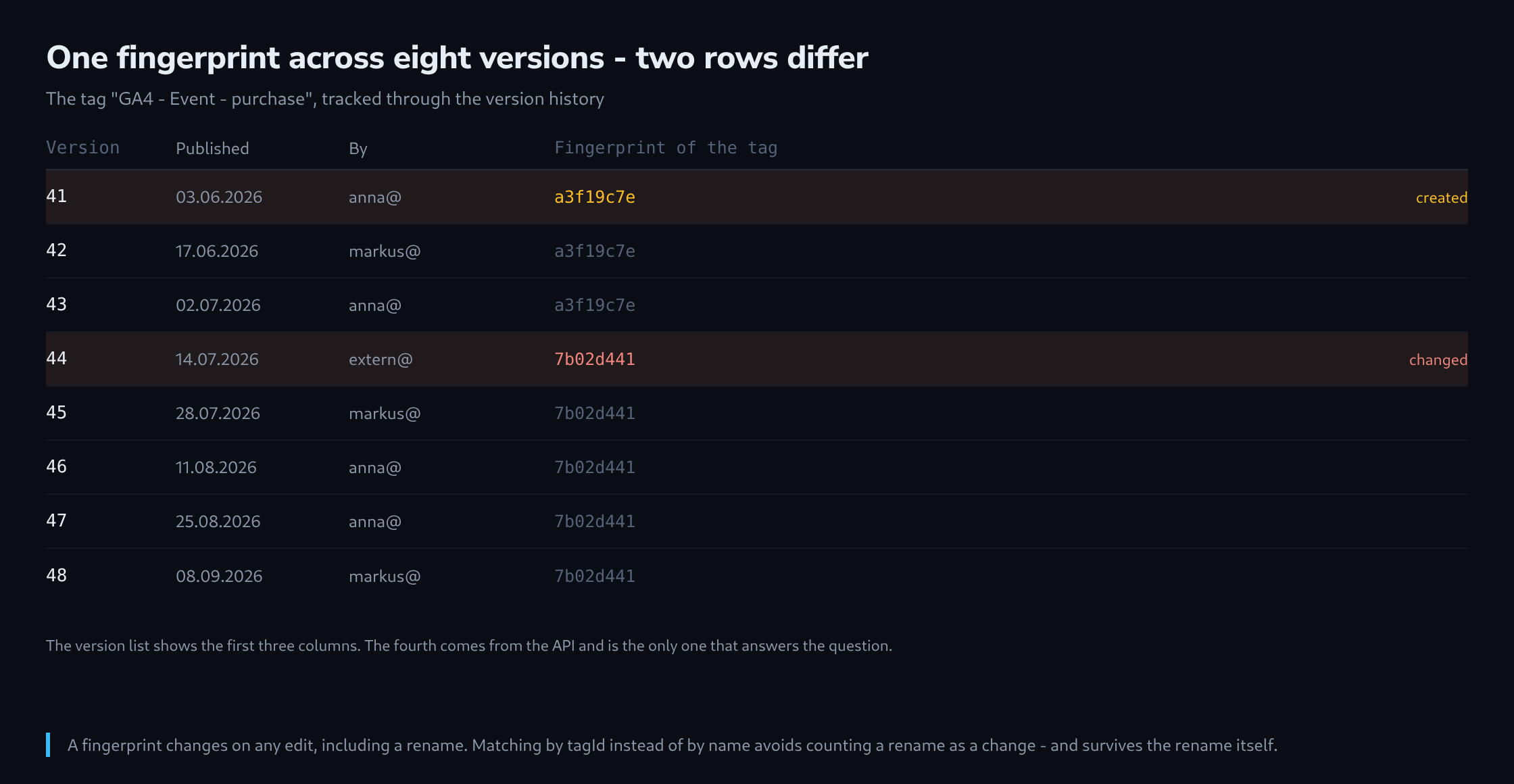
Every element in a container carries a fingerprint, and it changes whenever that element is modified. Comparing the fingerprint of one tag across versions therefore answers the question without comparing anything else.
import json, glob

GESUCHT = "25"   # tagId: GA4 - Event - purchase

vorher = None
for datei in sorted(glob.glob("version-*.json"),
                    key=lambda d: int(d.split("-")[1].split(".")[0])):
    daten = json.load(open(datei))
    tags  = {t["tagId"]: t for t in daten.get("tag", [])}
    tag   = tags.get(GESUCHT)

    if tag is None:
        print(f"{datei:16s} nicht vorhanden")
    else:
        marke = tag["fingerprint"]
        hinweis = "GEAENDERT" if vorher and marke != vorher else ""
        print(f"{datei:16s} {marke}  {hinweis}")
        vorher = marke
The output is one line per version, and the interesting ones announce themselves. A tag that was untouched for thirty versions and then changed once produces exactly one marked row, and that row is the answer.
Two properties of the fingerprint deserve a note. It is opaque – it says that something changed, not what – and that is enough for this step. And it changes for any modification including a rename, so a tag that was renamed shows as changed without behaving differently. Matching by tagId rather than by name does not change that, but it does survive the rename that made the element hard to find in the first place.
Finding the Version, Then Comparing Two
With the version identified, the comparison is between two files rather than forty, and it is worth doing on a normalised copy rather than on the raw export.
# nur das gesuchte Tag aus beiden Versionen, sortiert
for v in 43 44; do
  jq -S --arg n "GA4 - Event - purchase" \
    '.tag[] | select(.name == $n)' version-$v.json > tag-$v.json
done

diff -u tag-43.json tag-44.json
The -S is what makes the result readable. Without it, JSON keys come back in whatever order the API produced, and a diff of two semantically identical objects can be dozens of lines long. Sorting the keys removes that entirely, and what remains is the actual change.
Three fields are worth ignoring in the comparison because they change on their own: fingerprint, which is the thing being used to find the version rather than to describe it, and any timestamp or path field that carries the version number. Everything else that differs is a real difference.
Quota, and the Local Copy
The Tag Manager API is rate limited per minute and per day, and a loop over forty full versions runs into that quickly. The failure is a 429 response, and a script without a delay turns one investigation into a blocked API for the rest of the hour.
for v in $(cat versionen.txt); do
  [ -f "version-$v.json" ] && continue          # schon vorhanden
  curl -s -H "Authorization: Bearer $TOKEN" \
    "$BASIS/$PFAD/versions/$v" > "version-$v.json"
  sleep 2
done
The skip on an existing file is the important line. Versions are immutable, so a version fetched once never needs fetching again – and a directory of them becomes an archive that answers the next question without touching the API at all.
That archive is worth creating deliberately rather than as a side effect. A weekly job that fetches the newest versions costs nothing, and it means the history is available even for a container that somebody later loses access to.
The Question the API Cannot Answer
Three things stay outside, and knowing which they are prevents a long search for something that is not there.
The first is who changed a specific element. A version records who published it, and a publication can contain the work of several people over several weeks. The API has no per-element authorship, and the interface does not either.
The second is anything that never became a version. A change made in a workspace and reverted before publication leaves no trace, and so does a workspace that was deleted. The history is a history of publications, not of edits.
The third is the effect. Two versions can differ in a trigger condition that fires ten per cent more often, and nothing in the container says so – the difference is a line of configuration, and its consequence is in the data. Which is why this whole procedure is the first half of an investigation: it produces the moment and the change, and the second half is checking whether the numbers moved at that moment too.
Questions and answers
Does the fingerprint comparison also catch a change to a trigger or variable the tag uses?
No, and that is the most important gap in this procedure. A tag’s fingerprint changes only when the tag itself is modified. The tag refers to its triggers by their IDs and to variables by their names in double curly braces. If somebody changes a trigger’s condition or a variable’s value, the tag stays identical character for character, and so does its fingerprint, even though it now behaves differently.
The loop from the article can therefore be extended to the dependencies: the IDs in firingTriggerId and blockingTriggerId are read from the tag and the names of all {{…}} references are collected; then the fingerprints of those triggers in daten["trigger"] and those variables in daten["variable"] are compared across the versions in the same way as the tag’s.
Even that is not quite enough, because variables can refer to other variables. The thorough route is to follow the references until no new ones appear; the simpler one is to compare the fingerprints of every element in the container straight away while searching for the version.
What happens when a request in the loop fails with a 429?
A file is created anyway. Without further options, curl -s also writes an error response to the output, so version-44.json then holds the API’s JSON error message instead of a container. On the next run the file counts as present and is skipped, so exactly the line that makes the archive valuable preserves the error.
The analysis script does not flag this; it misleads instead: daten.get("tag", []) returns an empty list for the error message, and the version shows up as “nicht vorhanden”, as if the tag had been deleted in it.
Adding -f is not enough on its own, because the redirection with > creates the file before curl answers; an empty file would then be left behind and skipped just the same. The safe route is a temporary file that is only renamed once curl has succeeded and jq -e .containerVersionId finds a value.
Is the version in which the tag changed also the one that was live on the day in question?
Not necessarily. Every publication creates a version, but not every version gets published: a version can also be created without going live, and an older version can be published again later, for example to roll back a change. The version number therefore reflects the order of creation, not the order of publication.
What counts for the comparison with the report is when each version went live. If the comparison finds the change in version 44, the questions are whether and when version 44 was published, and whether an older version applied again afterwards.
What permissions does the weekly archive job need?
Read access is enough, as the article states, with the scope tagmanager.readonly. If the job runs under a service account, that account’s email address has to be added in Tag Manager as a user with read permission on the account or the container; the scope alone grants no access. With read permission only, the job cannot publish anything, and a leaked key then exposes the container’s content without being able to change it.
Sources
Related articles