English
 Deutsch
 Polski
DNS-Level Ad Blocking & Security: Pi-hole and AdGuard Home in a UniFi Network

Contents
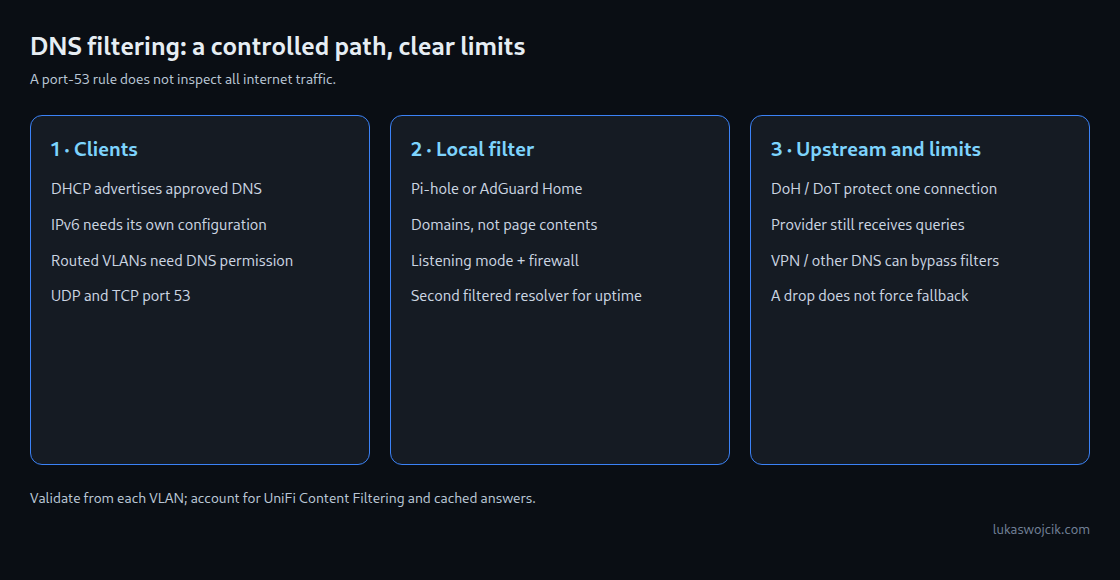
Pi-hole and AdGuard Home filter DNS queries: requests for domain names can be blocked before a connection starts. This can reduce advertising and tracking from separate domains across many devices. It does not inspect page contents or remove individual advertisements served from the same domain as wanted content. Direct IP connections, alternative resolvers and tunnels can bypass DNS filtering.
A clear DNS path across VLANs
A dedicated server VLAN is one possible location for the resolver, not a requirement for segmentation. A fixed address or DHCP reservation makes the service predictable. Each participating network can advertise the resolver through DHCP. IPv6 also needs a consistent DNS configuration through the mechanisms supported by the clients and gateway; an IPv4 setting alone does not cover IPv6.
Firewall rules should allow client networks to reach only the approved resolver addresses on UDP and TCP port 53. The destination is the server’s zone, not automatically the Gateway zone. Older UniFi rules use names such as LAN IN; current zone-based policies use source and destination zones. Administration of the resolver should remain restricted to authorized management clients.
The resolver must also accept requests from the routed networks. Pi-hole’s default local-only mode can reject other VLANs even when the firewall permits traffic. A suitable listening mode and firewall restrictions must be configured together. Opening DNS to the internet is unnecessary for this design.
Encrypted upstream traffic
Upstream means the server to which the local filter forwards unanswered queries. AdGuard Home supports encrypted upstreams directly. Pi-hole can use a suitable local forwarding service; older instructions using cloudflared proxy-dns are no longer a current installation method.
DoT uses TLS, normally on TCP port 853. DoH carries queries through HTTPS, usually on port 443. Both protect the configured connection, not every link in the resolution chain. The selected provider still receives the queries. Encryption is not DNSSEC validation, which checks signed DNS data. DoH can be harder to distinguish from other HTTPS traffic, but is neither invisible nor impossible to block. Low latency is not guaranteed.
Enforcement has limits
DHCP advertises DNS settings; it does not force applications to use those settings. A policy can allow the approved resolvers and block other plain DNS traffic from clients. Blocking may make an application fail instead of switching to the approved server. Resolver upstream traffic needs separate permission.
Destination NAT can redirect matching plain DNS traffic where the gateway version and topology support the required rule. Exceptions for all approved resolvers, return routing and IPv4/IPv6 behavior need explicit checks. A port-53 redirect does not capture DoH, DoT, a VPN or a connection that stays within a subnet without crossing the gateway.
Lists of known encrypted DNS endpoints provide partial coverage and need maintenance. Blocking shared CDN addresses can break unrelated services. Managed browser policies or restricted internet access for a dedicated device network can be more predictable, but must match the required applications. UniFi’s own Content Filtering also redirects DNS; combining both filters requires a deliberate design and verification of local names.
Validation and operation
From each VLAN, checks should cover a permitted domain, a deliberately blocked test domain, internal names, TCP and UDP DNS, and the configured IPv6 path. Query logs show which resolver actually handled a request. Cached answers and existing connections can continue temporarily after a rule change. A high block percentage alone proves neither effective privacy protection nor a faulty application.
Questions and answers
What happens if the resolver fails?
New lookups can fail while cached names and established connections continue to work. A second filtered resolver improves availability only if the clients and firewall can actually reach that instance. A public secondary resolver can bypass the policy; client selection is not necessarily strict primary-then-secondary failover.
Does Firefox’s canary domain enforce filtering?
A negative answer for use-application-dns.net signals Firefox to disable automatically enabled DoH under the documented conditions. It does not override an explicit user choice to enable DoH and is not a network-wide enforcement mechanism.
How should false positives be handled?
A reproducible failure, the client’s query log and a narrowly scoped temporary exception can identify the relevant domain. Exceptions should be reviewed after testing. DNS logs reveal browsing-related metadata, so access and retention should be limited to the operational need.
Related articles