

 English
 Deutsch
 Polski
Tutorial: Reading SunSpec Registers From a PV Inverter Over Modbus TCP

Management Summary
A solar inverter converts panel output into usable electricity and provides measurements for energy monitoring. SunSpec gives these values a shared meaning, while Modbus is the communication method used to read them. Together they can connect solar equipment to an independent monitoring system. The article explains why device-specific data locations, units and conversion rules matter: a working connection can still produce plausible but wrong figures, and missing readings must not become artificial zeros.
Contents
A Modbus register is a numbered storage location holding 16 bits. SunSpec defines how groups of these registers describe measurements and device information. The model chain makes it possible to discover supported data blocks instead of copying an address from another inverter. Discovery still needs the correct device configuration and model definitions; it does not make every measurement available on every inverter.
This tutorial reads phase A current from integer inverter model 103. The Python example uses the PyModbus 3.16.1 interface checked on 24 October 2026. It performs holding-register reads only. Host, port and unit identifier are device-specific; enabling access and selecting the register map follow the manufacturer’s documentation.
1. Finding the map with the correct address convention
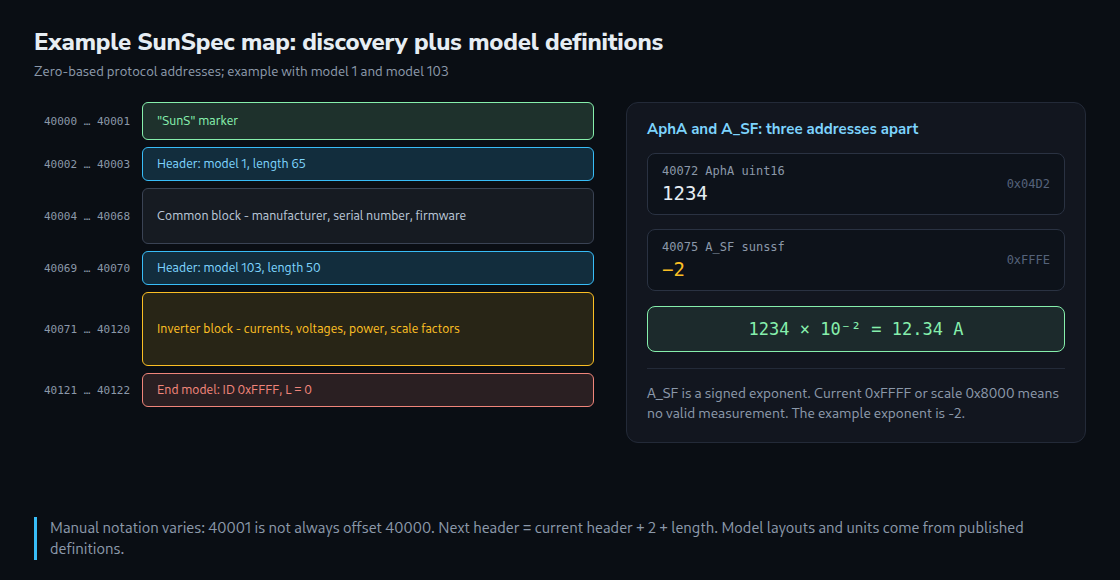
SunSpec’s standard zero-based protocol addresses are 0, 40000 and 50000. The first two registers contain 0x5375 and 0x6E53, together spelling SunS. These addresses are already protocol offsets.
A manual can use zero-based offsets, one-based register numbers or traditional 4xxxx holding-register references. Consequently, a printed “40001” cannot always be converted to 40000. In traditional reference notation, 40001 can mean the first holding register, whose protocol offset is 0. The documented convention and the marker must agree.
A meter and inverter may use separate unit identifiers, separate connections or different models in a shared map. Neither a second unit identifier nor a particular default setting is universal. A valid Modbus reply alone does not prove that the intended device answered.
2. Following model headers
After the two marker registers, each header contains a model ID and a length. The length counts data registers after the two-register header. The next header is therefore at current_header + 2 + length. End model 0xFFFF has length 0.
Model IDs identify layouts, but names, units and point offsets come from the published model definitions, not from a complete dictionary transmitted by every device. Unknown models can be skipped using their lengths; known models still need an appropriate decoder.
- 1: common device identification.
- 101/102/103: single-phase, split-phase and three-phase integer inverter models.
- 111/112/113: corresponding floating-point model family, with a different layout.
- 160: multiple-MPPT extension; input groups do not universally identify individual physical strings.
- 201–204: integer meter models for different wiring arrangements.
The supported models and any integer/float selection depend on the product. Model 102 means split phase, not an arbitrary two-phase installation. The example deliberately reports an error if exactly one model 103 is not present.
3. Consistent decoding of phase A current
All offsets below are zero-based from the first data register, excluding ID and length: A is at 0, AphA at 1, AphB at 2, AphC at 3 and A_SF at 4. If the data starts at 40071, phase A is at 40072 and the scale factor at 40075. That is a separation of three addresses.
The current is unsigned; the scale factor is a signed decimal exponent. Raw current 1234 and exponent −2 give 1234 × 10^-2 = 12.34 A. A different exponent gives a different multiplier. Missing current 0xFFFF or missing scale factor 0x8000 must not be converted into a measurement.
4. Reading with bounded discovery and error checks
The following example checks connection, response length, model boundaries, the end marker and both invalid-value markers. It uses device_id, as required by the documented PyModbus interface; older examples using slave need version-specific adaptation.
from pymodbus.client import ModbusTcpClient
from pymodbus.exceptions import ModbusException


def read_words(client, address, count, unit):
    if not 1 <= count <= 125 or not 0 <= address <= 65536 - count:
        raise ValueError("Invalid register range")
    response = client.read_holding_registers(
        address, count=count, device_id=unit
    )
    if response.isError():
        raise RuntimeError(f"Modbus error at {address}: {response}")
    words = response.registers
    if len(words) != count or any(not 0 <= x <= 65535 for x in words):
        raise RuntimeError("Incomplete or invalid response")
    return words


def find_base(client, unit):
    failures = []
    for base in (40000, 0, 50000):
        try:
            if read_words(client, base, 2, unit) == [0x5375, 0x6E53]:
                return base
        except (ModbusException, OSError, RuntimeError) as exc:
            failures.append(f"{base}: {exc}")
    raise RuntimeError("No SunS marker found; " + "; ".join(failures))


def discover(client, base, unit):
    position = base + 2
    models = []
    for _ in range(256):
        model, length = read_words(client, position, 2, unit)
        if model == 0xFFFF:
            if length != 0:
                raise RuntimeError("Invalid end model length")
            return models
        next_position = position + 2 + length
        if model == 0 or length == 0 or next_position > 65534:
            raise RuntimeError("Invalid model header or address range")
        models.append((model, position + 2, length))
        position = next_position
    raise RuntimeError("Model scan limit reached")


def phase_a_current(client, models, unit):
    matches = [m for m in models if m[0] == 103]
    if len(matches) != 1:
        raise RuntimeError("Exactly one model 103 required")
    _, start, length = matches[0]
    if length < 5:
        raise RuntimeError("Model 103 is too short")
    block = read_words(client, start, 5, unit)
    raw, sf_raw = block[1], block[4]
    if raw == 0xFFFF or sf_raw == 0x8000:
        return None
    exponent = sf_raw - 65536 if sf_raw >= 32768 else sf_raw
    if not -10 <= exponent <= 10:
        raise RuntimeError("Invalid SunSpec scale factor")
    return raw * (10.0 ** exponent)


def main():
    unit = 1  # Device-specific configuration
    client = ModbusTcpClient("192.168.1.50", port=502, timeout=3)
    try:
        if not client.connect():
            raise RuntimeError("Connection failed")
        base = find_base(client, unit)
        models = discover(client, base, unit)
        print("Base:", base, "Models:", models)
        current = phase_a_current(client, models, unit)
        print("No valid phase A current" if current is None
              else f"{current:.2f} A")
    finally:
        client.close()


if __name__ == "__main__":
    main()
The scan limit of 256 headers is a guard in this example, not a SunSpec model-count limit. A missing marker, missing model or invalid reply stops the calculation instead of printing a plausible value. The example handles one model-103 instance; multi-instance devices need explicit selection. Tests used a simulated client, including alternate bases, missing values and malformed headers; no inverter was contacted.
Other types and polling
SunSpec specifies high-word-first order for multi-register values. Modbus itself defines register transfer, not every manufacturer’s multiword layout. Signed values need two’s-complement decoding; floating-point values need their specified IEEE layout and invalid-value handling. Text occupies a fixed-size register area and may be null-terminated or null-padded.
Invalid patterns depend on the SunSpec type: for example, int16 uses 0x8000, uint16 uses 0xFFFF, and acc32 uses zero as “not accumulated”. An acc32 is not interchangeable with uint32 merely because both occupy two registers.
One block request reduces round trips but does not guarantee a simultaneous physical sample. Function 03 permits at most 125 registers per request; a device may impose a smaller limit. Polling frequency, connection limits and update cadence must follow the device documentation. No universal five-second interval is guaranteed safe for every product or shared gateway.
Home Assistant: a clearly scoped example
This configuration applies only to the illustrated map: model-103 data begins at 40071 and A_SF = -2. The fixed scale: 0.01 is a multiplier, not the exponent. Home Assistant does not automatically discover this SunSpec model or its scale factor from that YAML.
modbus:
  - name: inverter
    type: tcp
    host: 192.168.1.50
    port: 502
    sensors:
      - name: "Phase A current"
        slave: 1
        address: 40072
        input_type: holding
        data_type: uint16
        nan_value: 65535
        scale: 0.01
        precision: 2
        unit_of_measurement: "A"
        device_class: current
        state_class: measurement
        scan_interval: 10
nan_value excludes the raw current sentinel and produces unknown according to the current integration documentation. It cannot validate the separate scale-factor register. The fixed configuration is suitable only while the verified map and factor remain valid; rediscovery and comparison are appropriate after firmware or model-configuration changes.
Power in watts uses device_class: power and state_class: measurement. Energy totals use device_class: energy, a supported energy unit, and total or total_increasing according to reset behavior. Current Home Assistant energy views can also use power measurements. Energy can also be calculated from power over time: a constant 1 kW over two hours gives 2 kWh. For changing power, accuracy depends on sampling and the calculation method.
Questions and answers
Why is the scale factor part of the model?
A signed exponent trades numerical range for resolution. For a valid int16 power value, exponent 0 allows up to 32767 W, while positive exponents extend the range in larger steps. The referenced SunSpec model specification describes scale-factor points as static; changes in device configuration or firmware still warrant checking the resulting map.
What can corrupt energy statistics?
An invalid zero followed by the real lifetime total can be misinterpreted as a reset and a large new increase when using total_increasing. The point type and reset behavior therefore matter. For a model-defined accumulator, an invalid raw zero needs exclusion; that rule must not be copied blindly to unrelated sensors where zero is valid. Unknown data should remain unknown rather than becoming an artificial zero.
How should access be restricted?
Traditional Modbus TCP on port 502 has no built-in authentication or encryption. Modbus Security is a separate TLS-based protocol and requires device support. This tutorial needs only read access. A restricted network path and no public port forwarding reduce exposure. A routed firewall normally does not control direct same-subnet traffic; host firewalls, switch ACLs and client isolation can still restrict that traffic.
Sources
- SunSpec Device Information Model Specification, 2021 draft
- SunSpec Information Model Specification 1.9
- SunSpec model 103 definition
- SunSpec model 160 definition
- PyModbus 3.16.1 client interface
- Home Assistant Modbus integration
- Home Assistant energy FAQ
- Home Assistant sensor state classes
- Home Assistant Integral
- Modbus Application Protocol V1.1b3
- Modbus and Modbus Security specifications
- iSMA CONTROLLI: Modbus address notation example
Related articles


