

 English
 Deutsch
 Polski
Tutorial: Reading a GA4 Collect Request Parameter by Parameter

Management Summary
A GA4 collection request is the message a website sends to Google's analytics service about an activity. It can include page details, purchase amounts and consent information. Reading that message reveals what the website actually communicates, which is useful when reports look wrong or unexpected data appears. The whole message matters, not merely its address. A successful reply confirms neither complete processing nor a correct final report, and any later server forwarding can change what reaches the destination.
Contents
A GA4 Collect request shows what a browser attempted to send to a collection endpoint. The URL, request body and headers belong together. The body carries data outside the URL; headers carry additional information about the request, such as its content type. One request can contain several events, and the eventual report also depends on processing, configuration and other data sources. There is no fixed list of sixty parameters that explains every request.
The abbreviated fields below are diagnostic clues from the Google tag’s browser transport, not a stable public API for constructing requests. The documented gtag event fields and Measurement Protocol are separate interfaces. Internal encodings can change; the current Google tag implementation was checked on 24 October 2026.
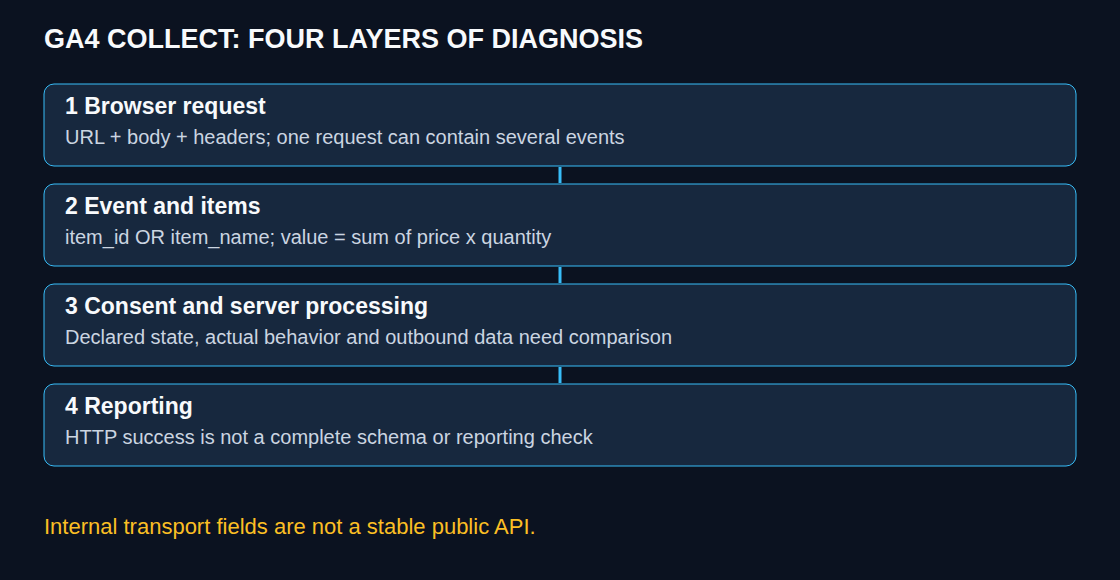
The complete request, not just its URL
In DevTools, recording starts before the test action; Preserve log retains entries across navigation. A filter for collect is a useful starting point, but can also match other services and miss a custom collection path. The destination, method, initiator, timing, payload and response identify the actual route.
Parameters may appear in the query string, the POST body or both. Batched requests can share URL parameters across several event lines. Method selection is not a universal small-GET/large-POST rule. A newline-formatted batch requires inspection of both shared context and event records; arbitrary lines in an unknown body are not automatically events.
The following synthetic example is wrapped for readability and is not a live request. The identifiers are placeholders. The purchase includes a transaction identifier, value, currency and an item; the purpose is inspection, not manually replaying a purchase.
https://www.google-analytics.com/g/collect
  ?v=2&tid=G-EXAMPLE&cid=1234567890.1737041234
  &sid=1737041234&sct=4&dl=https%3A%2F%2Fshop.example%2Fcheckout
  &dt=Checkout&en=purchase&ep.transaction_id=ORDER-EXAMPLE-42
  &epn.value=129.9&cu=EUR
  &pr1=idSKU-42~nmChair~pr64.95~qt2
Destination and session context
Not every request contains every field. A measurement ID identifies a web data stream within a property. A client identifier describes a browser instance rather than a verified person; storage permission, configuration and cross-domain behavior affect its origin and persistence.
| Observed field | Diagnostic meaning |
|---|---|
v=2 |
GA4 browser transport marker |
tid |
Target web-stream measurement ID |
cid |
Client identifier; not proof of a particular cookie or person |
sid / sct |
Session identifier / session count context |
seg |
Engaged-session indicator in the inspected format |
_p / _s |
Internal grouping / sequence clues, not delivery receipts |
Automatically generated GA4 session IDs use seconds since 1 January 1970 at 00:00 UTC, the Unix epoch. The session ID alone is not globally unique, and custom or server-provided values need separate scrutiny. A gap in an internal sequence field does not prove network loss: recording boundaries, filters, batching and multiple destinations can change the visible sequence. A missing request may also reflect a script error, CSP, a different endpoint or no matching trigger; the Network panel, Console and Tag Assistant provide complementary evidence.
Page context and privacy
dl, dr and dt commonly carry page location, referrer and title. Defaults come from browser document values, but configured overrides and redaction can alter the outgoing data. A missing referrer does not by itself prove direct traffic: browser policy and privacy controls can suppress it. In a single-page application, where content changes without loading a complete new document, the event timing and explicitly supplied title need to match the intended page.
ul and sr describe language and screen resolution. English settings and an 800×600 screen do not prove automation. Those values are neither identity checks nor reliable bot classifiers.
The decoded page URL needs inspection for sensitive paths, query values and other unintended data. Query content is not automatically a custom dimension, and page-path and full-location dimensions are different. Configured data redaction can remove selected values before transmission, but is a best-effort control with a defined scope. A clean URL alone says nothing about the remaining parameters or headers.
Event values and engagement
en commonly identifies the event; generic ep./epn. fields distinguish text and numeric event values in the inspected transport. up./upn. serve a similar purpose for user properties, while predefined fields can have dedicated codes such as cu for currency. The final request remains the relevant check when a template normalizes a supplied value.
A transport prefix does not automatically create a report dimension or metric. Custom reporting requires the appropriate definition, and Google can interpret numeric-looking dimension strings as numbers. Numeric values should meet the documented event schema at the source. Conversion with Number alone is insufficient validation: an empty string becomes zero, a decimal comma yields NaN, and Infinity is not a usable finite amount.
_et commonly represents engagement milliseconds. Engagement measures focused-page or foreground-app time, not simply wall-clock time between HTTP requests. It can be attached to a later event or omitted when no new engagement time exists. Zero or absence does not prove that the page had no human visitor.
Items and purchase totals
In the inspected browser format, pr1, pr2 and subsequent fields can each contain one packed item. The following common item-code mapping helps with reading; it is not a complete specification for software that splits and interprets every possible item encoding. Delimiters, encoding and custom item parameters require care.
| Code | GA4 field | Code | GA4 field |
|---|---|---|---|
| id | item_id | pr | price |
| nm | item_name | qt | quantity |
| br | item_brand | ds | discount |
| ca | item_category | cp | coupon |
| c2 … c5 | item_category2 … 5 | ln | item_list_name |
| va | item_variant | lp | index |
A documented item needs item_id or item_name; both are recommended. Missing id alone does not mean the item is discarded. Purchase value is the sum of item price times quantity, excluding shipping and tax, with a suitable currency. The example gives 64.95 × 2 = 129.90. Transaction IDs need to identify actual transactions consistently for duplicate prevention.
The documented items array allows up to 200 elements. Exactly 200 items do not inherently prove a transport overflow, and a short reported list has no single automatic explanation. Input construction, event limits, processing and report scope all need comparison. Event revenue and item revenue have different scopes; discrepancies can be investigated in suitable reports or exports as well as in the request.
Consent signals with their limits
gcs carries advertising-storage and analytics-storage states. Common values are G111 for both granted, G100 for both denied, G101 for analytics storage only and G110 for advertising storage only. These values cover two signals, not the whole consent implementation. gcd contains more detailed consent information and is also sent when consent mode is not active; it is not merely a record of defaults.
Tag Assistant makes defaults, updates and the four relevant Google signals easier to inspect: ad_storage, analytics_storage, ad_user_data and ad_personalization. The declared states need comparison with timing, actual tag behavior, storage and the banner choice, including a later withdrawal.
Advanced consent mode can send cookieless measurements while analytics storage is denied; basic mode blocks the Google tags until the required consent. A G100 request alone does not prove correct initialization, absence of all identifiers or modeling eligibility. Cookieless signals may include a page-load random value; a new client ID for every request is not a safe universal assumption. No visible request alone does not establish the reason for blocking.
Reception and server-side processing
An HTTP 204 means that the endpoint returned no response content; it is not an event-by-event schema validation or a guarantee of final reporting. DebugView requires debug mode and can omit events under client privacy controls or denied analytics-cookie consent. Realtime and processed reports answer different questions and are not complete raw-request ledgers.
With server-side tagging, the browser normally shows only the browser-to-server leg. The server preview exposes the incoming request, the claiming client, event data, fired tags and outgoing requests. Those records can reveal added, removed or changed fields. Browser data alone cannot establish what the downstream endpoint received or how it later processed the event.
Does a missing parameter prove that GA4 can never know the value?
No. It establishes only that the inspected field is absent from that part of the capture. The body, headers, other requests, server enrichment and later processing are separate sources.
Is Collect the Measurement Protocol?
The browser transport described here and the documented JSON Measurement Protocol have different formats and validation workflows. A browser query string is not a JSON Measurement Protocol payload.
Practical check: compare multiple Collect requests
The GA4 Parameter Analyser can now inspect several browser Collect requests together. One URL or URL-encoded query/body string goes on each line. If parameters belong to the common URL of a POST request, the separate shared-parameters field makes that context visible on every line.
The overview shows event names, measurement IDs and repeated parameter keys. The comparison lists only differences: an absent key is different from a key with an empty value. Different event types naturally carry different parameters, so a difference alone is not a tracking fault. Repeated keys remain in their original order; the tool makes no claim about which occurrence the receiver will use.
Values are decoded once and rendered as text, including any HTML-like content. The optional CSV download contains the decoded values and is not anonymized. This makes the analyser useful for examining an unexpected page URL or parameter, but it is not a complete personal-data detector. A clean-looking result does not prove that the implementation is free of personal data.
No pasted request is replayed or uploaded. The tool describes the input, not acceptance by Google. Actual collection can be checked using Google DebugView where applicable. Query decoding follows the URL form-encoding rules; packed item segments are only decoded heuristically. JSON Measurement Protocol payloads require the separate validator.
Sources
- Google Analytics: Recommended events and purchase fields
- Google Tag Platform: Consent mode overview
- Google Analytics: User engagement
- Google Analytics: Configuration reference
- Google Analytics: Custom dimensions and metrics
- Google Analytics: Data redaction
- Chrome DevTools: Network features reference
- Google Analytics: Monitor events in DebugView
- Google Tag Manager: Preview and debug server containers
- Google Tag Platform: Troubleshoot consent mode with Tag Assistant
- Google Analytics: About Analytics sessions
- Google Analytics: Measure ecommerce
- Google tag: delivered JavaScript implementation, checked 24 October 2026
- IETF RFC 9110: 204 No Content
- MDN: JavaScript Number
- Google Analytics: Validate Measurement Protocol events
Related articles


