AI-Powered Edge Video Surveillance: Frigate NVR with Google Coral TPU
Part 1 of 2 in the series Video surveillance on your own hardware

Contents
Traditional motion detection in CCTV surveillance systems relies on pixel contrast variations across video frames. This basic approach generates constant false alarms caused by rain, falling leaves, swaying trees, or shifting shadows. Sending high-resolution video streams to cloud-based computer vision APIs introduces significant latency, privacy vulnerabilities, and high bandwidth costs. Implementing Frigate NVR locally with a Google Coral Edge TPU enables real-time object detection at over 100 frames per second with sub-10-millisecond inference times, completely eliminating weather-induced false alerts while keeping all video footage strictly on-premise.
1. Hardware Architecture & Coral TPU Acceleration
Frigate NVR decouples video decoding from AI inference. Utilizing an Application-Specific Integrated Circuit (ASIC) like the Google Coral Edge TPU offloads heavy neural network processing from the host server’s CPU:
- Interface Selection: M.2 and PCIe Google Coral accelerators offer maximum throughput via direct bus access. USB 3.0 Coral accelerators require dedicated USB 3.0 controller ports; connecting to USB 2.0 hubs creates severe bandwidth bottlenecks.
- Container Pass-Through: When running inside Docker or Proxmox, the USB device (
/dev/bus/usb) or PCIe device node (/dev/apex_0) must be passed through directly to the Frigate container without virtualization abstraction layers. - Hardware Decoding Acceleration: Video decoding should be assigned to integrated GPU encoders (Intel QuickSync via
VAAPIor NVIDIA NVDEC) so that host CPU utilization remains below 15% even with multiple simultaneous streams.
2. Dual-Stream Strategy for Optimal Performance
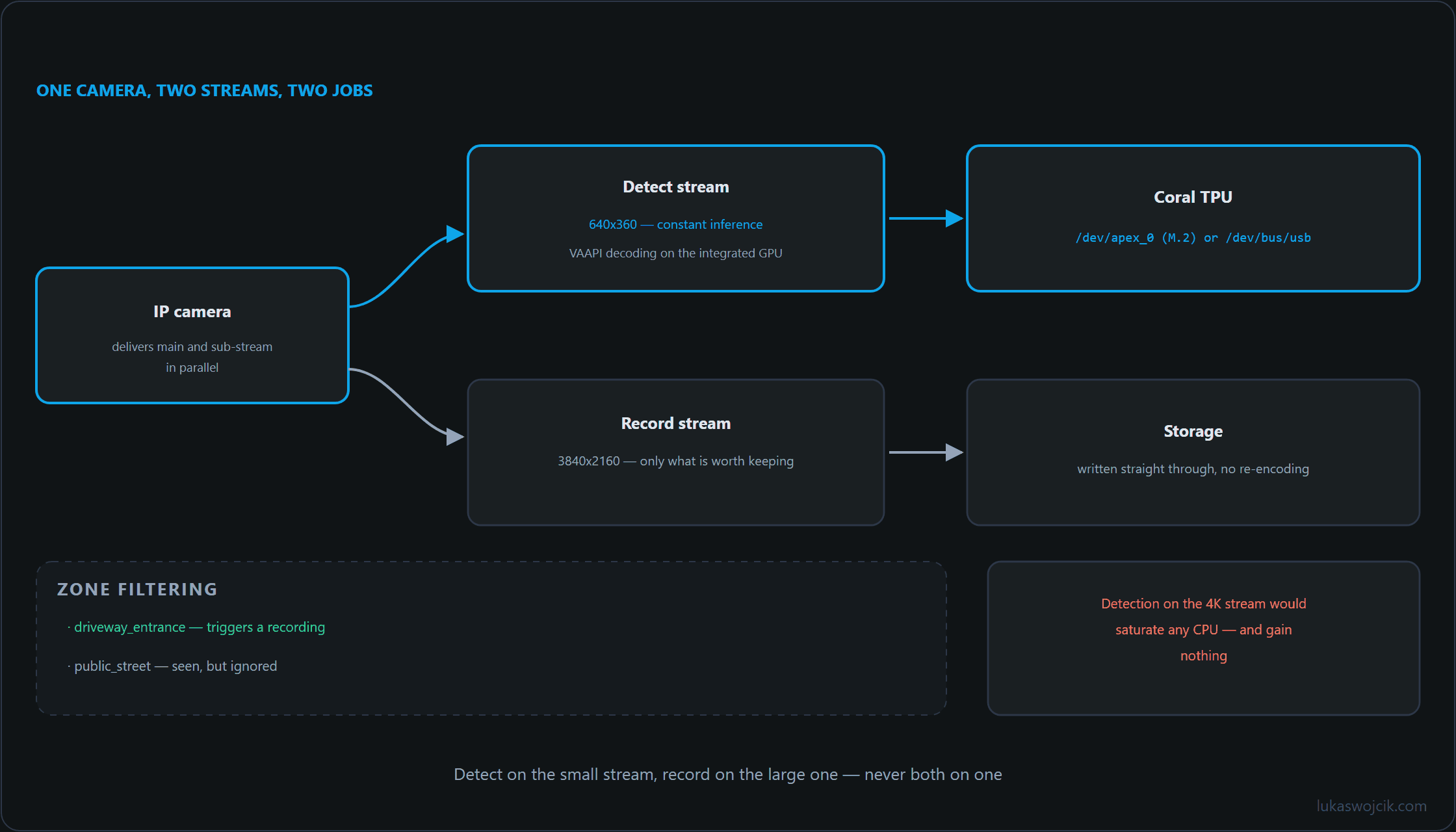
Feeding 4K video feeds directly into an object detector wastes compute resources because standard AI models operate on smaller bounding matrices. A robust CCTV architecture mandates a dual-stream configuration per camera:
- Detect Stream (Sub-Stream): Configure an IP camera sub-stream at a lower resolution (e.g.,
640x360or1280x720) at 5 frames per second (FPS). This stream is processed exclusively by the Coral TPU for bounding-box recognition. - Record Stream (Main Stream): Configure the main RTSP stream at maximum resolution (e.g.,
3840x21604K) at 15–20 FPS. This stream is written directly to disk without re-encoding when an object is verified.
3. Step-by-Step Frigate NVR YAML Configuration
The following production-ready configuration file defines the Edge TPU detector, enables QuickSync hardware decoding, and assigns the dual-stream topology for precision filtering of people, vehicles, and animals:
mqtt:
  host: 192.168.10.10
  topic_prefix: frigate

detectors:
  coral_tpu:
    type: edgetpu
    device: usb

ffmpeg:
  # Using Intel QuickSync hardware acceleration for video decoding
  hwaccel_args: preset-vaapi

objects:
  track:
    - person
    - car
    - dog
    - cat
  filters:
    person:
      min_score: 0.75
      threshold: 0.80

cameras:
  driveway_camera:
    ffmpeg:
      inputs:
        - path: rtsp://viewer:SecretPassword@192.168.10.101:554/stream2
          roles:
            - detect
        - path: rtsp://viewer:SecretPassword@192.168.10.101:554/stream1
          roles:
            - record
    detect:
      width: 1280
      height: 720
      fps: 5
    record:
      enabled: true
      retain:
        days: 7
        mode: motion
      events:
        retain:
          default: 30
          mode: active_objects
4. Step-by-Step False Alarm Suppression & Zone Filtering
To eliminate alerts caused by stationary parked cars or neighboring properties, spatial filtering rules must be implemented inside the Frigate Web UI:
- Privacy Masking: Define polygon motion masks over camera timestamps, overlay text, and swaying vegetation to prevent unnecessary AI inference cycles.
- Zone Demarcation: Create explicit bounding zones (e.g.,
driveway_entrancevs.public_street). Configure notification automations so alerts trigger only when an object’s bottom-center bounding box enters the private property polygon. - Stationary Object Filter: Enable stationary object tracking to ensure vehicles parked permanently on the driveway do not generate repeated motion notifications after initial classification.
5. Summary & Architectural Value
What this tutorial achieves: The successful deployment of an edge-processed, AI-powered CCTV surveillance system using Frigate NVR, Google Coral Edge TPU acceleration, and a dual-stream decoding architecture.
Resulting value: False alarms triggered by rainfall, shadows, and vegetation are permanently eliminated through neural network object verification. Local Edge TPU inference guarantees sub-10-millisecond response times without cloud server reliance, zero ongoing subscription fees, and 100% data privacy. Furthermore, separating detection and high-resolution recording streams ensures maximum 4K evidence retention while keeping CPU load minimal.
Sources
Video surveillance on your own hardware
- AI-Powered Edge Video Surveillance: Frigate NVR with Google Coral TPU
- CCTV Cabling: PoE Compared With Coax for Security Installations
Related articles