

 English
 Deutsch
 Polski
Tutorial: Implementing the TikTok Events API for Online Shops

Management Summary
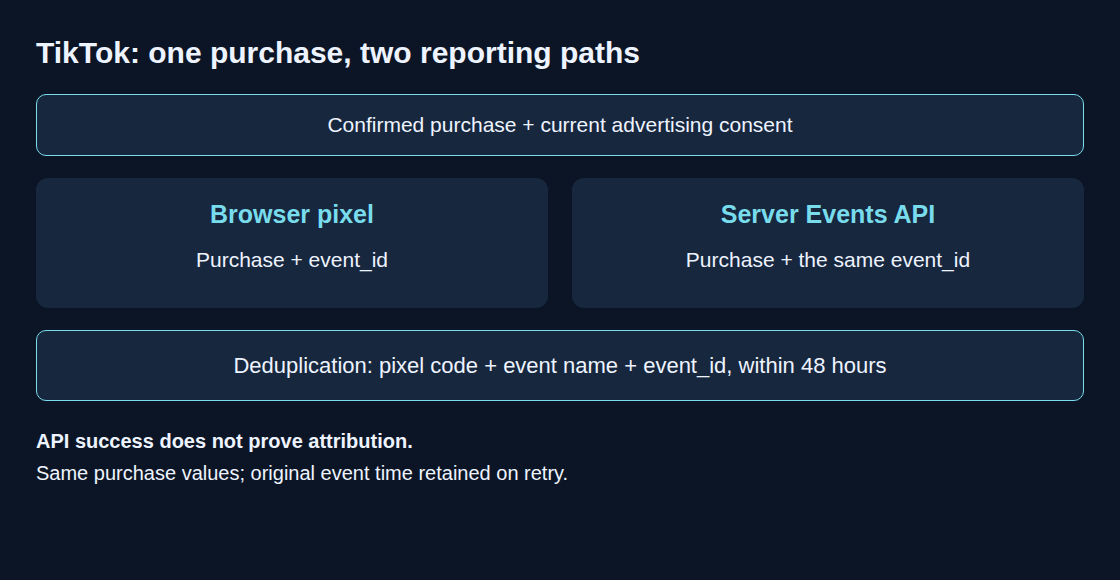
TikTok’s Events API is a direct connection for sending online shop purchases to the advertising platform. It supplements browser measurement when a sale would otherwise be missed and helps assess campaign results. The shop’s confirmed orders provide the basis for those reports, while matching browser and server messages prevents double counting. Required advertising consent still applies. Receiving a purchase report and crediting a TikTok advertisement are separate outcomes.
Contents
- Step 1: A Stable Identifier for Each Confirmed Purchase
- Step 2: The Same Purchase Data for the Pixel
- Step 3: Available Click and Browser Data After Consent
- Step 4: Preparing the Data for Server Delivery
- Step 5: Separate Checks of Delivery, Duplicate Reports and Ad Attribution
- Questions and answers
- Sources
A browser pixel can miss purchases when an ad blocker intervenes or a confirmation tab closes early. TikTok Events API adds a reporting path from the shop backend. This can improve coverage, but does not guarantee complete collection or attribution of every purchase to an ad.
A pixel is measurement code running in the browser. The backend is the shop’s server-side software, and an API is an interface for exchanging data between programs. An access token is a credential permitting that exchange. Deduplication means recognizing repeated reports of the same event; attribution means assigning a purchase to an ad under defined rules.
The following implementation connects both paths through a shared event identifier. Prerequisites are a TikTok pixel, a server-only access token, an integrated consent system and a reliable purchase-confirmation event in the backend. The examples cover data preparation; shop integration, a delivery queue and error handling require additional implementation.
Step 1: A Stable Identifier for Each Confirmed Purchase
The backend creates event_id once. Browser reporting, server reporting and retries retain that value. For example, purchase-10432 identifies one confirmed purchase. An order-based identifier must be unique within the data source and contain no personal information. Recurring payments need a separate identifier for each payment.
TikTok deduplicates using the pixel code, event name and event_id within a 48-hour window. A confirmation-page reload after that window is not protected indefinitely. The shop also needs to limit repeated purchase reporting, for example through a delivery status per event. Retries retain the original purchase time as well.
Step 2: The Same Purchase Data for the Pixel
The backend supplies the confirmation page with purchase fields converted into a data format that can be embedded safely in the page: event_id, contents, value and currency. Prices and basket contents come from the confirmed order, not freely editable URL parameters. This function requires an initialized pixel controlled by the consent system:
function sendTikTokPurchase(purchase, advertisingConsent) {
  if (advertisingConsent !== true) return false;
  if (!purchase.event_id || !window.ttq) return false;
  window.ttq.track('Purchase', {
    content_type: 'product',
    contents: purchase.contents,
    value: purchase.value,
    currency: purchase.currency
  }, { event_id: purchase.event_id });
  return true;
}
The call takes place only after purchase confirmation and with current advertising consent. A return value of true means that ttq.track was called, not that delivery succeeded. Pixel initialization and any automatic events require the same consent controls.
New implementations use Purchase on both paths. Since May 2025, TikTok automatically maps the previous name CompletePayment to Purchase; the legacy name remains supported. Other naming differences without a documented mapping remain potential errors.
Step 3: Available Click and Browser Data After Consent
ttclid may arrive in an ad landing-page URL. _ttp is a pixel cookie. These values are not browser-only: the shop server can also read incoming URL parameters and cookies. The cookie may not exist on the initial request. Missing identifiers stay omitted; fabricated replacements reduce data quality.
A small client-side function can store an available click ID after approval. The consent system calls the function after the initial decision and after subsequent consent changes:
function updateTikTokClickCookie(advertisingConsent) {
  const attributes = ';path=/;Secure;SameSite=Lax';
  if (advertisingConsent !== true) {
    document.cookie = 'shop_ttclid=;max-age=0' + attributes;
    return;
  }
  const clickId = new URLSearchParams(location.search).get('ttclid');
  // Local size limit, not a TikTok identifier-format specification.
  if (!clickId || clickId.length > 1024) return;
  document.cookie = 'shop_ttclid=' + encodeURIComponent(clickId) +
    ';max-age=2592000' + attributes;
}
The 30-day period is an example retention choice, not a TikTok requirement or a guarantee of browser persistence. A later page without ttclid does not extend the cookie. Denial or withdrawal deletes the cookie created here. Server-held identifiers and queued events need corresponding withdrawal handling; cookies on other paths or domains are outside this deletion.
At checkout, available identifiers can be associated with the purchase. The ttp field receives the value of _ttp. The IP address and user agent (the browser’s description of its software) must describe the original visit, not the later API client. A proxy forwards requests between systems. IP addresses in forwarded request headers are trustworthy only when the receiving server accepts them from correctly configured, trusted proxies.
Step 4: Preparing the Data for Server Delivery
The destination is POST https://business-api.tiktok.com/open_api/v1.3/event/track/, with Access-Token and Content-Type: application/json headers. event_source_id contains the same pixel code used by the browser integration. This Python function builds a payload without making a network request:
import hashlib
import re

def sha256(value):
    return hashlib.sha256(value.encode('utf-8')).hexdigest()

def build_payload(pixel_code, order, advertising_consent,
                  email, phone_e164=None):
    if advertising_consent is not True:
        return None
    email = email.strip().lower()
    if not email:
        raise ValueError('Missing email for this example')
    user = {'email': sha256(email)}
    if phone_e164 is not None:
        # Input already parsed and validated for its country.
        if not re.fullmatch(r'\+[1-9][0-9]{1,14}', phone_e164):
            raise ValueError('Expected international phone number with +')
        user['phone'] = sha256(phone_e164)
    return {
        'event_source': 'web',
        'event_source_id': pixel_code,
        'data': [{
            'event': 'Purchase',
            'event_time': order['confirmed_at_unix'],
            'event_id': order['event_id'],
            'user': user,
            'properties': {
                'content_type': 'product',
                'contents': order['contents'],
                'currency': order['currency'],
                'value': order['value']
            },
            'page': {'url': order['confirmation_url']}
        }]
    }
order is an already validated backend record: a confirmed purchase, a stored stable identifier, the purchase time as whole seconds since 1 January 1970 UTC (Unix time), the appropriate currency code such as EUR, a numeric value and a product list. The confirmation URL must belong to the shop and exclude email addresses, access tokens and other confidential parameters. Authorization comes from trusted consent records, including known withdrawals; an unverified browser field is insufficient.
The example removes whitespace at the start and end of the email address and changes letters to lowercase. SHA-256 then calculates a fixed-length hash from that text. An optional phone number must already be normalized correctly, for example +12133734253; the plus sign remains part of the hashed value. The regular expression checks only the basic format, not whether a phone number is valid. The number is interpreted and checked using the rules for its country before this function runs. Missing phone numbers are omitted. Email is required by this simplified example, not the only matching option supported by TikTok.
Hashing does not anonymize the data. Additional supported fields follow separate rules: external_id is hashed, while ttclid, ttp, IP address and user agent are transmitted unhashed. Raw identifiers and hashes do not belong in general debug logs. Contact information needed for order fulfillment remains subject to the shop’s separate retention policy.
Delivery should follow purchase confirmation promptly. A queue preserves the original ID and time, checks consent again before delivery and limits retries. Both the HTTP status (the response status of the web request) and the JSON response (structured result data) need evaluation: code: 0 indicates API success, not person matching or ad attribution. A timeout means that no reply arrived within the waiting period. It can occur after successful receipt, so the delivery state must allow “outcome unknown” without inventing a new event identifier.
Step 5: Separate Checks of Delivery, Duplicate Reports and Ad Attribution
Test Events and the supplied test_event_code help validate the chosen integration. Test data is separate from production; the test configuration must be removed before genuine reporting. Visible hashed fields do not establish a successful person match. A controlled test purchase checks both channels, the same pixel code, matching event identifiers and consistent purchase values.
Ongoing monitoring uses deduplication details and diagnostics in Events Manager. Browser, server and combined metrics cannot be added without checking the definitions. Equal totals alone do not prove a fault: without channel overlap, no duplicates exist. Dashboard latency, timezones and filters can also change comparisons.
Reconciliation with the shop uses the same purchase definition, reporting period and population authorized for transmission. “Total Events” includes attributed and unattributed events; Ads Manager conversions additionally depend on matching and attribution windows, the allowed intervals between an ad interaction and a purchase. An accepted event is therefore not a guaranteed ad conversion.
Questions and answers
Why can Events API totals still differ from shop orders?
Consent, missing attribution, reporting delay and different counting rules can explain differences, alongside technical failures. A delivery log distinguishes at least: not authorized, authorized and pending, rejected, accepted, and outcome unknown. Internal event ID, attempt count, error code and request ID generally provide useful diagnostics without storing complete customer-data payloads.
Does shop_ttclid last 30 days in every browser?
No. Safari can remove script-writable storage after seven days of Safari use without interaction with the website; some cases involving tracking identifiers added to links have shorter limits. Server-set cookies provide no general bypass: WebKit also limits cookies when it detects a third-party service disguised through a DNS alias (CNAME) or an IP address that appears to belong to the site. Longer storage does not replace consent or extend an attribution window.
Must value and basket contents agree between both reports?
Yes. Both reports describe the same purchase. Consistent rules for tax, shipping, currency and products prevent contradictory revenue values. TikTok can supplement missing fields in an earlier report; conflicting values must not rely on an assumed priority for server data.
Related articles


