English
 Deutsch
 Polski
Autonomous Docker-Compose Home Server with Traefik, SSL, and Watchtower
Part 4 of 4 in the series Homelab on the Raspberry Pi

Contents
Architectural Overview: Autonomous Home Server Design on Raspberry Pi
Deploying a self-hosted home laboratory on a Raspberry Pi requires a resilient, low-maintenance orchestration architecture. Exposing internal Docker containers to local or public networks without centralized SSL/TLS termination introduces administrative complexity and severe security vulnerabilities. Manual certificate renewals, static reverse proxy configurations, and manual container updates inevitably lead to downtime and expired cryptographic certificates.
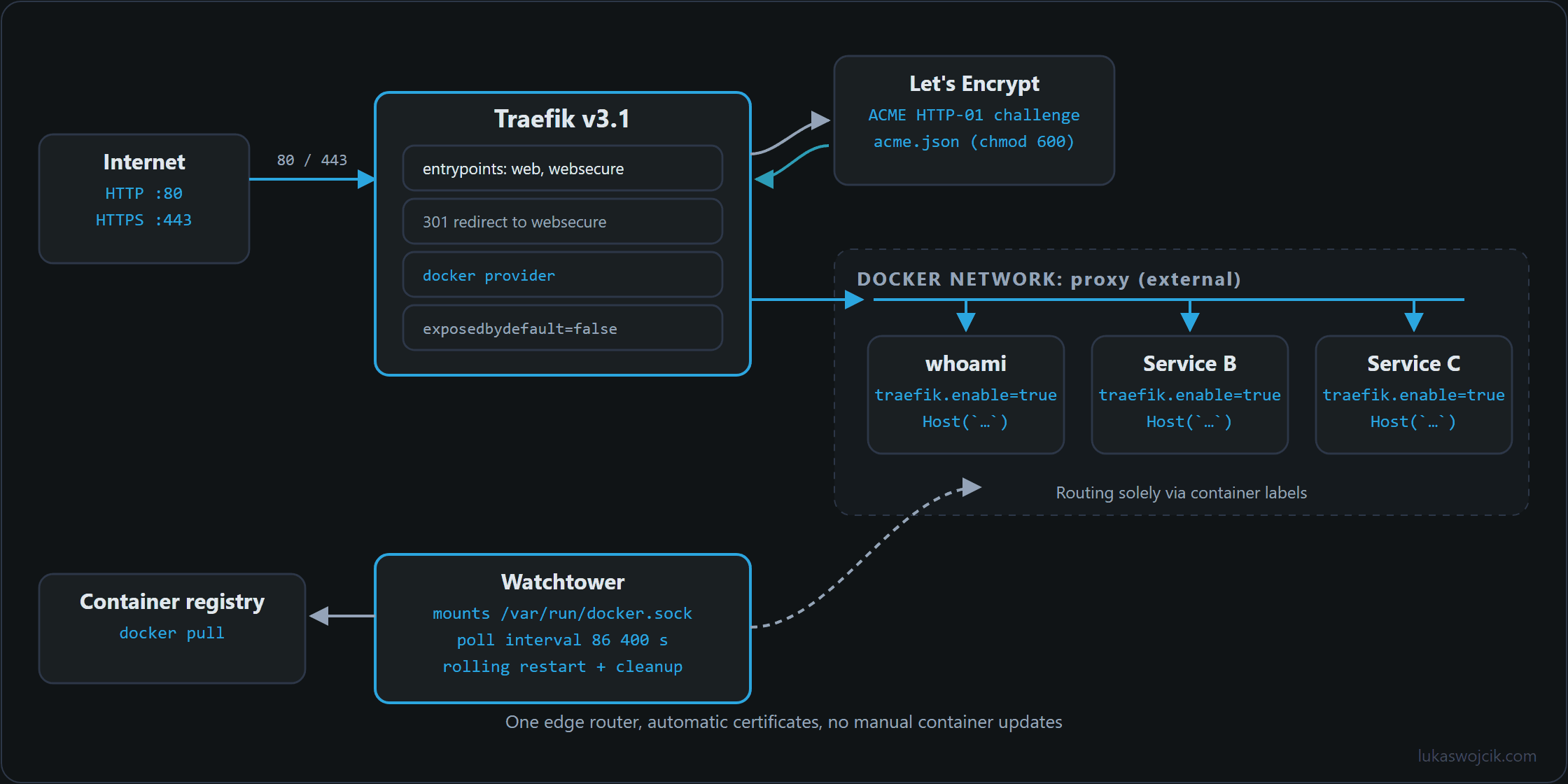
An autonomous home server architecture combines three core technologies within a single declarative Docker Compose stack: Traefik v3 acts as a dynamic edge router that monitors the Docker socket and routes incoming HTTP/HTTPS requests based on container labels. Let’s Encrypt ACME integration automates SSL certificate generation and renewal via HTTP-01 or DNS-01 challenges; and Watchtower provides automated lifecycle management by periodically checking container registries and gracefully rolling over outdated container images without manual intervention.
Step-by-Step Implementation Guide
Step 1: System Preparation and File Hierarchy Architecture
To ensure persistent data storage and clean separation of concerns on the Raspberry Pi host, a standardized filesystem directory tree must be established under /opt/containers/:
mkdir -p /opt/containers/traefik/data
mkdir -p /opt/containers/watchtower
touch /opt/containers/traefik/data/acme.json
chmod 600 /opt/containers/traefik/data/acme.json
Critical Security Note: The acme.json file storing private Let’s Encrypt cryptographic keys must be restricted to file permissions 600. Traefik will refuse to start if read/write permissions are excessively permissive.
Step 2: Designing the Traefik v3 Dynamic Edge Router Stack
The routing infrastructure is defined within a root docker-compose.yml file located in /opt/containers/traefik/. This configuration specifies entrypoints for port 80 (HTTP) with mandatory redirects to port 443 (HTTPS), enables automated Let’s Encrypt HTTP-01 challenges, and mounts the Docker Unix socket read-only:
services:
  traefik:
    image: traefik:v3.1
    container_name: traefik
    restart: unless-stopped
    security_opt:
      - no-new-privileges:true
    networks:
      - proxy
    ports:
      - "80:80"
      - "443:443"
    command:
      - "--api.dashboard=true"
      - "--providers.docker=true"
      - "--providers.docker.exposedbydefault=false"
      - "--providers.docker.network=proxy"
      - "--entrypoints.web.address=:80"
      - "--entrypoints.web.http.redirections.entryPoint.to=websecure"
      - "--entrypoints.web.http.redirections.entryPoint.scheme=https"
      - "--entrypoints.websecure.address=:443"
      - "--certificatesresolvers.myresolver.acme.httpchallenge=true"
      - "--certificatesresolvers.myresolver.acme.httpchallenge.entrypoint=web"
      - "--certificatesresolvers.myresolver.acme.email=admin@lukaswojcik.com"
      - "--certificatesresolvers.myresolver.acme.storage=/data/acme.json"
    volumes:
      - "/var/run/docker.sock:/var/run/docker.sock:ro"
      - "/opt/containers/traefik/data:/data"
    labels:
      - "traefik.enable=true"
      - "traefik.http.routers.dashboard.rule=Host(`proxy.lukaswojcik.com`)"
      - "traefik.http.routers.dashboard.service=api@internal"
      - "traefik.http.routers.dashboard.entrypoints=websecure"
      - "traefik.http.routers.dashboard.tls.certresolver=myresolver"
      - "traefik.http.routers.dashboard.middlewares=dashboard-ip"
      - "traefik.http.middlewares.dashboard-ip.ipallowlist.sourcerange=192.168.0.0/16, 10.0.0.0/8"

networks:
  proxy:
    external: true
Step 3: Creating the External Proxy Docker Network
Before executing the compose stack, an isolated bridge network must be initialized on the host system to allow Traefik to communicate securely with downstream application containers:
docker network create proxyStep 4: Integrating Watchtower for Automated Lifecycle Management
To eliminate manual container update maintenance, Watchtower is added as an autonomous background service. Since the original containrrr/watchtower repository was archived on 17 December 2025 and receives no further fixes or security updates, the actively maintained fork nickfedor/watchtower is used here as a drop-in replacement. It checks configured registries every 24 hours (86400 seconds), pulls updated images matching current tags, gracefully terminates old container instances, and removes orphaned images automatically:
services:
  watchtower:
    image: nickfedor/watchtower:latest
    container_name: watchtower
    restart: unless-stopped
    volumes:
      - "/var/run/docker.sock:/var/run/docker.sock"
    environment:
      - WATCHTOWER_CLEANUP=true
      - WATCHTOWER_POLL_INTERVAL=86400
      - WATCHTOWER_INCLUDE_RESTARTING=true
      - WATCHTOWER_ROLLING_RESTART=true
Step 5: Deploying a Secure Downstream Microservice via Labels
To attach any self-hosted application to the Traefik edge router without modifying central proxy files, dynamic Traefik routing labels are declared directly within the target service’s compose definition:
services:
  whoami:
    image: traefik/whoami:latest
    container_name: whoami
    restart: unless-stopped
    networks:
      - proxy
    labels:
      - "traefik.enable=true"
      - "traefik.http.routers.whoami.rule=Host(`whoami.lukaswojcik.com`)"
      - "traefik.http.routers.whoami.entrypoints=websecure"
      - "traefik.http.routers.whoami.tls.certresolver=myresolver"
      - "traefik.http.services.whoami.loadbalancer.server.port=80"

networks:
  proxy:
    external: true
Step 6: Quality Assurance and System Auditing
After bringing up the services with docker compose up -d, the infrastructure must be systematically verified:
- Certificate Issuance Verification: Inspect container log output via
docker logs -f traefikto confirm successful Let’s Encrypt ACME challenges and verify thatacme.jsonis populated with valid RSA/ECDSA certificates. - Automated Redirection Audit: Execute a plain HTTP cURL query against the domain (
curl -I http://whoami.lukaswojcik.com) to confirm an immediate308 Permanent Redirector301 Moved Permanentlyheader pointing to HTTPS. - Update Trigger Simulation: Execute a single non-invasive Watchtower check via
docker exec -it watchtower /watchtower --run-once --monitor-onlyto verify that access permissions to the Docker socket are functioning correctly. The flag--no-pullis no substitute here: it only suppresses registry pulls, while a newer image already present locally still causes the container to be stopped and recreated.
Summary and Measurable Added Value
What is achieved: Replacement of manual reverse proxy routing, fragile SSL script cron jobs, and manual container updates with an autonomous, declarative Docker Compose infrastructure powered by Traefik v3 and Watchtower.
Resulting added value:
- Zero-Touch SSL/TLS Maintenance: Cryptographic certificates are requested, provisioned, and renewed automatically by Let’s Encrypt, preventing browser certificate warnings and service outages.
- Dynamic Service Discovery: New home server applications are routed and encrypted instantly by appending Docker labels, eliminating manual Nginx/Apache configuration file edits and server reloads.
- Continuous Automated Patching: Security patches and application updates are automatically applied within 24 hours of upstream registry releases, hardening the Raspberry Pi against known vulnerabilities. This guarantee only holds as long as the update tool itself is maintained, which is why the actively developed fork
nickfedor/watchtowertakes the place of the archived original.
Questions and answers
Does the :ro on the Docker socket make Traefik’s access harmless?
No. The :ro only prevents the container from modifying the socket file itself. Through the socket, however, Traefik talks to the Docker API, and the API does not distinguish between read and write calls just because the file is mounted read-only. Whoever reaches the socket can start containers through it, including ones with the host’s root directory mounted, and thereby effectively holds root privileges on the Raspberry Pi.
The risk therefore lies in Traefik’s attack surface: it is the only service that accepts connections directly from the internet. A vulnerability in Traefik would not stop at the container. Watchtower needs write access to the socket anyway in order to replace containers, but it accepts no connections from outside.
A socket proxy mitigates this: a small container that holds the socket and forwards only the read-only API endpoints Traefik needs for container discovery. Traefik then receives the network address of this proxy instead of the socket, and the Docker provider can be pointed at it through its endpoint parameter.
Which updates does Watchtower install, and how can jumps to a new major version be avoided?
Watchtower follows the tag an image is listed with, not a version number. A container on latest therefore also receives the jump to a new major version as soon as one is published under latest, including changed configuration or data formats. There is no way back built in: after cleanup with WATCHTOWER_CLEANUP=true, the old image is not even left on disk.
The setup in the article already shows the countermeasure: Traefik is pinned to traefik:v3.1 and so only receives new images under that tag, meaning fixes within 3.1 but no jump to another version. The same is worthwhile for every service that keeps its own data, such as a database. For the services on latest, whoami and Watchtower itself in the article, the risk is lower because they hold no data.
Is the Traefik dashboard at proxy.lukaswojcik.com protected?
Yes, limited to the home network: besides TLS, the dashboard router has the dashboard-ip middleware, an IP allow list (ipAllowList) that only lets through addresses from 192.168.0.0/16 and 10.0.0.0/8. Without it, anyone who knows the hostname could see every router, service and hostname of the home server. If the dashboard should also be reachable from outside, a basic auth middleware is added.
Does the HTTP-01 challenge work on every home internet connection?
Only if Let’s Encrypt can reach the Raspberry Pi from the internet on port 80: the hostname has to point publicly to the connection, and the router has to forward port 80 to the Pi. On connections without a public IPv4 address of their own, behind carrier-grade NAT or DS-Lite for example, this fails over IPv4; it then only works if the hostname has an AAAA record and the Pi is reachable over IPv6. The same limitation applies to services meant to be reachable only on the home network.
The DNS-01 challenge mentioned in the article is intended for these cases. It proves control over the domain with a TXT record in DNS, needs no open port and also allows wildcard certificates. In return, Traefik needs credentials for the DNS provider’s API, and those credentials then deserve the same protection as acme.json.
Homelab on the Raspberry Pi
- Raspberry Pi 4 and 5: Booting From an SSD by Changing the Bootloader
- Uninterruptible Power Supply (UPS) for Raspberry Pi 4 and 5: Top 5 Solutions for High-Load Setups
- Local CI/CD for Raspberry Pi: Automating Docker Compose Deployments
- Autonomous Docker-Compose Home Server with Traefik, SSL, and Watchtower
Related articles