English
 Deutsch
 Polski
Crossfades and Cuts: The Click at the Splice, the Level Hole in the Fade and the Length a Fade Needs, Measured

Contents
FL Studio fades out the last 10 ms of an audio clip by default. The manual also names the reason: a cut usually lands in the middle of a wave, and if it lands far from the centre, it creates a sudden jump that is heard as a click. The common advice to cut on a zero crossing follows directly from that.
A fade, however, has two jobs that contradict each other: remove the jump and hold the level while doing so. Which curve manages the second depends on whether the same material sits on both sides. This measurement takes the two apart.
How this was measured
- The fade: all 23 curves of
acrossfadein ffmpeg 7.1.5, with a fade length of one second. The two gain curves were sampled with a constant value, so that only the curve itself passes through the filter, without material that brings fluctuations of its own. - Two cases: from those two curves follows the level for the same material on both sides, where the gains add, and for different material, where their powers add. Both were checked against pink noise, the second case averaged over 60 independent pairs.
- The click: a tone of 220 Hz at −6 dBFS, cut at five positions in the wave and continued with a second piece of the same tone. Measured were the jump in value, the break in slope and the peak above 5 kHz, where the tone itself contributes nothing.
- Fade length: the same cut with fades from 0 to 20 ms, once at 220 Hz and once at 50 Hz.
- Zero crossing: two tones of 200 and 300 Hz together. Counted were the zero crossings of the sum and, among them, the places where both tones stand at zero at once.
The fade: which curve holds which case
| Curve | Level at the midpoint, same material | Level at the midpoint, different material |
|---|---|---|
linear (tri, the default) |
0.00 dB | −3.01 dB |
quarter sine (qsin) |
+3.01 dB | 0.00 dB |
half sine (hsin) |
0.00 dB | −3.01 dB |
square root (squ) |
+3.01 dB | 0.00 dB |
cubic (cub) |
−12.04 dB | −15.05 dB |
logarithmic (log) |
+5.48 dB | +2.47 dB |
exponential (exp) |
−43.98 dB | −46.99 dB |
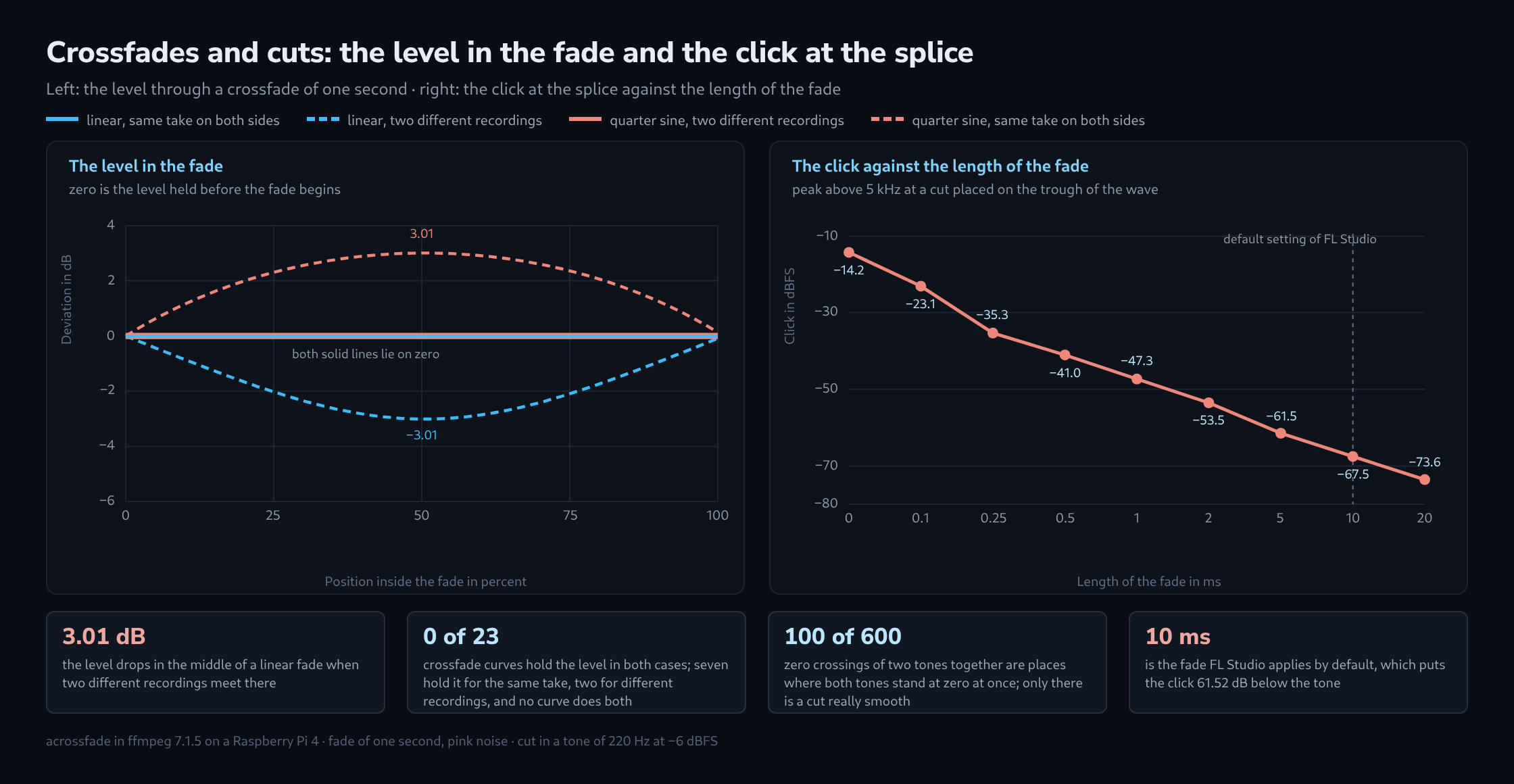
Of the 23 curves, seven hold the level when both sides carry the same material and two hold it when the sides carry different material. Not a single one holds both. The reason lies in the arithmetic: identical material adds as voltage, different material as power, and the two conditions contradict each other. A curve whose gains add up to one reaches the square root of a half with different material, which is −3.01 dB; a curve whose squares add up to one reaches +3.01 dB with identical material.
The check against pink noise confirms both. With the same material the result matches the sum of the gains sample for sample, the remainder sitting 147.8 dB below, which is pure arithmetic precision. With different material, averaged over 60 independent pairs, the midpoint deviates from the prediction by 0.12 dB and no point in the fade by more than 0.96 dB; that is the spread random material leaves behind.
The remaining curves are not fades at all. exp drops by almost 44 dB at the midpoint and cub by 12 dB; shapes like these are meant as envelopes, not as a transition between two recordings.
The click at the splice
| Position in the wave | Jump in value | Break in slope | Click above 5 kHz |
|---|---|---|---|
| zero crossing, both rising | 0 % | 0 % | −120.44 dBFS (measurement floor) |
| one twelfth past the zero crossing | 50 % | 13 % | −20.21 dBFS |
| on the peak | 100 % | 100 % | −13.98 dBFS |
| zero crossing, but falling | 0 % | 200 % | −37.44 dBFS |
| in the trough | 100 % | 100 % | −14.24 dBFS |
The jump is given relative to the peak of the tone, the break relative to the slope the tone has at a zero crossing. Cut on the peak, the value jumps by the full peak and the click lands 7.96 dB below the tone, plainly audible. One twelfth past the zero crossing the jump is half as large and the click 6 dB quieter. The click follows the jump, not the loudness of the material.
Why a zero crossing alone is not enough
The fourth row breaks the pattern. The cut lies exactly on a zero crossing, the value before and after the cut is the same, and it still clicks at −37.44 dBFS, 82 dB above the measurement floor. The reason stands in the third column: the first part is falling, the second is rising. The value matches, the direction does not, and at 200 percent the break in slope is twice as large as anywhere else.
With composite material a second problem comes on top. Two tones of 200 and 300 Hz together have 600 zero crossings per second, but at only 100 of them do both tones stand at zero at once. One example from the measurement: the sum sits at 0.004 while the 200 Hz tone sits at +0.207 and the 300 Hz tone at −0.203. A cut there does not silence the two partials, it merely separates them.
This can be measured. A cut at such a zero crossing of the sum clicks at −33.59 dBFS, a cut at an arbitrary point at −18.57 dBFS, and a cut on the common period of both tones, every 441 samples or 10 ms, clicks at −121.49 dBFS and thus sits on the measurement floor. The zero crossing of the sum therefore buys about 15 dB over an arbitrary point, and the right point buys another 88 dB.
How long the fade has to be
| Length of the fade | Samples at 44.1 kHz | Click above 5 kHz | Below the tone |
|---|---|---|---|
| no fade | 0 | −14.24 dBFS | 8.22 dB |
| 0.1 ms | 4 | −23.09 dBFS | 17.07 dB |
| 0.25 ms | 11 | −35.31 dBFS | 29.29 dB |
| 0.5 ms | 22 | −41.04 dBFS | 35.02 dB |
| 1 ms | 44 | −47.32 dBFS | 41.30 dB |
| 2 ms | 88 | −53.52 dBFS | 47.50 dB |
| 5 ms | 220 | −61.48 dBFS | 55.46 dB |
| 10 ms | 441 | −67.54 dBFS | 61.52 dB |
| 20 ms | 882 | −73.59 dBFS | 67.57 dB |
From about one millisecond upwards, every doubling of the length reliably buys 6 dB. The first tenths of a millisecond buy more, because a fade of 0.1 ms covers only four samples at 44.1 kHz and even those four halve the jump. The default of FL Studio, 10 ms, puts the click 61.52 dB below the tone.
What does not change is the striking part. The same series on a tone of 50 Hz instead of 220 Hz gives values that differ by at most 0.31 dB. The fade length needed therefore does not depend on how low the material sounds, only on how large the jump is. A bass needs no longer fade than a cymbal.
What follows from this
For a cut inside one take, such as a clip split and joined again without any shift, the linear curve is the right one: both sides carry the same material, and an equal power curve would build a bump of 3.01 dB in the middle. For a transition between two different recordings, two tracks in a mix or two layers of one sound, the opposite holds: there the quarter sine holds the level and the linear curve tears a hole of 3.01 dB.
The length follows separately. Removing the click alone is done with a fade of one to two milliseconds; a transition meant to be heard is chosen by the material, and then the curve has to be set deliberately, because at that length the level error carries weight. Every fade is also a window, and every window spreads energy over time — what a filter of that kind puts ahead of the signal is covered in the article on linear phase against minimum phase EQ.
The seam between two finished files follows arithmetic of its own, because the encoder adds delay and padding there; whether a file joins seamlessly is shown by the gapless playback checker.
What this covers and what it does not
- The measurement used
acrossfadefrom ffmpeg, not a DAW. The curve names belong to that filter; the arithmetic behind them, voltage against power, holds everywhere. - The two cases are the extremes. Material that partly matches, such as two microphones on one source, lies in between, and so does the level error, somewhere between zero and 3.01 dB.
- The click was measured on a single tone. With dense material the high end of the material itself partly masks the click, but the jump remains the same.
- The limit of −120 dBFS is the measurement floor of this setup, not evidence that nothing at all arises at a well chosen point.
Questions and answers
Linear and half sine show the same values in the table. How do they differ?
In their shape, not in their sum. Each curve adds up to one with its mirrored fade-out at every point: t and 1 − t for the linear curve, (1 − cos πt) / 2 and (1 + cos πt) / 2 for the half sine. That is why both hold the level with the same material and lose 3.01 dB at the midpoint with different material.
The difference lies at the edges. The linear curve starts and ends with a kink, because its slope jumps abruptly from zero to a fixed value there. The half sine starts and ends flat and so has no kink in its gain. Following the logic of the second table, where a break in slope without any jump in value already produces a click, that makes it the calmer shape for very short fades; for a fade of one second it makes no difference. This difference was not measured.
Is the 3.01 dB level hole audible in a fade lasting one millisecond?
Hardly as a drop in level. The ear integrates loudness over periods much longer than a millisecond, so a hole that short does not register as a quieter moment. This matches the article: the curve needs a deliberate choice only for audible transitions, because only at that length does the level error carry weight.
What decides whether the two sides of a fade count as the same material?
Not the name of the track, but whether both sides match sample for sample in the overlap. Adding as voltage assumes that both signals are in phase. Even a small offset changes that depending on frequency: with an assumed offset of 1 ms and equal levels, the two sides are exactly half a period apart at 500 Hz and cancel there instead of adding up.
Material is clearly the same when a clip is split at one point and joined again without any shift, or when a periodic tone continues in phase, as in the measurement. Two tracks in a mix or two layers of one sound are clearly different. Everything in between, such as two microphones on one source, lies between zero and 3.01 dB in level error.
When in doubt, the level at the midpoint of the fade decides: if it holds with the linear curve, the material has enough in common; if it sags, the equal power curve is the better choice.
Sources
- Image-Line: Sampler Channel Settings: the section on declicking, with the explanation that a cut can land in the middle of a wave, and the modes — the default of out only with 10 ms, generic with 20 ms and crossfade with 200 ms.
- Audacity: Crossfade Tracks: constant gain as the default with the note that the level may dip slightly during the fade, and constant power with the note that the peak level may rise there.
- ffmpeg: Filters Documentation: the section on
acrossfadewithcurve1,curve2,durationandoverlap; the list of curves and the defaults come from the built-in help of ffmpeg 7.1.5.
Related articles