English
 Deutsch
 Polski
Serverless Microservices: Scaling on Google Cloud Run with GitHub Actions

Contents
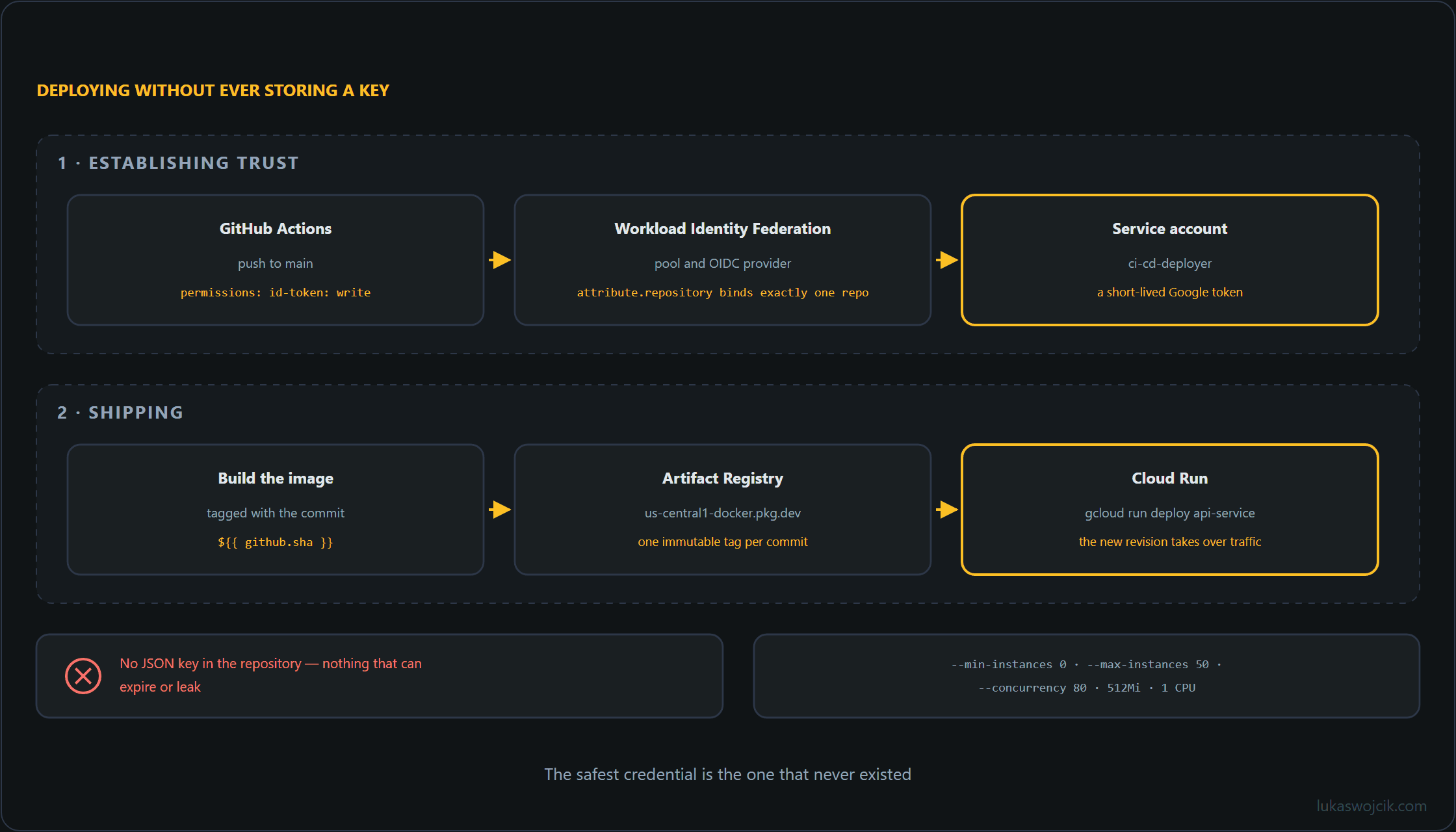
Running microservices on static virtual machines or permanent Kubernetes clusters incurs constant baseline infrastructure costs, even during prolonged periods of zero traffic. Deploying stateless containerized web APIs to Google Cloud Run enables a fully managed, serverless architecture that scales automatically from zero instances during idle hours up to thousands of concurrent containers during traffic spikes. Integrating this deployment model with GitHub Actions and Workload Identity Federation establishes a zero-maintenance, highly secure Continuous Integration and Continuous Deployment (CI/CD) pipeline without storing long-lived service account JSON keys in external repositories.
1. Architectural Framework: Scale-to-Zero & Keyless CI/CD
An enterprise-grade serverless deployment architecture on Google Cloud relies on three decoupled components:
- Google Cloud Run Container Execution: Stateless containers are invoked on demand via incoming HTTP requests. Concurrency settings allow a single container instance to process up to 100 simultaneous requests before horizontal autoscaling triggers additional instances.
- Workload Identity Federation (WIF): Replaces static, exportable service account JSON keys with OpenID Connect (OIDC) token exchange between GitHub and Google Cloud IAM, eliminating credential leakage vulnerabilities.
- GitHub Actions Pipeline: An automated workflow builds the application Docker image, pushes it to Google Artifact Registry, and updates the Cloud Run revision with zero downtime.
2. Step-by-Step Workload Identity Federation Setup
To enable keyless authentication for GitHub Actions, a Workload Identity Pool and Provider must be provisioned via the Google Cloud CLI:
# 1. Create Workload Identity Pool
gcloud iam workload-identity-pools create "github-actions-pool"
  --project="enterprise-ai-project"
  --location="global"
  --display-name="GitHub Actions Pool"

# 2. Create OIDC Identity Provider for GitHub
gcloud iam workload-identity-pools providers create-oidc "github-provider"
  --project="enterprise-ai-project"
  --location="global"
  --workload-identity-pool="github-actions-pool"
  --display-name="GitHub Provider"
  --attribute-mapping="google.subject=assertion.sub,attribute.actor=assertion.actor,attribute.repository=assertion.repository"
  --issuer-uri="https://token.actions.githubusercontent.com"

# 3. Bind Service Account to the GitHub Repository
gcloud iam service-accounts add-iam-policy-binding "ci-cd-deployer@enterprise-ai-project.iam.gserviceaccount.com"
  --project="enterprise-ai-project"
  --role="roles/iam.workloadIdentityUser"
  --member="principalSet://iam.googleapis.com/projects/1234567890/locations/global/workloadIdentityPools/github-actions-pool/attribute.repository/enterprise-org/microservice-repo"
3. Step-by-Step GitHub Actions Workflow Configuration
The automated deployment pipeline requires a structured YAML configuration located in .github/workflows/deploy.yml. This workflow authenticates via OIDC, builds the container image, and deploys to Cloud Run with explicit autoscaling and concurrency parameters:
name: Deploy to Google Cloud Run

on:
  push:
    branches:
      - main

permissions:
  contents: 'read'
  id-token: 'write'

jobs:
  build-and-deploy:
    runs-on: ubuntu-latest
    steps:
      - name: Checkout Code
        uses: actions/checkout@v4

      - name: Authenticate to Google Cloud
        uses: google-github-actions/auth@v2
        with:
          workload_identity_provider: 'projects/1234567890/locations/global/workloadIdentityPools/github-actions-pool/providers/github-provider'
          service_account: 'ci-cd-deployer@enterprise-ai-project.iam.gserviceaccount.com'

      - name: Set up Cloud SDK
        uses: google-github-actions/setup-gcloud@v2

      - name: Configure Docker for Artifact Registry
        run: gcloud auth configure-docker us-central1-docker.pkg.dev

      - name: Build and Push Docker Image
        run: |
          docker build -t us-central1-docker.pkg.dev/enterprise-ai-project/services/api-service:${{ github.sha }} .
          docker push us-central1-docker.pkg.dev/enterprise-ai-project/services/api-service:${{ github.sha }}

      - name: Deploy to Cloud Run
        run: |
          gcloud run deploy api-service
            --image us-central1-docker.pkg.dev/enterprise-ai-project/services/api-service:${{ github.sha }}
            --region us-central1
            --platform managed
            --allow-unauthenticated
            --min-instances 0
            --max-instances 50
            --concurrency 80
            --memory 512Mi
            --cpu 1
4. Step-by-Step Scaling & Concurrency Engineering
To ensure optimal resource utilization and prevent cold-start latency from degrading API performance, Cloud Run runtime flags must be configured precisely:
- Scale-to-Zero Verification (
--min-instances=0): Guarantees that the container is terminated entirely after 15 minutes of inactivity, bringing compute billing to exactly $0.00 during idle periods. - Concurrency Tuning (
--concurrency=80): Allows a single container CPU to handle up to 80 simultaneous requests before scaling out, reducing container churn and memory footprint compared to single-concurrency architectures. - CPU Throttling Allocation: By default, CPU is throttled outside of active request processing. If background tasks or asynchronous cleanup operations are required post-response, set `–no-cpu-throttling` in combination with `–min-instances=1`.
5. Summary & Architectural Value
What this tutorial achieves: The deployment of a fully automated, keyless CI/CD deployment pipeline for containerized microservices on Google Cloud Run using GitHub Actions and Workload Identity Federation.
Resulting value: Hosting costs are minimized by dropping compute expenses to zero during inactive periods while retaining the ability to scale horizontally in seconds during sudden traffic bursts. Eliminating long-lived JSON service account keys removes credential leakage risks, and setting explicit concurrency limits maximizes container efficiency, creating a secure, maintenance-free serverless backend infrastructure.
Questions and answers
Does a service that scales to zero instances really cost nothing?
Compute time costs nothing; the rest of the chain does not come free. Every pipeline run pushes a new image tagged with the commit hash to Artifact Registry, and that storage is billed by volume whether the service is running or not. A cleanup policy in Artifact Registry that deletes old images while keeping a few recent ones, so that rolling back to an earlier revision remains possible, keeps that cost small.
Which roles does the ci-cd-deployer service account need beyond the Workload Identity binding?
The binding with roles/iam.workloadIdentityUser only allows GitHub to act as this account. What the account may do afterwards is determined by further roles, and the workflow needs three of them:
- Write access to the Artifact Registry repository, usually
roles/artifactregistry.writer; without it,docker pushfails. - A Cloud Run role for deploying.
roles/run.developeris enough forgcloud run deploy, but not for--allow-unauthenticated: that flag changes the service’s IAM policy, which requiresroles/run.admin. roles/iam.serviceAccountUseron the service account the service runs as; without a separate setting, that is the project’s default Compute Engine service account. Without this role, the deployer cannot create a revision that runs under another identity.
Granting these roles as narrowly as possible, on the one repository and the one service rather than the whole project, is the sensible choice. A leaked key is ruled out; a faulty workflow is not, and the roles decide how far its damage reaches.
Is the binding to the repository enough, or can any branch deploy?
The binding covers the entire repository. The workflow only starts on a push to main, but any other workflow file in the same repository, including one on another branch, can request a token with id-token: write, and Google accepts it because the repository attribute matches.
The branch narrows it down, and GitHub’s OIDC token carries it in the ref claim. A condition on the provider such as assertion.ref == 'refs/heads/main' (the --attribute-condition parameter), or an additionally mapped attribute that the service account is bound to, lets only runs from main through. A condition on assertion.repository_owner also ensures that the pool does not accept tokens from other organizations at all.
What does combining –no-cpu-throttling with –min-instances=1 cost?
The advantage the article starts with. A minimum instance with CPU always allocated runs around the clock and is billed even when no request arrives, so compute costs no longer drop to zero during idle periods. For work after the response, a separate queue or a Cloud Run job is therefore often the cheaper option, leaving the web service itself free to scale to zero.
Related articles