English
 Deutsch
 Polski
Sanitizing, Escaping, Nonces, Capabilities in Plugin Review

Contents
- The rule: sanitize early, escape late, always validate
- The sample plugin, version 0.1
- Finding 1: input taken over unchecked
- Finding 2: output without escaping
- Finding 3: no nonce in the form
- Finding 4: no capability check, and why the nonce is not enough
- REST routes: permission_callback is required
- Limits and open points
- Questions and answers
- Sources
Security feedback from the WordPress.org plugin review rarely concerns anything exotic. The review team’s “Common issues” page opens with a “Security” section, and its entries are basic: input that is never sanitized, output that is never escaped, nonce values passed on unsanitized, SQL built without prepare(). The Security chapter of the Developer Handbook adds nonces and capabilities to the picture. The last of these is the easiest to miss: a form handler verifies the nonce but never asks whether the logged-in user is allowed to perform the action at all, and none of the security checks in Plugin Check reports that gap.
This article works through the four findings on a small admin plugin. Version 0.1 contains every flaw at once, and each later version fixes one of them, so every finding comes with a faulty and a corrected piece of code. A final section covers REST routes, where the authorization check is called permission_callback and has formally been required since WordPress 5.5. Function descriptions follow the handbooks and the Code Reference as of WordPress 7.1.2.
The rule: sanitize early, escape late, always validate
The “Common issues” page condenses the requirement into one line: “Sanitize early, Escape Late, Always Validate”. The Security chapter of the Common APIs Handbook expresses the same attitude as guiding principles, among them “Never trust user input”, “Escape as late as possible” and “Escape everything from untrusted sources”, and it explicitly counts the database among those untrusted sources.
The three terms describe different operations. Validation tests data against a fixed pattern with a definite result, valid or invalid; the handbook recommends allowlists compared with in_array() in strict mode. Sanitizing filters input so it can be stored, for instance with sanitize_text_field(). Escaping makes a value harmless for exactly one output context: HTML text, an attribute, a URL or a textarea. According to the “Common issues” page, neither group of functions can stand in for the other.
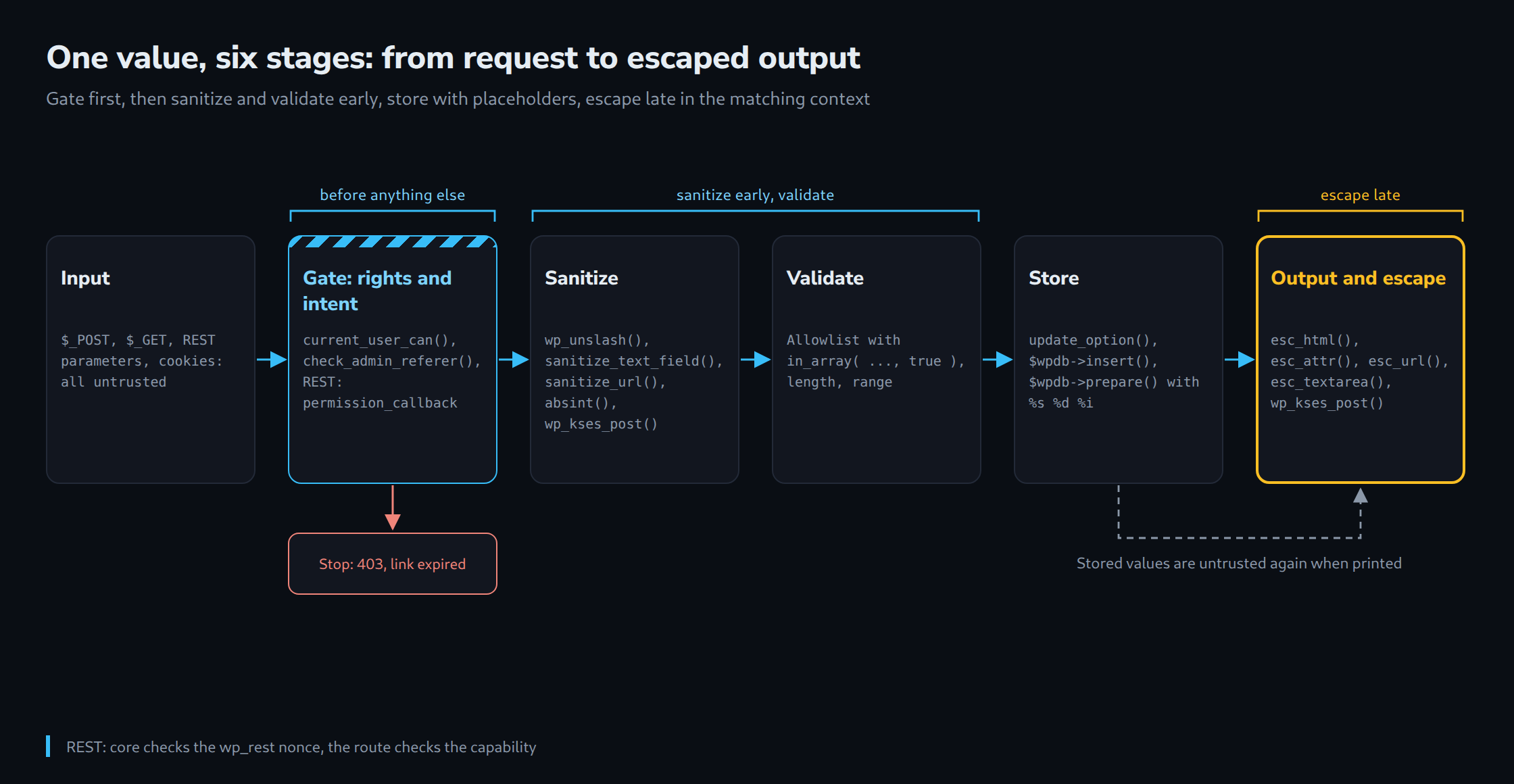
For requests that change data, a gate comes before all three stages: is this user allowed to do this (capability), and did the request come from the plugin’s own form (nonce)? The diagram traces a value through these stages, with the functions used at each one.
The sample plugin, version 0.1
The “LW Notice Box” plugin adds a page under Settings. It stores a label, a link, a message that may contain HTML, and the number of log rows to display. Every change is written as a row to a custom table, a shortcode prints the notice on the front end, and a REST route allows the label to be changed. The file is complete and runs, but it is deliberately insecure:
<?php
/**
 * Plugin Name:       LW Notice Box
 * Description:       Demo plugin for the security review. Version 0.1 contains deliberate flaws.
 * Version:           0.1.0
 * Requires at least: 6.2
 * Requires PHP:      7.4
 * License:           GPL-2.0-or-later
 * Text Domain:       lw-notice-box
 */

if ( ! defined( 'ABSPATH' ) ) {
	exit;
}

register_activation_hook( __FILE__, 'lw_nb_install' );

/**
 * Creates the log table (unchanged in all versions).
 */
function lw_nb_install() {
	global $wpdb;
	require_once ABSPATH . 'wp-admin/includes/upgrade.php';

	$table   = $wpdb->prefix . 'lw_nb_log';
	$charset = $wpdb->get_charset_collate();

	dbDelta(
		"CREATE TABLE $table (
			id bigint(20) unsigned NOT NULL AUTO_INCREMENT,
			user_id bigint(20) unsigned NOT NULL DEFAULT 0,
			label varchar(100) NOT NULL DEFAULT '',
			saved_at datetime NOT NULL,
			PRIMARY KEY  (id)
		) $charset;"
	);
}

/**
 * Default values of the stored option (unchanged in all versions).
 */
function lw_nb_defaults() {
	return array(
		'label'   => '',
		'link'    => '',
		'message' => '',
		'rows'    => 10,
	);
}

add_action( 'admin_menu', 'lw_nb_menu' );

/**
 * Adds the settings page (unchanged in all versions).
 */
function lw_nb_menu() {
	add_options_page( 'Notice Box', 'Notice Box', 'manage_options', 'lw-notice-box', 'lw_nb_render_page' );
}

// FLAW (findings 1 and 2): $_GET value inside SQL, unescaped output.
function lw_nb_render_page() {
	global $wpdb;
	$opt     = wp_parse_args( get_option( 'lw_nb_notice', array() ), lw_nb_defaults() );
	$orderby = isset( $_GET['orderby'] ) ? $_GET['orderby'] : 'saved_at';
	$rows    = $wpdb->get_results( "SELECT user_id, label, saved_at FROM {$wpdb->prefix}lw_nb_log ORDER BY $orderby DESC LIMIT {$opt['rows']}" );
	?>
	<div class="wrap">
		<h1>Notice Box</h1>
		<form method="post" action="<?php echo admin_url( 'admin-post.php' ); ?>">
			<input type="hidden" name="action" value="lw_nb_save">
			<p><input type="text" name="label" value="<?php echo $opt['label']; ?>"></p>
			<p><input type="url" name="link" value="<?php echo $opt['link']; ?>"></p>
			<p><textarea name="message"><?php echo $opt['message']; ?></textarea></p>
			<p><input type="number" name="rows" value="<?php echo $opt['rows']; ?>"></p>
			<p><button type="submit" class="button button-primary">Save</button></p>
		</form>
		<ul>
			<?php foreach ( $rows as $row ) : ?>
				<li><?php echo $row->saved_at . ' | ' . $row->label; ?></li>
			<?php endforeach; ?>
		</ul>
	</div>
	<?php
}

add_action( 'admin_post_lw_nb_save', 'lw_nb_save' );

// FLAW (findings 1, 3 and 4): no capability, no nonce, raw $_POST, SQL by concatenation.
function lw_nb_save() {
	global $wpdb;
	update_option( 'lw_nb_notice', $_POST );
	$wpdb->query( "INSERT INTO {$wpdb->prefix}lw_nb_log (user_id, label, saved_at) VALUES (" . get_current_user_id() . ", '" . $_POST['label'] . "', NOW())" );
	wp_redirect( admin_url( 'options-general.php?page=lw-notice-box' ) );
	exit;
}

add_shortcode( 'lw_notice', 'lw_nb_shortcode' );

// FLAW (finding 2): stored values go to the front end unescaped.
function lw_nb_shortcode() {
	$opt = wp_parse_args( get_option( 'lw_nb_notice', array() ), lw_nb_defaults() );
	return '<div class="lw-notice"><a href="' . $opt['link'] . '">' . $opt['label'] . '</a>' . $opt['message'] . '</div>';
}

add_action( 'rest_api_init', 'lw_nb_register_routes' );

// FLAW (REST): no permission_callback, the route is public.
function lw_nb_register_routes() {
	register_rest_route(
		'lw-nb/v1',
		'/notice',
		array(
			'methods'  => 'POST',
			'callback' => 'lw_nb_rest_update',
		)
	);
}

function lw_nb_rest_update( WP_REST_Request $request ) {
	$opt          = wp_parse_args( get_option( 'lw_nb_notice', array() ), lw_nb_defaults() );
	$opt['label'] = $request['label'];
	update_option( 'lw_nb_notice', $opt );
	return rest_ensure_response( $opt );
}
The “FLAW” comments mark where each finding sits. The functions lw_nb_install(), lw_nb_defaults() and lw_nb_menu() stay the same in every version; the others are replaced by functions of the same name in the following sections. Swapping in all corrected functions and raising the version number yields version 1.0.
Finding 1: input taken over unchecked
The handler in version 0.1 writes the entire $_POST array into the option. That stores action and any extra field an attacker cares to send, still carrying the backslashes that WordPress adds to $_GET, $_POST, $_COOKIE and $_SERVER in wp_magic_quotes() during bootstrap. The “Common issues” page strongly advises against ever processing the whole $_POST, $_REQUEST or $_GET stack.
// Version 0.1: the whole, still slashed $_POST array lands in the option,
// the label is concatenated into SQL.
update_option( 'lw_nb_notice', $_POST );
$wpdb->query( "INSERT INTO {$wpdb->prefix}lw_nb_log (user_id, label, saved_at) VALUES (" . get_current_user_id() . ", '" . $_POST['label'] . "', NOW())" );
Version 0.2 reads only the four fields it needs. Each one first passes through wp_unslash(), which according to the Code Reference removes slashes from a string or recursively from the strings in an array, and then through a matching sanitizing function. sanitize_text_field() checks for invalid UTF-8, converts single < characters to entities, strips all tags and removes line breaks, tabs and extra whitespace. sanitize_url() receives a list of permitted protocols, and wp_kses_post() keeps only the HTML allowed in post content. For the row count, absint() is enough: it converts any value to a non-negative integer.
/**
 * Handles the settings form (version 0.2: input is cleaned and validated).
 * Still missing: nonce (finding 3) and capability check (finding 4).
 */
function lw_nb_save() {
	// Sanitize early: read only the fields we need, unslash, then clean.
	$label   = isset( $_POST['label'] ) ? sanitize_text_field( wp_unslash( $_POST['label'] ) ) : '';
	$link    = isset( $_POST['link'] ) ? sanitize_url( wp_unslash( $_POST['link'] ), array( 'http', 'https' ) ) : '';
	$message = isset( $_POST['message'] ) ? wp_kses_post( wp_unslash( $_POST['message'] ) ) : '';
	$rows    = isset( $_POST['rows'] ) ? absint( $_POST['rows'] ) : 10;

	// Always validate: reject what does not fit instead of storing it.
	if ( '' === $label || mb_strlen( $label ) > 100 ) {
		wp_die(
			esc_html__( 'The label must contain 1 to 100 characters.', 'lw-notice-box' ),
			'',
			array( 'back_link' => true )
		);
	}
	if ( $rows < 1 || $rows > 50 ) {
		$rows = 10;
	}

	update_option(
		'lw_nb_notice',
		array(
			'label'   => $label,
			'link'    => $link,
			'message' => $message,
			'rows'    => $rows,
		)
	);
	lw_nb_log_change( $label );

	wp_safe_redirect( admin_url( 'options-general.php?page=lw-notice-box' ) );
	exit;
}

/**
 * Writes one log row. $wpdb->insert() prepares the values via the format list.
 *
 * @param string $label Already sanitized label.
 */
function lw_nb_log_change( $label ) {
	global $wpdb;

	// phpcs:ignore WordPress.DB.DirectDatabaseQuery.DirectQuery -- Custom table without a core API.
	$wpdb->insert(
		$wpdb->prefix . 'lw_nb_log',
		array(
			'user_id'  => get_current_user_id(),
			'label'    => $label,
			'saved_at' => current_time( 'mysql' ),
		),
		array( '%d', '%s', '%s' )
	);
}
Validation follows sanitizing. An empty or overlong label is not silently truncated but rejected. The row count has to lie between 1 and 50, otherwise the default applies. These limits are business rules of the plugin, and no sanitizing function knows about them. The log entry is now written with $wpdb->insert() and a format list that declares every value as an integer or a string.
The phpcs:ignore comment answers a warning that Plugin Check raises for every direct database call. A custom table has no core API, so the justification sits in the comment. How Plugin Check classifies such messages is the subject of a separate article in this series.
SQL as a special case: $wpdb->prepare() with %s, %d and %i
Sanitizing does not protect against SQL injection. For custom queries, the “Common issues” page requires wpdb methods combined with prepare(). The flaw in version 0.1 sits in the sorting:
// Version 0.1: ?orderby=... goes straight into the query. ORDER BY needs no
// quotes, so the slashes added by wp_magic_quotes() do not help here.
$orderby = isset( $_GET['orderby'] ) ? $_GET['orderby'] : 'saved_at';
$rows    = $wpdb->get_results( "SELECT user_id, label, saved_at FROM {$wpdb->prefix}lw_nb_log ORDER BY $orderby DESC LIMIT {$opt['rows']}" );
The parameter ends up in ORDER BY without quotes, so the extra backslashes from wp_magic_quotes() achieve nothing there. According to the Code Reference, $wpdb->prepare() supports the placeholders %d (integer), %f (float), %s (string) and %i (identifier, such as a table or field name). %i was added in WordPress 6.2, which is why the sample plugin declares “Requires at least: 6.2” in its header. Placeholders stay unquoted in the query string, and each one needs exactly one argument.
/**
 * Returns the latest log rows.
 *
 * @param string $orderby Requested sort column (untrusted).
 * @param int    $limit   Number of rows.
 * @return array
 */
function lw_nb_get_log( $orderby, $limit ) {
	global $wpdb;

	// An identifier placeholder quotes a name, it does not restrict it: allowlist first.
	$allowed = array( 'saved_at', 'label', 'user_id' );
	if ( ! in_array( $orderby, $allowed, true ) ) {
		$orderby = 'saved_at';
	}

	// phpcs:ignore WordPress.DB.DirectDatabaseQuery.DirectQuery, WordPress.DB.DirectDatabaseQuery.NoCaching -- Custom table, small admin-only list.
	return $wpdb->get_results(
		$wpdb->prepare(
			'SELECT user_id, label, saved_at FROM %i ORDER BY %i DESC LIMIT %d',
			$wpdb->prefix . 'lw_nb_log',
			$orderby,
			min( 50, absint( $limit ) )
		)
	);
}
The order of operations in this function matters. %i wraps a name correctly in backticks, but it does not limit which name arrives; without the allowlist, sorting by any column of the table would still be possible. The allowlist is the validation, the placeholder the technical safeguard. For LIKE searches the Code Reference adds another rule: the complete pattern including the percent signs is passed as an argument, and the search term is run through $wpdb->esc_like() first, for example $wpdb->prepare( 'SELECT COUNT(*) FROM %i WHERE label LIKE %s', $table, '%' . $wpdb->esc_like( $term ) . '%' ). For lists inside IN ( … ), the “Common issues” page shows a pattern that creates one placeholder per element.
Finding 2: output without escaping
Version 0.1 prints every stored value raw, both in the admin form and in the shortcode. A double quote in the label breaks out of the value attribute; a </textarea> in the message ends the text field early. Sanitizing on save does not make escaping redundant, because stored values can reach the database by other routes too: an import, another plugin, or an older version of the same code.
// Version 0.1: attribute, textarea content and HTML block all printed raw.
<input type="text" name="label" value="<?php echo $opt['label']; ?>">
<textarea name="message"><?php echo $opt['message']; ?></textarea>
return '<div class="lw-notice"><a href="' . $opt['link'] . '">' . $opt['label'] . '</a>' . $opt['message'] . '</div>';
“Escape late” means escaping directly at the echo and in a way that fits the context. The escaping chapter of the handbook provides the mapping, and the “Common issues” page asks for all variables, options and generated data to be escaped when they are echoed, not when a variable is built.
| Output context | Function | Use in the plugin |
|---|---|---|
| Text between HTML tags | esc_html() |
Page title, log rows |
| Value of an HTML attribute | esc_attr() |
value of label and row count |
URL in href, src, action |
esc_url() |
Form target, sort links, notice link |
| Content of a textarea | esc_textarea() |
Message in the form |
| HTML that has to survive | wp_kses_post() |
Message in the shortcode |
| Translated text | esc_html_e(), esc_attr__() |
Field labels |
/**
 * Renders the settings page (version 1.0: every value escaped at output).
 */
function lw_nb_render_page() {
	$opt = wp_parse_args( get_option( 'lw_nb_notice', array() ), lw_nb_defaults() );

	// Read-only sort parameter: it changes nothing and is checked in lw_nb_get_log().
	// phpcs:ignore WordPress.Security.NonceVerification.Recommended
	$orderby = isset( $_GET['orderby'] ) ? sanitize_key( wp_unslash( $_GET['orderby'] ) ) : 'saved_at';
	$rows    = lw_nb_get_log( $orderby, absint( $opt['rows'] ) );
	?>
	<div class="wrap">
		<h1><?php echo esc_html( get_admin_page_title() ); ?></h1>
		<form method="post" action="<?php echo esc_url( admin_url( 'admin-post.php' ) ); ?>">
			<input type="hidden" name="action" value="lw_nb_save">
			<?php wp_nonce_field( 'lw_nb_save', 'lw_nb_nonce' ); // Finding 3. ?>
			<p>
				<label for="lw-nb-label"><?php esc_html_e( 'Label', 'lw-notice-box' ); ?></label><br>
				<input type="text" id="lw-nb-label" name="label" class="regular-text" value="<?php echo esc_attr( $opt['label'] ); ?>">
			</p>
			<p>
				<label for="lw-nb-link"><?php esc_html_e( 'Link', 'lw-notice-box' ); ?></label><br>
				<input type="url" id="lw-nb-link" name="link" class="regular-text" value="<?php echo esc_url( $opt['link'] ); ?>">
			</p>
			<p>
				<label for="lw-nb-message"><?php esc_html_e( 'Message (HTML allowed)', 'lw-notice-box' ); ?></label><br>
				<textarea id="lw-nb-message" name="message" rows="4" class="large-text"><?php echo esc_textarea( $opt['message'] ); ?></textarea>
			</p>
			<p>
				<label for="lw-nb-rows"><?php esc_html_e( 'Log rows (1-50)', 'lw-notice-box' ); ?></label><br>
				<input type="number" id="lw-nb-rows" name="rows" min="1" max="50" value="<?php echo esc_attr( $opt['rows'] ); ?>">
			</p>
			<?php submit_button(); ?>
		</form>
		<p>
			<a href="<?php echo esc_url( add_query_arg( 'orderby', 'saved_at' ) ); ?>"><?php esc_html_e( 'Sort by date', 'lw-notice-box' ); ?></a> |
			<a href="<?php echo esc_url( add_query_arg( 'orderby', 'label' ) ); ?>"><?php esc_html_e( 'Sort by label', 'lw-notice-box' ); ?></a>
		</p>
		<ul>
			<?php foreach ( $rows as $row ) : ?>
				<li><?php echo esc_html( $row->saved_at . ' | ' . $row->label ); ?></li>
			<?php endforeach; ?>
		</ul>
	</div>
	<?php
}

/**
 * Front-end output of the notice (version 1.0).
 *
 * @return string
 */
function lw_nb_shortcode() {
	$opt = wp_parse_args( get_option( 'lw_nb_notice', array() ), lw_nb_defaults() );
	if ( '' === $opt['label'] ) {
		return '';
	}

	return sprintf(
		'<div class="lw-notice"><a href="%1$s">%2$s</a>%3$s</div>',
		esc_url( $opt['link'] ),
		esc_html( $opt['label'] ),
		wp_kses_post( $opt['message'] )
	);
}
Three details in this version deserve attention. According to the Code Reference, esc_url() returns an empty string when the URL uses a protocol outside the permitted list, so a stored javascript: link has no effect. add_query_arg() without a third parameter works on the current request URL and therefore has to be escaped as well. And the “Common issues” page points out that esc_url_raw() is not an escaping function but a sanitizer for the database or a redirect, similar to sanitize_url(). Plugin Check covers this finding with the WordPress.Security.EscapeOutput sniff, but only for direct output such as echo or printf(): for version 0.1 it reported seven places in the settings page, not the unescaped return value of the shortcode.
Finding 3: no nonce in the form
Without a nonce, any other website can build a form that posts to admin-post.php. When a logged-in administrator opens that page, the browser sends the login cookie along, and the change is made under the administrator’s account. The Nonces chapter describes nonces as protection against several types of attacks including CSRF; they do not prevent replay attacks, because WordPress does not check whether a nonce has already been used. According to wp_verify_nonce(), a nonce is valid for between 12 and 24 hours by default, and the source of wp_create_nonce() derives it from the action, the user ID, the session token and a time tick.
The fix has two parts. The form outputs a hidden field with wp_nonce_field( 'lw_nb_save', 'lw_nb_nonce' ); that line is already part of the lw_nb_render_page() version shown under finding 2. The handler verifies the field with check_admin_referer() before reading anything else:
/**
 * Handles the settings form (version 0.3: nonce checked).
 * Still missing: capability check (finding 4).
 */
function lw_nb_save() {
	// Intent: did the request come from our own form? Dies with a 403 error page otherwise.
	check_admin_referer( 'lw_nb_save', 'lw_nb_nonce' );

	$label   = isset( $_POST['label'] ) ? sanitize_text_field( wp_unslash( $_POST['label'] ) ) : '';
	$link    = isset( $_POST['link'] ) ? sanitize_url( wp_unslash( $_POST['link'] ), array( 'http', 'https' ) ) : '';
	$message = isset( $_POST['message'] ) ? wp_kses_post( wp_unslash( $_POST['message'] ) ) : '';
	$rows    = isset( $_POST['rows'] ) ? absint( $_POST['rows'] ) : 10;

	if ( '' === $label || mb_strlen( $label ) > 100 ) {
		wp_die(
			esc_html__( 'The label must contain 1 to 100 characters.', 'lw-notice-box' ),
			'',
			array( 'back_link' => true )
		);
	}
	if ( $rows < 1 || $rows > 50 ) {
		$rows = 10;
	}

	update_option(
		'lw_nb_notice',
		array(
			'label'   => $label,
			'link'    => $link,
			'message' => $message,
			'rows'    => $rows,
		)
	);
	lw_nb_log_change( $label );

	wp_safe_redirect( admin_url( 'options-general.php?page=lw-notice-box' ) );
	exit;
}
When the nonce is invalid, check_admin_referer() stops the request with an error page from wp_nonce_ays() (status 403, “The link you followed has expired.”); only the log-out action gets a confirmation question instead. Called without an action name, it has triggered a _doing_it_wrong() notice since WordPress 3.2.0, so a distinct action name per form is mandatory. Where the check is done by hand with wp_verify_nonce(), the “Common issues” page asks for the field to be run through wp_unslash() and sanitize_text_field() first, because the function is pluggable: wp_verify_nonce( sanitize_text_field( wp_unslash( $_POST['lw_nb_nonce'] ) ), 'lw_nb_save' ).
Finding 4: no capability check, and why the nonce is not enough
Version 0.3 looks secure but is not. The Code Reference describes check_admin_referer() as a function that “verifies intent, not authorization” and does not verify the user’s capabilities; that job belongs to current_user_can(). The Nonces chapter is even more direct: “Nonces should never be relied on for authentication, authorization, or access control.” Functions are to be protected with current_user_can(), and nonces should always be assumed to be compromisable.
add_options_page() with manage_options only protects the display of the settings page. The handler, however, hangs on admin_post_lw_nb_save, and according to its source admin-post.php fires that hook for every logged-in user without any capability check of its own. A nonce is bound to an action, a user and a session. If any part of the plugin also hands out a nonce for lw_nb_save to users with fewer rights, say in a front-end form, or if a valid nonce leaks by some other route, a logged-in subscriber can change the settings with it. A nonce answers the question “Did this user mean to send this request from this form?”, not the question “Is this user allowed to?”.
Version 1.0 therefore puts the capability check first and keeps the nonce as a second, independent check:
/**
 * Handles the settings form (version 1.0).
 */
function lw_nb_save() {
	// Authorization: may this user change the settings at all?
	if ( ! current_user_can( 'manage_options' ) ) {
		wp_die(
			esc_html__( 'You are not allowed to change these settings.', 'lw-notice-box' ),
			'',
			array( 'response' => 403 )
		);
	}

	// Intent: did the request come from our own form?
	check_admin_referer( 'lw_nb_save', 'lw_nb_nonce' );

	// Sanitize early.
	$label   = isset( $_POST['label'] ) ? sanitize_text_field( wp_unslash( $_POST['label'] ) ) : '';
	$link    = isset( $_POST['link'] ) ? sanitize_url( wp_unslash( $_POST['link'] ), array( 'http', 'https' ) ) : '';
	$message = isset( $_POST['message'] ) ? wp_kses_post( wp_unslash( $_POST['message'] ) ) : '';
	$rows    = isset( $_POST['rows'] ) ? absint( $_POST['rows'] ) : 10;

	// Always validate.
	if ( '' === $label || mb_strlen( $label ) > 100 ) {
		wp_die(
			esc_html__( 'The label must contain 1 to 100 characters.', 'lw-notice-box' ),
			'',
			array( 'back_link' => true )
		);
	}
	if ( $rows < 1 || $rows > 50 ) {
		$rows = 10;
	}

	update_option(
		'lw_nb_notice',
		array(
			'label'   => $label,
			'link'    => $link,
			'message' => $message,
			'rows'    => $rows,
		)
	);
	lw_nb_log_change( $label );

	wp_safe_redirect( admin_url( 'options-general.php?page=lw-notice-box' ) );
	exit;
}
The check targets a capability, not a role. The Code Reference for current_user_can() calls checking against role names “discouraged” because it may produce unreliable results. For actions on individual objects there are meta capabilities with an object ID, such as current_user_can( 'edit_post', $post_id ), which WordPress maps to primitive capabilities through map_meta_cap(). Plugin Check offers little help with this finding: the five checks in the Security folder of the Plugin Check repository deal with database access, escaping, nonces and redirects, and none of them detects a missing capability check.
REST routes: permission_callback is required
REST routes split the work differently. The nonce is handled by core: with cookie authentication, the REST API expects a nonce with the action wp_rest, passed as _wpnonce or in the X-WP-Nonce header. If it is missing, the handbook states that the API sets the current user to 0 and treats the request as unauthenticated. Authorization, on the other hand, belongs in the route’s permission_callback. Version 0.1 leaves it out:
// Version 0.1: since WordPress 5.5 this raises a _doing_it_wrong() notice,
// but the route is still registered - without any check, for everyone.
register_rest_route(
	'lw-nb/v1',
	'/notice',
	array(
		'methods'  => 'POST',
		'callback' => 'lw_nb_rest_update',
	)
);
Since WordPress 5.5, register_rest_route() issues a _doing_it_wrong() notice in this case. With WP_DEBUG enabled, a REST request receives it as the X-WP-DoingItWrong response header; debug.log only records it when the routes are registered outside a REST request, for example when the block editor loads or in WP-CLI. The route is registered anyway, and the REST server only runs a permission check when a callback is set. The 5.5 dev note explains the notice: a callback that is forgotten or misspelled makes an endpoint public by accident. For routes that are meant to be public, both the handbook and the notice text recommend __return_true, so that the intent is visible in the code.
/**
 * Registers GET (public) and POST (administrators only) for /lw-nb/v1/notice.
 */
function lw_nb_register_routes() {
	register_rest_route(
		'lw-nb/v1',
		'/notice',
		array(
			array(
				'methods'             => WP_REST_Server::READABLE,
				'callback'            => 'lw_nb_rest_get',
				'permission_callback' => '__return_true', // Public on purpose.
			),
			array(
				'methods'             => WP_REST_Server::EDITABLE,
				'callback'            => 'lw_nb_rest_update',
				'permission_callback' => 'lw_nb_rest_can_edit',
				'args'                => array(
					'label' => array(
						'type'              => 'string',
						'required'          => true,
						'minLength'         => 1,
						'maxLength'         => 100,
						// A custom sanitize_callback replaces the default schema check,
						// so the validation callback is set explicitly.
						'validate_callback' => 'rest_validate_request_arg',
						'sanitize_callback' => 'sanitize_text_field',
					),
				),
			),
		)
	);
}

/**
 * Authorization for write access.
 *
 * @return bool
 */
function lw_nb_rest_can_edit() {
	return current_user_can( 'manage_options' );
}

/**
 * Public read access: only the fields the front end needs.
 *
 * @return WP_REST_Response
 */
function lw_nb_rest_get() {
	$opt = wp_parse_args( get_option( 'lw_nb_notice', array() ), lw_nb_defaults() );
	return rest_ensure_response(
		array(
			'label' => $opt['label'],
			'link'  => $opt['link'],
		)
	);
}

/**
 * Write access; runs only after lw_nb_rest_can_edit() returned true.
 *
 * @param WP_REST_Request $request Request with the sanitized label.
 * @return WP_REST_Response
 */
function lw_nb_rest_update( WP_REST_Request $request ) {
	$opt          = wp_parse_args( get_option( 'lw_nb_notice', array() ), lw_nb_defaults() );
	$opt['label'] = $request->get_param( 'label' );
	update_option( 'lw_nb_notice', $opt );
	lw_nb_log_change( $opt['label'] );

	return rest_ensure_response( array( 'label' => $opt['label'] ) );
}
If the callback returns false, the server responds with a rest_forbidden error, using status 401 for anonymous and 403 for logged-in users. One trap hides in the argument definition: once a custom sanitize_callback is set, WordPress no longer applies its default handler rest_parse_request_arg(), which is what validates against the schema. That is why rest_validate_request_arg is set explicitly as validate_callback; without it, minLength and maxLength would have no effect. Building fast REST endpoints and endpoints with OAuth 2.0 authorization is covered in the articles on high-performance custom REST API endpoints and on a secure REST API with authorized endpoints.
Limits and open points
The code was run on a test installation with WordPress 7.1.2 and PHP 8.4, as an administrator, as a subscriber and without login, and checked with Plugin Check 2.1.0. Apart from the missing readme.txt, Plugin Check reports nothing for version 1.0; without the phpcs:ignore comments, five warnings would remain: NonceVerification.Recommended twice for the sort parameter, DirectQuery for $wpdb->insert() and for the log query, and NoCaching for the log query. For version 0.1 it lists 10 errors and 17 warnings in the code, none of them for the missing capability check or the missing permission_callback.
Some topics are intentionally left out: AJAX handlers with check_ajax_referer(), file uploads, custom roles and capabilities, and Content Security Policy. And the allowlist of sort columns is a validation that is only as good as its upkeep: when a column is added, the list has to grow with it.
Questions and answers
Does a GET parameter that only changes the sort order need a nonce?
Nonces protect actions that change something. A parameter such as orderby, which only sorts the display, changes no state. Plugin Check still reports the access as a WordPress.Security.NonceVerification.Recommended warning, and a phpcs:ignore comment with a reason documents the decision. The value still has to be validated, in the example through an allowlist of permitted columns.
Is sanitize_text_field() enough to prevent SQL injection?
No. sanitize_text_field() strips tags, line breaks and invalid UTF-8, but it does not make a value safe for SQL. Values belong in placeholders of $wpdb->prepare() or in the format list of $wpdb->insert(). Column and table names need %i, available since WordPress 6.2, plus an allowlist.
Why not simply check whether the user has the “administrator” role?
Roles can be reshaped, while capabilities are the actual unit of permission. The Code Reference for current_user_can() calls checking role names “discouraged” because it may produce unreliable results. Worth noting as well: for super admins on a multisite network, current_user_can() always returns true unless the capability is specifically denied.
Does a custom REST route have to verify the nonce itself?
With cookie authentication, core verifies the nonce with the action wp_rest. Without it, the request counts as unauthenticated and the current user is 0. The route itself handles authorization in its permission_callback, for example with current_user_can( 'manage_options' ); public routes set __return_true explicitly.
Sources
Retrieved on 29 September 2026.
- Common APIs Handbook: Security
- Common APIs Handbook: Sanitizing Data
- Common APIs Handbook: Data Validation
- Common APIs Handbook: Escaping Data
- Common APIs Handbook: Nonces
- Common APIs Handbook: User Roles and Capabilities
- Plugin Handbook: Common issues (Plugin Review Team)
- REST API Handbook: Adding Custom Endpoints
- REST API Handbook: Authentication
- Make WordPress Core: REST API changes in WordPress 5.5
- Code Reference: sanitize_text_field()
- Code Reference: absint()
- Code Reference: wp_unslash()
- Code Reference: esc_html()
- Code Reference: esc_attr()
- Code Reference: esc_url()
- Code Reference: wp_kses_post()
- Code Reference: wp_nonce_field()
- Code Reference: check_admin_referer()
- Code Reference: wp_verify_nonce()
- Code Reference: current_user_can()
- Code Reference: wpdb::prepare()
- Code Reference: register_rest_route()
- Code Reference: admin_post_{$action}
- wordpress-develop: wp-admin/admin-post.php
- wordpress-develop: wp-includes/pluggable.php (wp_create_nonce, check_admin_referer)
- wordpress-develop: wp-includes/load.php (wp_magic_quotes)
- wordpress-develop: class-wp-rest-server.php
- wordpress-develop: class-wp-rest-request.php
- Plugin Check: security checks
- WordPress releases (current: 7.1.2, 22 September 2026)
Related articles