English
 Deutsch
 Polski
How the Stats4U WordPress plugin works: counter code, placement, consent and requests

Contents
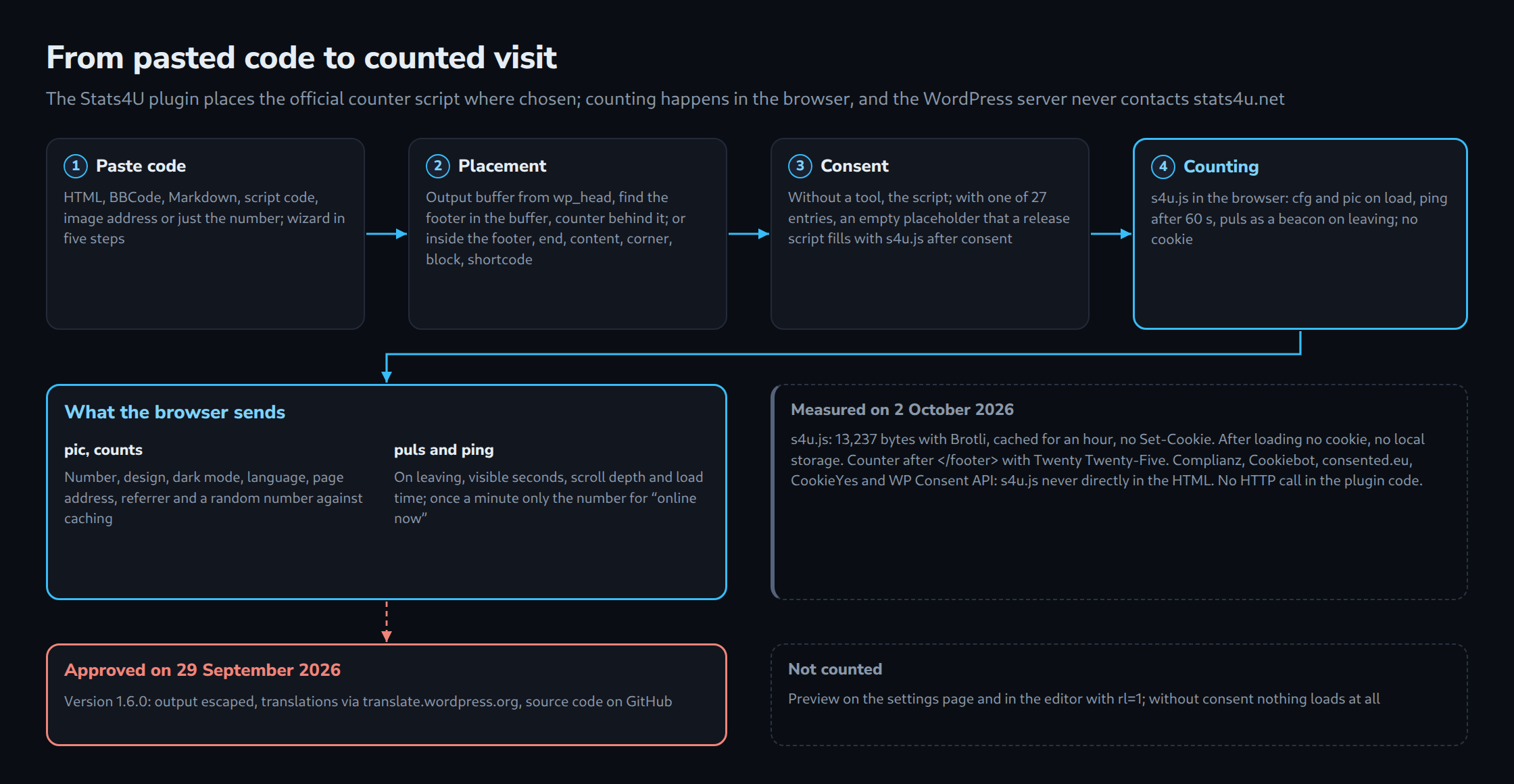
Stats4U is a visitor counter by LW IT Solutions: a small image on the website that counts page views, plus statistics on stats4u.net with where visitors came from, time on page, scroll depth and the visitors online right now. No account is needed; the counter number is enough. For WordPress there is a dedicated plugin. It has been listed in the WordPress.org plugin directory since 29 September 2026, in version 1.6.0, and its source code is public on GitHub.
This post shows how the plugin works: how it reads a pasted counter code, how it places the counter right below the footer of any theme, how it waits for a consent tool, and what the browser then sends to stats4u.net. Everything was measured again on 2 October 2026 on a local test installation with WordPress 7.1.2, PHP 8.4 and Twenty Twenty-Five, using the plugin from the directory. The end covers the way through the WordPress.org review and lists all links.
From pasted code to counter
Under “Settings → Stats4U”, a wizard leads through the setup in five steps: counter, appearance, placement, consent, done. The custom configuration offers all settings on one page instead. The first step takes the code that the creator on stats4u.net produces. There are three ways to get it: an existing code, a button that opens the creator and brings the code back at its end, or a new counter number on request. The last two run from the administrator’s browser, not from the server.
The creator knows several formats, and the plugin accepts all of them. The table shows what stats4u_code_lesen() made of twelve inputs:
| Pasted | Result |
|---|---|
| HTML, image with link | number, design, dark mode and size 150% |
| BBCode | number, design, dark mode |
| Markdown | number, design, language German |
script code with s4u.js |
number, design, dark mode, counting “unique visitors”, language Polish |
| image address alone | number and design |
old long form ?action=pic&s4uid=… |
number and design |
the number only, also with # |
number, design unchanged |
address of the statistics page /live/<number> |
number |
| statistics page with a custom name | note: paste the code or the number |
globe widget globe.js |
note: the plugin shows image counters |
| any other text | note: code not recognised |
What the page then carries is no longer the image alone but the service’s official script, the same <script src="https://www.stats4u.net/s4u.js" data-id="…" async> that the creator produces. Up to version 1.4.0, the plugin placed only the image. That was lighter, but with an image from another server a browser sends only the site’s domain, neither the page nor where the visitor came from. Only the script delivers these details, plus time on page, scroll depth and “online now”. A single function decides what stands at the counter’s place:
// stats4u.php (excerpt)
function stats4u_zaehler_teile($e) {
    $daten = stats4u_skript_daten($e);
    if (stats4u_cmp($e) === null) {
        return array('skript' => array('src' => STATS4U_SKRIPT, 'async' => true) + $daten);
    }
    stats4u_wartet(true);
    return array('platzhalter' => $daten);
}

function stats4u_html() {
    $e = stats4u_einstellungen();
    if ($e['id'] === '') { return ''; }
    $t = stats4u_zaehler_teile($e);
    if (isset($t['skript'])) {
        return '<span class="stats4u-zaehler">' . trim(wp_get_script_tag($t['skript'])) . '</span>';
    }
    return '<span class="stats4u-zaehler" data-stats4u="' . esc_attr(wp_json_encode($t['platzhalter'])) . '"></span>';
}
Without a consent tool, this is a script tag built with wp_get_script_tag(), which escapes every attribute. With a tool, it is an empty placeholder that carries the counter’s settings as JSON. More on that below.
Right below the footer of any theme
By default, the counter appears directly below the theme’s footer. That sounds simple, but WordPress has no hook “after the footer”. The usual hook, wp_footer, sits just before </body>. Up to version 1.3.0 the counter hung there, and on a page whose body is laid out as a flexbox it ended up as a column beside the content, halfway down. Since 1.3.1, the plugin buffers the output from the end of wp_head, looks for the footer in the buffer and places the counter behind it. An element counts as the footer if it identifies itself as one:
// stats4u.php (excerpt)
function stats4u_ist_seitenfuss($name, $tag) {
    if (preg_match('/(?<![\w-])role\s*=\s*["\']?contentinfo\b/i', $tag)) { return true; }
    if (preg_match('/(?<![\w-])itemtype\s*=\s*["\']?[^"\'>]*WPFooter/i', $tag)) { return true; }
    $namen = array('colophon', 'footer', 'site-footer', 'main-footer', 'page-footer', 'global-footer',
                   'elementor-location-footer');
    if ($name === 'footer') { $namen[] = 'wp-block-template-part'; }
    foreach (array('id', 'class') as $attr) {
        if (preg_match('/(?<![\w-])' . $attr . '\s*=\s*(?:"([^"]*)"|\'([^\']*)\'|([^\s>]+))/i', $tag, $m)) {
            $wert = strtolower(($m[1] ?? '') . ($m[2] ?? '') . ($m[3] ?? ''));
            if (array_intersect(preg_split('/\s+/', trim($wert)), $namen)) { return true; }
        }
    }
    return false;
}
Among several candidates, the last outermost one wins, so that with themes that wrap a <footer> in another footer area the counter sits below the whole bar. Without a recognisable footer, the counter goes to the end of the page. Until the script has drawn the image, a CSS rule with :has() hides the empty box, so no margin is left as a gap. Since version 1.6.0, the callback of the output buffer does this work; the plugin no longer prints the buffered page itself. That change came from the WordPress.org review.
On the test installation, the counter landed in the described place for every setting. “Below the footer” put it directly after </footer>, “inside the footer” just before it, “at the end of the page” before the final scripts. “Below the content” put it on single pages only, not on the front page. The corners fixed it at the bottom right or left, and “nowhere automatically” left it out. For custom places there are the block “Stats4U counter” and the shortcode , in a template as do_shortcode( '' ). Block and shortcode on the same page gave two counters, the block with its own alignment.
Only after consent
A site with a consent tool selects it in the fourth step. The list has 27 entries: 25 tools, CookieYes additionally in its legacy mode, and the WP Consent API, plus any tool that blocks scripts through attributes of its own. The counter’s place then holds an empty span with the settings in data-stats4u. At the end of the page sits a small release script that the tool runs only after consent and that then puts the official s4u.js into every placeholder. Measured, it looked like this:
| Tool | Release script in the HTML |
|---|---|
| Complianz | <script type="text/plain" data-category="statistics"> |
| Cookiebot | <script type="text/plain" data-cookieconsent="statistics"> |
| consented.eu | <script type="text/plain" data-consented="stats4u"> |
| CookieYes | <script data-cookieyes="cookieyes-analytics" src="…/freigabe.js"> |
| WP Consent API | inline script that asks wp_has_consent() and listens for changes |
In none of these cases did s4u.js appear directly in the HTML. For tools that release only scripts with an address of their own, such as CookieYes, the plugin includes the file freigabe.js. With the WP Consent API, the script first checks whether a consent type is set at all, because without a type wp_has_consent() returns true even after a refusal. For a tool that is not in the list, custom attributes can be entered. Only type, class and data-* get through:
// stats4u.php (excerpt)
function stats4u_eigene_attribute($roh) {
    $aus = array('type' => 'text/plain');
    if (preg_match_all('/([a-zA-Z][a-zA-Z0-9_.:-]*)\s*=\s*(?:"([^"]*)"|\'([^\']*)\'|([^\s"\'>]+))/', (string) $roh, $m, PREG_SET_ORDER)) {
        foreach ($m as $a) {
            $name = strtolower($a[1]);
            if (!preg_match('/^(data-[a-z0-9_.:-]+|class|type)$/', $name)) { continue; }
            $wert = $a[2] !== '' ? $a[2] : ((isset($a[3]) && $a[3] !== '') ? $a[3] : ($a[4] ?? ''));
            $aus[$name] = substr(preg_replace('/[^A-Za-z0-9 _.:\/,#-]/', '', $wert), 0, 80);
        }
    }
    return $aus;
}
An entered onload="alert(1)" was missing from the output; what remained was type="text/plain" and data-category="statistics".
What the browser sends to stats4u.net
For this measurement, a Chrome with a fresh profile paused every request. Only the script file s4u.js itself was allowed to load. Every other request to stats4u.net was logged and then aborted, so no test count reached the service. The page stayed open for 70 seconds, then the browser navigated away.
| When | Request | Content |
|---|---|---|
| on load | s4u.js |
13,237 bytes transferred, Brotli, cached for an hour, no Set-Cookie |
| on load | action=cfg, GET |
the counter number only: the counter’s settings |
| on load | action=pic, image |
counter number, design, dark mode, language, page address, referrer and a random number against caching; this request counts |
| after 60 s | action=ping, POST |
the counter number only, for “online now” |
| on leaving | action=puls, beacon |
counter number, page address, visible seconds, scroll depth and load time |
After loading, the browser held no cookies and nothing in local storage. The script turned the counter into a link to its statistics page, https://www.stats4u.net/live/<number>. The service sets this link, not the plugin; a counter set to “not public” on stats4u.net links to the service’s home page. The WordPress server itself never contacts stats4u.net: the plugin’s code contains not a single HTTP call. The preview on the settings page and in the editor carries the parameter rl=1 and does not count.
Multilingual and without full reloads
When the counter’s language is set to “the language of each page”, the plugin takes it from the locale of each request. With Polylang, the counter carried data-lang="en" on the English front page, de on the German one and pl on the Polish one. Themes that switch pages without a full reload count only the first page unless they help. For them there is the event s4u:seiteweg, which closes the time on the old page, and, after consent, the function window.stats4uAn(), which fills new placeholders. This website uses exactly that: it runs Stats4U 1.6.0 with consented.eu, and its page switching without reload fires s4u:seiteweg before every swap.
Through the WordPress.org review
The first submission was put on hold on 26 September 2026. The review team asked for every value to be escaped at output, including HTML that a function returns, and for no translation files in the package. Version 1.6.0 does both. Every output goes through esc_html(), esc_attr(), esc_url(), wp_kses() or wp_print_script_tag(), and the callback of the output buffer places the counter below the footer. The 18 translations that shipped in the package up to 1.5.0 now sit in the GitHub repository as templates; translation happens on translate.wordpress.org, and WordPress loads the language packs by itself. On 29 September 2026, the review team approved Stats4U.
On deletion, the plugin removes its option and the remembered view of its settings page. Measured: an option of 236 bytes and the view were present before, both gone afterwards. The counter on stats4u.net and its statistics remain.
All links
- Stats4U in the WordPress.org plugin directory
- Source code on GitHub, with README and the translation templates
- Translation on translate.wordpress.org
- stats4u.net, with the creator for new counters
- Paragraph for a site’s own privacy policy, per counter number and in 19 languages
- Terms of use and privacy policy of Stats4U
Questions and answers
Does Stats4U set a cookie?
No. In the measurement with a fresh browser profile, the browser held no cookie and nothing in local storage after loading, and the response with s4u.js carried no Set-Cookie. As with any request to another server, the browser’s IP address and user agent reach stats4u.net. A suggested paragraph for the privacy policy is at stats4u.net/privacy-embed.
What happens if stats4u.net is unreachable?
Then the counter is missing from the page, and nothing else. The script loads asynchronously and does not hold up the page. Until it has drawn an image, a CSS rule hides the empty box, so no gap is left.
Do visits in the preview or the editor count?
No. The preview on the settings page and in the block editor loads only the counter image with the parameter rl=1, which means “display only”. Up to version 1.1.0, every look at the settings page counted as a visit; that is fixed.
Does deleting the plugin also delete the counter?
No. On deletion, the plugin removes its option and the remembered view of its settings page, and nothing else. The counter on stats4u.net belongs to the site owner and keeps its statistics.
Sources
- Stats4U 1.6.0 in the plugin directory, retrieved 02.10.2026
- Stats4U-Wordpress, source code on GitHub, retrieved 02.10.2026
- WordPress.org: Detailed Plugin Guidelines, retrieved 02.10.2026
- WP Consent API, retrieved 02.10.2026
- wp_get_script_tag(), retrieved 02.10.2026
- wp_print_inline_script_tag(), retrieved 02.10.2026
- PHP: ob_start(), retrieved 02.10.2026
- MDN: Navigator.sendBeacon(), retrieved 02.10.2026
- MDN: :has(), retrieved 02.10.2026
- Stats4U: paragraph for the privacy policy, retrieved 02.10.2026
Related articles