English
 Deutsch
 Polski
Tutorial: Fixing “Unassigned” Traffic in GA4 Acquisition Reports

Contents
- Step 1: Split the Bucket by Session Source and Medium
- Step 2: When a Real Value Appears — the Tagging Case
- Step 3: When (not set) Appears — Parameters Lost in Transit
- Step 4: The Consent Mode Case
- Step 5: Quantifying It in BigQuery
- Staying Inside the Guardrails
- Questions and answers
- Sources
- Practical check: audit real acquisition rows
“Unassigned” in a GA4 traffic acquisition report is not a channel — it is what remains when a session’s source and medium match none of the rules in the Default Channel Group. That makes it a symptom with several unrelated causes, which is why the usual advice to “fix the UTMs” resolves some cases and does nothing for others.
The reliable approach is to split the bucket before touching anything: one reading of the report separates a tagging problem from a data-loss problem, and each has its own fix.
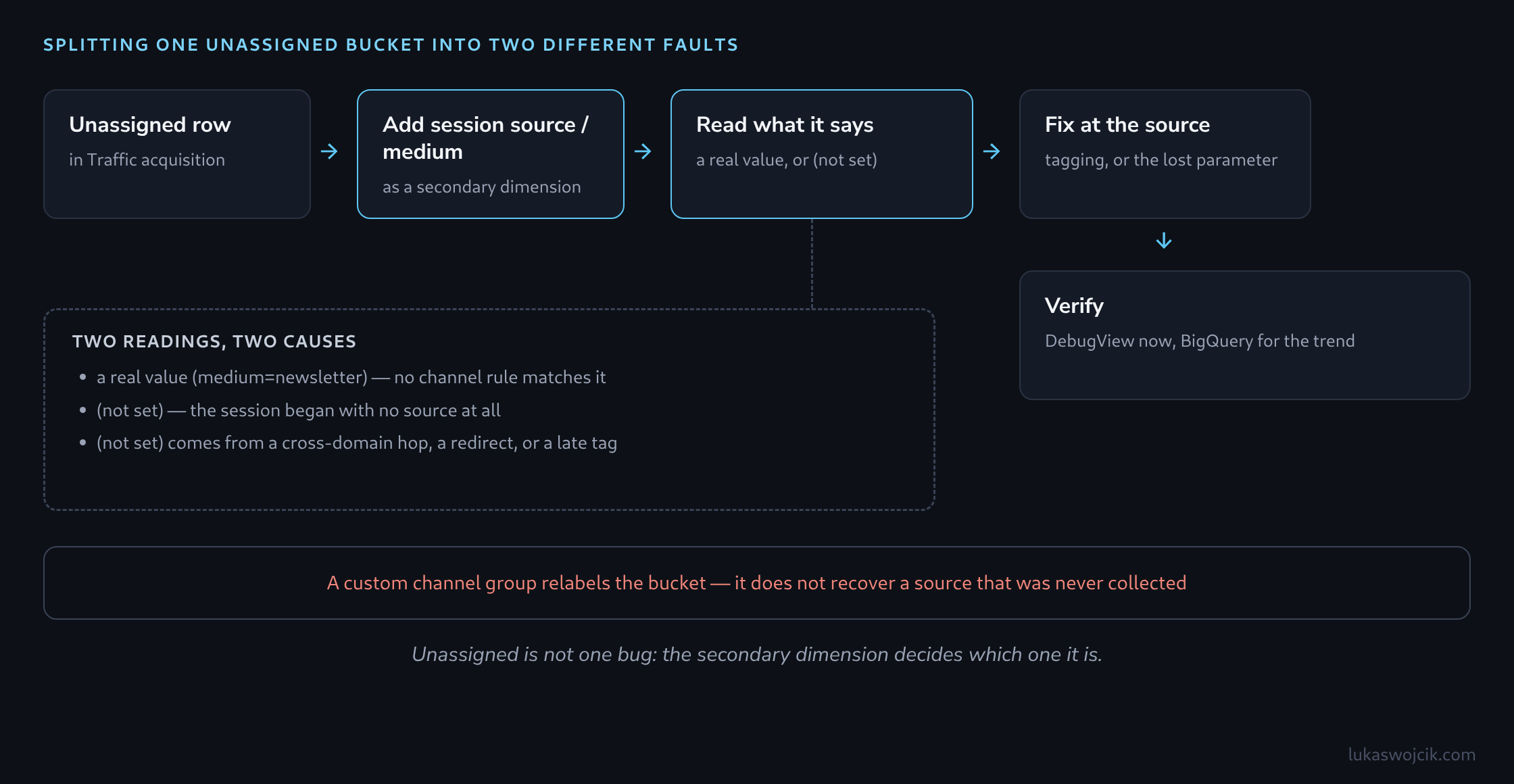
Step 1: Split the Bucket by Session Source and Medium
In the Traffic acquisition report, adding Session source / medium as a secondary dimension to the Unassigned row splits it into two fundamentally different cases:
- A real value appears, such as
newsletter / october-promo— the data arrived intact, but no channel rule matches it. This is a taxonomy problem, fixable by correcting the tagging. (not set)appears — the session started with no source information at all. Nothing is wrong with the channel rules; the campaign data never reached GA4.
One more distinction is worth making first: Unassigned in the User acquisition report describes first-visit attribution, while Traffic acquisition describes each session. Comparing a user-scoped dimension against a session-scoped metric produces Unassigned rows that reflect the scope mismatch rather than a collection fault, so both reports are worth checking separately before any change is made.
Step 2: When a Real Value Appears — the Tagging Case
GA4’s Default Channel Group matches specific values, not intent. A medium of newsletter does not become the Email channel; the Email rule requires a source or medium of exactly email, e-mail, e_mail or e mail. Case does not matter, so Email with an uppercase E is fine; newsletter, mailing, or crm do not match. A utm_source with no utm_medium at all also leaves GA4 unable to classify the session.
| Intended channel | Medium that matches | Common value that does not |
|---|---|---|
email, e-mail, e_mail |
newsletter, mailing, crm |
|
| Organic Search | organic |
seo, search |
| Paid Search | cpc, ppc, paid… (search source) |
sem, adwords |
| Paid Social | cpc, ppc, paid… (social source) |
social-paid, fb-ads |
| Referral | referral, link |
partner |
| Affiliates | affiliate |
affiliates, partnerprogram |
<!-- Falls into Unassigned: no rule matches medium=newsletter -->
https://example.com/offer?utm_source=mailchimp&utm_medium=newsletter

<!-- Classified as Email: the medium matches the channel rule -->
https://example.com/offer?utm_source=mailchimp&utm_medium=email&utm_campaign=october-promo
Correcting the tagging only affects traffic collected from that point on; sessions already recorded keep the value they arrived with. A custom channel group can classify the historical values into a named channel for reporting, but that is a relabelling of what was collected, not a repair of it.
Step 3: When (not set) Appears — Parameters Lost in Transit
A session that begins with no source at all points at the path the visitor took, not at the campaign tagging. Three mechanisms account for most of it:
- A cross-domain hop without the linker. When a visitor moves from one domain to another — a shop handing off to a payment provider and back — GA4 carries identity in the
_glparameter appended by cross-domain measurement. Without both domains configured under the same data stream, the return visit starts a fresh session whose referrer is the payment provider; if that host also sits in the referral exclusion list, the referral is discarded and nothing remains to attribute the session to. - A redirect that drops the query string. A server-side redirect for language, trailing slashes, or http-to-https that rebuilds the URL without forwarding
?utm_…removes the campaign parameters before any tag can read them. - A tag that fires after the URL has changed. In a single-page application, a client-side route change that runs before the GA4 tag loads leaves the tag reading the post-navigation URL, which no longer carries the campaign parameters.
Step 4: The Consent Mode Case
Consent Mode contributes to Unassigned in a specific way: when advertising or analytics storage is denied, click identifiers and the linker parameter cannot be persisted in cookies across a page transition. Enabling URL Passthrough in the Google tag or the Conversion Linker keeps gclid and _gl in the URL instead, so the source survives navigation even without storage.
The heavier cause is hard-blocking. Preventing Google tags from firing at all until consent is granted — using a blocking trigger rather than the built-in consent checks — means the landing page view is never measured; the first event GA4 sees arrives after the visitor has navigated onward, without the original campaign parameters. Using the tags’ own consent settings keeps that first hit as a cookieless ping that still carries the source, which is also what makes behavioural modelling possible.
Step 5: Quantifying It in BigQuery
The GA4 interface shows the proportion; the BigQuery export shows the source and medium combinations sessions arrive with, which is what makes a fix measurable. It contains no channel group, and according to Google’s export schema manual_source and manual_medium in collected_traffic_source hold not only UTM values but also values parsed from referral parameters, so the list has to be checked against the channel rules:
SELECT
  IFNULL(collected_traffic_source.manual_source, '(not set)') AS source,
  IFNULL(collected_traffic_source.manual_medium, '(not set)') AS medium,
  COUNT(*) AS sessions
FROM `project.analytics_XXXXXXXXX.events_*`
WHERE _TABLE_SUFFIX BETWEEN '20260901' AND '20260930'
  AND event_name = 'session_start'
GROUP BY source, medium
ORDER BY sessions DESC
LIMIT 50;
Rows with real but unmatched mediums quantify the tagging half of the problem. Rows where both fields read (not set) are only an upper bound for the data-loss half: they also contain direct entries that bring neither UTM parameters nor a referrer and that GA4 assigns to the Direct channel as (direct) / (none). Re-running the query after each change shows which of the two actually moved.
Staying Inside the Guardrails
Some missing campaign data is irreducible. Visitors who decline analytics storage send nothing at all under hard-blocking; with the tags’ consent settings their cookieless pings do carry the source, but they appear in reports only through behavioural modelling, not as sessions of their own, and no configuration recovers what was never collected. Genuine direct entries and visits from app or browser environments that strip referrers do not belong here: without any source, GA4 assigns them to the Direct channel as (direct) / (none). A realistic target is a small, stable share — a rising one signals a new fault, which is the reading worth monitoring rather than the absolute number.
Questions and answers
How can a redirect that drops the UTM parameters be found?
By requesting the landing page with test parameters and looking at every stop in the redirect chain, for example in the network tab of the developer tools or with curl -sIL. The Location header of each response is what counts: if the query string that was still in the request is missing there, that stop is the cause. Variants without a trailing slash, with http and with a language prefix belong in the test, because each of them can trigger a rule of its own.
How do campaign parameters survive in a single-page application until the tag reads them?
The article names the mechanism: if the router changes the address before the GA4 tag has loaded, the tag reads an address without parameters. Three measures keep the parameters in place:
- Loading the Google tag early, in the head of the page and before the router’s code, so that the first page view still sees the original address.
- Saving the landing address in a variable immediately on load and passing it as
page_locationwith the first page_view. GA4 reads the campaign parameters from that value, so a later change of address no longer affects it. - Deferring the URL clean-up. Some applications remove query parameters with
history.replaceState()to make the address look tidy; that should only happen once the first hit has been sent.
A consent banner makes the problem worse if it delays loading the tag until a choice has been made: by then the router may long since have changed the address. The same saved landing address helps here too.
Sources
Practical check: audit real acquisition rows
The Acquisition Audit in the Channel Debugger adds a report-based check to the individual channel-rule examples. After Google authorization, a property and an explicit date range determine the query. The tool reads session source, medium, campaign and default channel group together with sessions. It does not mix first-user acquisition with session acquisition.
- Select a completed reporting period. Recent data may still change.
- Review rows in Unassigned, starting with the largest session values. Compare their source and medium with the channel rules described above.
- Inspect spelling candidates such as
Emailandemail, or campaign names with extra spaces. A candidate is a naming inconsistency to investigate, not an automatic correction. - Inspect the returned metadata before interpreting the result. Thresholding, sampling and an
(other)row can hide detail. - Export the findings as CSV and correct future campaign links or tracking configuration where the evidence supports it.
The displayed Unassigned percentage uses the sum of the returned session values. It is not an independently retrieved property total. The tool rejects incomplete pagination and does not rewrite historical attribution. A row containing (not set) alone cannot establish whether consent, redirects or tagging caused the missing value.
Technical references: Data API dimensions and metrics and response metadata.
Related articles