

Securing WordPress Logins: Introducing WP Admin Captcha

Securing the WordPress admin login page (wp-login.php) is a fundamental step in protecting a website from malicious activity. Automated bots constantly scan for vulnerabilities, attempting to brute-force passwords to gain unauthorized access. The WP Admin Captcha plugin provides an efficient, lightweight solution to this problem by integrating Google reCAPTCHA v2 directly into the login interface.
How It Works
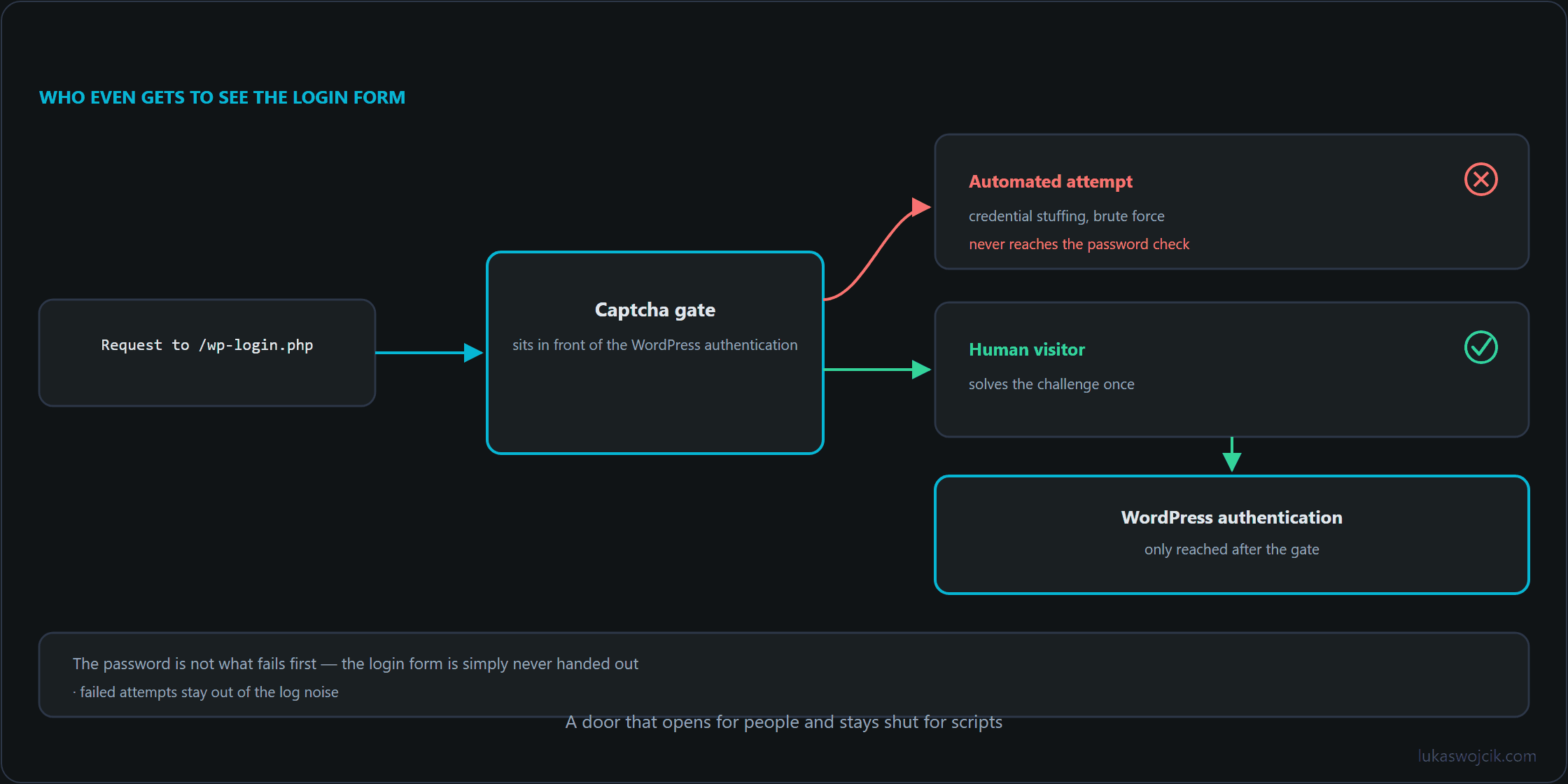
The plugin functions by intercepting the authentication process before a user is logged in. It adds the standard “I’m not a robot” checkbox to the login screen, requiring manual interaction to prove that the login attempt is originating from a human, not a script. When the user submits the form, the plugin sends a request to Google’s verification servers. With keys configured, the plugin only allows the WordPress authentication process to proceed once Google confirms a successful completion of the challenge.
Key Features
- Simple Configuration: A dedicated settings page allows the insertion of Site and Secret keys. Since the migration of reCAPTCHA Classic was completed in the first quarter of 2026, these keys are created and managed in the Google Cloud Console, and every key belongs to a Google Cloud project; the legacy reCAPTCHA Admin Console only serves to view historical data. Usage remains free of charge up to 10,000 assessments per month.
- Lockout Protection: If the required keys are not configured, the plugin skips verification, ensuring that the administrator never loses access to their own site due to a misconfiguration. Until valid keys are stored, the login page therefore remains without captcha protection.
- Minimal Overhead: By utilizing native WordPress hooks and the built-in HTTP API, the plugin ensures performance remains unaffected.
- Open Source: The code is transparent and available for review or contribution on GitHub: https://github.com/LW-IT-Solutions/wp-admin-captcha.
Summary
WP Admin Captcha protects WordPress login pages against automated brute-force attacks by requiring Google reCAPTCHA v2 verification, while ensuring administrator accessibility through a lockout protection that skips verification as long as no keys are stored.
Related articles



2 comments
The lockout protection is the design decision that makes this installable on a client site — a captcha plugin that can lock the administrator out of their own login page is worse than no captcha.
Where does the boundary sit exactly? The description says verification is skipped when keys are not configured. Does that also cover a stored but invalid secret, or a verification request that cannot reach Google at all?
It covers the missing-keys case only. Keys present means the challenge is enforced, and a challenge that cannot be confirmed is treated as not solved — which is the correct behaviour for a security check and an uncomfortable one during an outage.
A wrong secret and an unreachable verification endpoint therefore look the same from the login page: the form refuses the attempt. The protection that matters in that moment is not part of the plugin at all — it is a second way in that does not depend on it, whether that is WP-CLI or renaming the plugin directory over SSH. Anyone deploying a login captcha should have tried that route once, before needing it.
One quota detail belongs next to this. The free tier covers 10,000 assessments per month, and each login page render consumes one. A site under sustained bot pressure can reach that figure without a single successful login, and what happens afterwards is a verification that stops confirming — a failure that arrives through the same door as the outage above.