English
 Deutsch
 Polski
WordPress.org plugin guidelines: why submissions get rejected

Contents
A plugin that runs cleanly on a test site is not automatically a plugin that WordPress.org will host. Every new submission to the Plugin Directory passes an automated pre-check and then a manual review by the Plugins Team, measured against the Detailed Plugin Guidelines. On 29 September 2026 that page lists 18 numbered guidelines, last updated on 11 March 2026. Most problems the team describes are recurring patterns rather than edge cases: missing or contradictory licence information, features locked behind a payment, undisclosed requests to external servers, credit links switched on by default and plugin names that start with somebody else’s trademark.
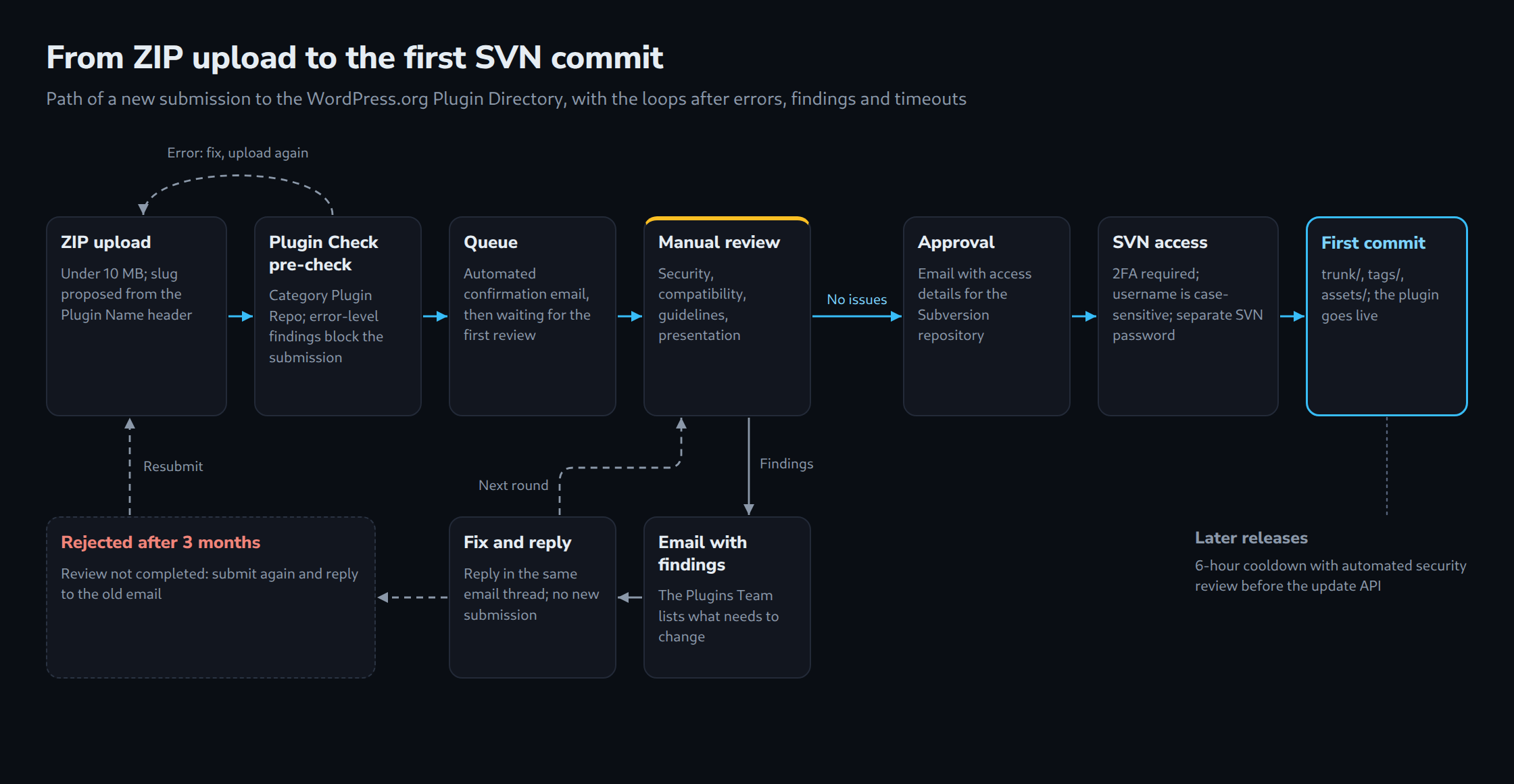
This article groups the 18 guidelines by topic, shows in a short plugin what consent before an outgoing request and an opt-in credit link look like in code, explains how the slug is derived from the plugin name and follows a submission from the ZIP upload to the first SVN commit, including the queue figures published on 28 September 2026. Plugin Check, the security functions and the readme format have their own articles in this series. The earlier articles on the author’s plugins Lite Page Cache and WP Admin Captcha show what such plugins do on a site; this one is about getting a plugin into the official directory.
Eighteen guidelines in four groups
The numbering says nothing about how often a rule leads to a rejection, and the Plugins Team does not publish a breakdown by guideline. Its annual report for 2025 only gives totals: 12,713 plugins reviewed, 5,415 approved, 59,137 issues identified, and for 38.7 percent of the reviewed plugins the authors never replied. The team also maintains a handbook page called “Common issues” with excerpts from its review emails, but that page is not ranked by frequency either and calls itself incomplete. The order used here follows the topics on that page and in the developer FAQ; it is a grouping, not a ranking.
| Group | Guidelines | Core rule |
|---|---|---|
| Licence and code | 1, 4, 13 | GPL-compatible licence, readable code, no bundled core libraries |
| Business model | 5, 6, 8 | No locked features, documented services, no code or updates from third-party servers |
| Protection of site users | 7, 10, 11 | Consent before external contact, credits off by default, no hijacked dashboard |
| Directory and conduct | 2, 3, 9, 12, 14–18 | Responsibility, honesty, no readme spam, SVN for releases only, complete plugin, trademarks |
Two guidelines frame the rest. Guideline 2 makes developers responsible for every file, including third-party libraries, and for the terms of the services the plugin uses. Guideline 18 reserves the right to change the rules, remove plugins, grant exceptions and act for reasons not spelled out in the list. The guidelines are a minimum, not a complete contract.
Licence, readable code and bundled libraries
Guideline 1 requires a licence compatible with the GNU General Public License; “GPLv2 or later”, the licence of WordPress itself, is strongly recommended. This applies to everything in the ZIP file, including data files and images, and third-party components are checked against the list of compatible licences on gnu.org. The common-issues page shows several variants of the same problem: no GPL-compatible licence declared, different licences in readme and plugin header, incompatible code in the package, and minified files without documented source.
That last point belongs to guideline 4. Obfuscated code is not allowed, and minified builds are acceptable only if the readable source is included or publicly linked from the readme. A plugin built with Composer is expected to ship its composer.json. Guideline 13 forbids bundling libraries that WordPress already contains; the common-issues page names jQuery, SimplePie, PHPMailer and PHPass among others. The same page also lists development leftovers such as node_modules, test suites and demo folders. None of this is hard to fix, but each item costs a round of emails. Header fields and the readme are covered in a separate article in this series.
Trialware, services and code from other servers
The sharpest lines concern the business model. Guideline 5 prohibits trialware: features may not be locked until payment, and they may not stop working after a trial period or quota. Sandbox-only access to an API counts as trialware too. Guideline 9 adds that implying users must pay to unlock included features is dishonest.
Guideline 6 describes what is allowed. A plugin may be the interface to an external service, including a paid one, if the service provides substantial functionality and is documented in the readme, ideally with a link to its terms. Not acceptable are services that only validate licences while all functionality sits in the plugin, code moved to a server merely to look like a service, and pure storefronts.
Guideline 8 covers the technical side. Code from a documented service may be loaded over a secure connection. Not allowed are updates or installations of plugins, themes or add-ons from servers other than WordPress.org, installing a premium version of the same plugin, third-party CDNs for anything other than fonts, and admin pages embedded via iframes. The common-issues page adds that plugins may not contact other servers for updates and may not offload images, scripts or stylesheets unrelated to a service.
For freemium plugins this leaves a clear pattern. The free plugin has to be complete in itself, paid functionality may live in a service, and upgrade notices are allowed within guideline 11: contextual or on the settings page, with site-wide notices dismissible. The free plugin may not download and install its paid version.
Consent before requests and links on the public site
Guideline 7 prohibits contact with external servers without explicit and authorised consent, typically obtained through an opt-in, a registration with the service or a checkbox in the settings. Data collection belongs in the readme, preferably with a privacy policy. Prohibited examples include automated data collection without confirmation, offloading assets unrelated to a service, undocumented use of external data such as blocklists and third-party advertising that tracks views. Plugins that are an interface to a service, such as a spam filter with an external API, are exempt: installing and configuring them counts as consent.
Guideline 10 applies the same idea to the front end. “Powered by” credits and links must be optional and off by default, the opt-in must be a clearly worded choice rather than a line in the terms, and the plugin may not require a credit to work.
The following plugin calculates a reading time locally and offers two optional extras: weekly usage statistics sent to an example server and a link to the plugin website. Both options default to false. Without consent the stats function returns before any request is built, and the link only appears after the second opt-in. Since the HTTP API sends the site URL in its default user agent, the example sets its own user agent.
<?php
/**
* Plugin Name: Reading Time Badge
* Description: Shows the estimated reading time above posts. Usage statistics and a credit link are opt-in.
* Version: 1.0.0
* Requires at least: 6.5
* Requires PHP: 7.4
* License: GPLv2 or later
* License URI: https://www.gnu.org/licenses/gpl-2.0.html
* Text Domain: reading-time-badge
*
* @package ReadingTimeBadge
*/
if ( ! defined( 'ABSPATH' ) ) {
exit;
}
define( 'RTBADGE_VERSION', '1.0.0' );
define( 'RTBADGE_STATS_URL', 'https://stats.example.com/v1/ping' );
/**
* Returns the settings merged with defaults. Every outgoing feature is off by default.
*
* @return array
*/
function rtbadge_get_settings() {
$defaults = array(
'share_stats' => false,
'show_credit' => false,
);
return wp_parse_args( (array) get_option( 'rtbadge_settings', array() ), $defaults );
}
/**
* Stores exactly two booleans, whatever the form sends.
*
* @param mixed $input Raw option value.
* @return array
*/
function rtbadge_sanitize_settings( $input ) {
$input = is_array( $input ) ? $input : array();
return array(
'share_stats' => ! empty( $input['share_stats'] ),
'show_credit' => ! empty( $input['show_credit'] ),
);
}
add_action( 'admin_init', 'rtbadge_register_settings' );
/**
* Registers the option with a sanitize callback.
*/
function rtbadge_register_settings() {
register_setting(
'rtbadge',
'rtbadge_settings',
array(
'type' => 'array',
'sanitize_callback' => 'rtbadge_sanitize_settings',
'default' => array(
'share_stats' => false,
'show_credit' => false,
),
)
);
}
add_action( 'admin_menu', 'rtbadge_add_settings_page' );
/**
* Adds the settings page below Settings.
*/
function rtbadge_add_settings_page() {
add_options_page(
__( 'Reading Time Badge', 'reading-time-badge' ),
__( 'Reading Time Badge', 'reading-time-badge' ),
'manage_options',
'rtbadge',
'rtbadge_render_settings_page'
);
}
/**
* Renders two unchecked-by-default opt-in checkboxes.
*/
function rtbadge_render_settings_page() {
if ( ! current_user_can( 'manage_options' ) ) {
return;
}
$settings = rtbadge_get_settings();
?>
<div class="wrap">
<h1><?php echo esc_html( get_admin_page_title() ); ?></h1>
<form action="options.php" method="post">
<?php settings_fields( 'rtbadge' ); ?>
<p>
<label>
<input type="checkbox" name="rtbadge_settings[share_stats]" value="1" <?php checked( $settings['share_stats'] ); ?>>
<?php esc_html_e( 'Send usage statistics (plugin, WordPress and PHP version) to stats.example.com once a week.', 'reading-time-badge' ); ?>
</label>
</p>
<p>
<label>
<input type="checkbox" name="rtbadge_settings[show_credit]" value="1" <?php checked( $settings['show_credit'] ); ?>>
<?php esc_html_e( 'Show a link to the plugin website next to the reading time on the public site.', 'reading-time-badge' ); ?>
</label>
</p>
<?php submit_button(); ?>
</form>
</div>
<?php
}
add_action( 'admin_init', 'rtbadge_maybe_send_stats' );
/**
* Sends usage statistics at most once a week, and only after opt-in.
*/
function rtbadge_maybe_send_stats() {
$settings = rtbadge_get_settings();
if ( ! $settings['share_stats'] ) {
return; // No consent: no request at all.
}
if ( false !== get_transient( 'rtbadge_stats_sent' ) ) {
return;
}
set_transient( 'rtbadge_stats_sent', 1, WEEK_IN_SECONDS );
wp_remote_post(
RTBADGE_STATS_URL,
array(
'blocking' => false,
'timeout' => 5,
// The default user agent of the HTTP API contains the site URL; replace it.
'user-agent' => 'reading-time-badge/' . RTBADGE_VERSION,
'body' => array(
'plugin_version' => RTBADGE_VERSION,
'wp_version' => get_bloginfo( 'version' ),
'php_version' => PHP_VERSION,
),
)
);
}
add_filter( 'the_content', 'rtbadge_prepend_reading_time' );
/**
* Prepends the reading time. The credit link appears only after opt-in.
*
* @param string $content Post content.
* @return string
*/
function rtbadge_prepend_reading_time( $content ) {
if ( ! is_singular( 'post' ) || ! in_the_loop() || ! is_main_query() ) {
return $content;
}
$words = preg_split( '/\s+/u', trim( wp_strip_all_tags( $content ) ), -1, PREG_SPLIT_NO_EMPTY );
$minutes = max( 1, (int) ceil( count( $words ) / 200 ) ); // Assumes 200 words per minute.
$badge = '<p class="rtbadge">' . esc_html(
sprintf(
/* translators: %d: estimated reading time in minutes */
_n( '%d minute read', '%d minutes read', $minutes, 'reading-time-badge' ),
$minutes
)
);
$settings = rtbadge_get_settings();
if ( $settings['show_credit'] ) {
$badge .= ' · <a href="' . esc_url( 'https://example.com/reading-time-badge/' ) . '">'
. esc_html__( 'Reading Time Badge', 'reading-time-badge' ) . '</a>';
}
return $badge . '</p>' . $content;
}The readme documents what is sent, when and to whom. The common-issues page asks for exactly these elements for external services: when the plugin relies on the service, a link to it and links to its terms or privacy policy. The heading in the example is a suggestion, not a requirement.
== Privacy and external services ==

Reading Time Badge calculates the reading time locally and works without any external service.

If the option "Send usage statistics" under Settings > Reading Time Badge is enabled,
the plugin sends the plugin version, the WordPress version and the PHP version
to stats.example.com once a week. The request contains no site URL, no user data
and no content. As with any HTTP request, the server's IP address is visible to the service.
The option is disabled by default.

* Service: https://stats.example.com/
* Terms of use: https://stats.example.com/terms/
* Privacy policy: https://stats.example.com/privacy/
Plugin name, slug and trademarks
The slug is the permanent address of a plugin in the directory and in SVN. According to the submission page it is derived from the Plugin Name header; if the name is taken, a number is appended. The developer FAQ allows one slug change after submission, none after approval, while the display name can change later.
Guideline 17 prohibits a trademark or another project’s name as the sole or first term of a slug unless ownership or authorised representation is proven. WordPress itself is the example: the WordPress Foundation holds the trademark, and the rule explicitly extends to plugin slugs. Everyone else should use the form “Feature for Brand”, or better an original name. Guideline 16 adds that slugs cannot be reserved; only a complete plugin can be submitted.
| Plugin Name header | Slug | Guideline 17 |
|---|---|---|
| WordPress Delivery Dates | wordpress-delivery-dates |
Starts with a protected term, not acceptable |
| WooCommerce Delivery Dates | woocommerce-delivery-dates |
Only acceptable for the trademark owner |
| Delivery Dates for WooCommerce | delivery-dates-for-woocommerce |
Follows “Feature for Brand” |
The header of the third variant is shown below. The common-issues page also expects the main file to be named after the slug and the text domain to match it.
<?php
/**
 * Plugin Name: Delivery Dates for WooCommerce
 * Description: Lets customers pick a delivery date at checkout.
 * Version:     1.0.0
 * License:     GPLv2 or later
 * Text Domain: delivery-dates-for-woocommerce
 *
 * @package DeliveryDatesForWooCommerce
 */

// Main file: delivery-dates-for-woocommerce/delivery-dates-for-woocommerce.php
// Slug proposed on submission: delivery-dates-for-woocommerce

if ( ! defined( 'ABSPATH' ) ) {
	exit;
}
The account behind a submission matters as well. The FAQ allows generally one submission at a time, up to ten for authors with more than one million active installations, and suspends secondary accounts used to get around that limit. Organisations submit with their official account. Guideline 9 prohibits sockpuppet accounts and false identities used to evade earlier sanctions. Since 1 October 2024 two-factor authentication is mandatory for all plugin owner and committer accounts.
From ZIP upload to first SVN commit
A submission starts with a ZIP file under 10 MB that installs through the “Upload Plugin” function. Since 1 October 2024 it first runs through the “Plugin Repo” category of Plugin Check, and an error-level finding blocks the submission until fixed; the separate article on Plugin Check covers this step. After the upload a confirmation email arrives and the plugin enters the queue.
The manual review checks security, compatibility, compliance and presentation. Without findings the plugin is approved; otherwise an email lists what has to change. The FAQ asks authors to reply in the same thread and not to resubmit. The exception: a review not completed within three months is rejected, and the author then resubmits and replies to the old email.
After approval an email explains access to the Subversion repository at https://plugins.svn.wordpress.org/ plus the slug, with trunk/, tags/ and assets/. The username is case-sensitive, and a separate SVN password can be set in the account settings. According to the FAQ the plugin is live once the code is committed. For later releases, every plugin and theme release has passed a cooldown since 5 June 2026, currently six hours, before the update API distributes it; an automated security review analyses the changes and blocks releases with a high risk score.
The queue on 28 September 2026
The weekly report of 28 September 2026 on make.wordpress.org/updates lists 4,598 plugins in the queue. Only 30 are new and unprocessed, 3,860 are waiting for their authors, 475 for a reviewer, and 233 are marked as waiting for a reviewer with the email not yet sent. On 7 September 2026 the queue held 4,893 plugins, 160 of them new and unprocessed.
The reports state no waiting time. The small number of unprocessed submissions suggests that a first review currently follows soon after upload, but that is an interpretation. Official time frames differ: the submission page speaks of one to ten days with a target of five business days, and the FAQ expects a small, correct plugin to be approved within fourteen days of the initial review. The June 2026 status report shows how volatile the queue is: about 1,050 plugins in mid-April, nearly zero a few weeks later, and a record of around 700 submissions per week in May.
Limits and open points
There is no official data on which guideline causes the most rejections; the grouping here is not a ranking. The queue figures describe a state, not a waiting time, and most entries are waiting for authors rather than reviewers. The June and September figures probably count different things, and an older handbook page from 2022 still mentions fourteen business days.
The announcement does not say whether the six-hour cooldown also applies to the first release of a newly approved plugin. The Plugin Check pre-check is described as announced in October 2024; its scope may have changed. The guidelines are revised regularly, so the page is worth rereading right before a submission. The example plugin passes the WordPress Coding Standards without findings; Plugin Check 2.1.0 on WordPress 7.1.2 only reports the missing readme.txt (no_plugin_readme), and with a complete readme around the section shown above it reports nothing, runtime checks included.
Questions and answers
May a plugin in the directory promote a paid Pro version?
Yes, within limits. Guideline 11 allows upgrade prompts when they are contextual or confined to the plugin’s settings page, and site-wide notices have to be dismissible. The free plugin itself must stay complete (guideline 5), may not suggest that included features have to be paid for (guideline 9) and may not download or install the premium version on its own (guideline 8).
Can the slug still be changed after the plugin has been approved?
No. According to the developer FAQ, the slug can be changed once after submission and not at all after approval. The display name from the Plugin Name header can still change later. The name chosen before the upload therefore determines the permanent address in the directory and in SVN.
Does a clean Plugin Check run mean that the plugin will be approved?
No. On submission only the Plugin Repo category runs, and only error-level findings block the upload. The manual review of security, compatibility, guidelines and presentation follows afterwards. Several guidelines concern questions an automated check can only partly assess, such as the business model, consent before external requests or trademarks in the name.
What happens to a submission when the review email is never answered?
If the review is not completed within three months, the submission is rejected. To continue afterwards, the plugin is submitted again and the author replies to the old email. The annual report for 2025 shows how common this is: for 38.7 percent of the reviewed plugins, the authors never replied.
Sources
- Detailed Plugin Guidelines, retrieved 29 September 2026
- Common issues, retrieved 29 September 2026
- Plugin Developer FAQ, retrieved 29 September 2026
- Add your Plugin, retrieved 29 September 2026
- Planning, Submitting, and Maintaining Plugins, retrieved 29 September 2026
- How to Use Subversion, retrieved 29 September 2026
- Plugin Check and 2FA Now Mandatory For New Plugin Submissions, retrieved 29 September 2026
- Plugins Team: 28 Sep 2026, retrieved 29 September 2026
- Plugins Team: 7 Sep 2026, retrieved 29 September 2026
- Update on the status of the team – June 2026, retrieved 29 September 2026
- A Year in the Plugins Team – 2025, retrieved 29 September 2026
- Automated security review for plugin releases, retrieved 29 September 2026
- class-wp-http.php (default user agent), retrieved 29 September 2026
Related articles