English
 Deutsch
 Polski
Developing High-Performance Custom REST API Endpoints in WordPress

Contents
Architectural Overview: REST API vs. admin-ajax.php
Interactive frontend components in WordPress traditionally rely on the legacy admin-ajax.php handler. However, every request routed through admin-ajax.php initializes the entire administration core (including dashboard widgets, authentication checks, and admin-specific hooks). This architectural overhead frequently results in Time to First Byte (TTFB) latencies exceeding 400–600 milliseconds, even for lightweight database queries.
In WordPress v7.0.2, developing custom REST API endpoints using the register_rest_route() API provides a streamlined alternative. REST endpoints bypass the administrative subsystem, enforce native JSON schema validation, support HTTP caching headers, and execute significantly faster. When combined with direct database queries via the $wpdb abstraction layer—instead of instantiating heavy WP_Query loops—data payloads can be delivered in under 50 milliseconds.
Step-by-Step Implementation Guide
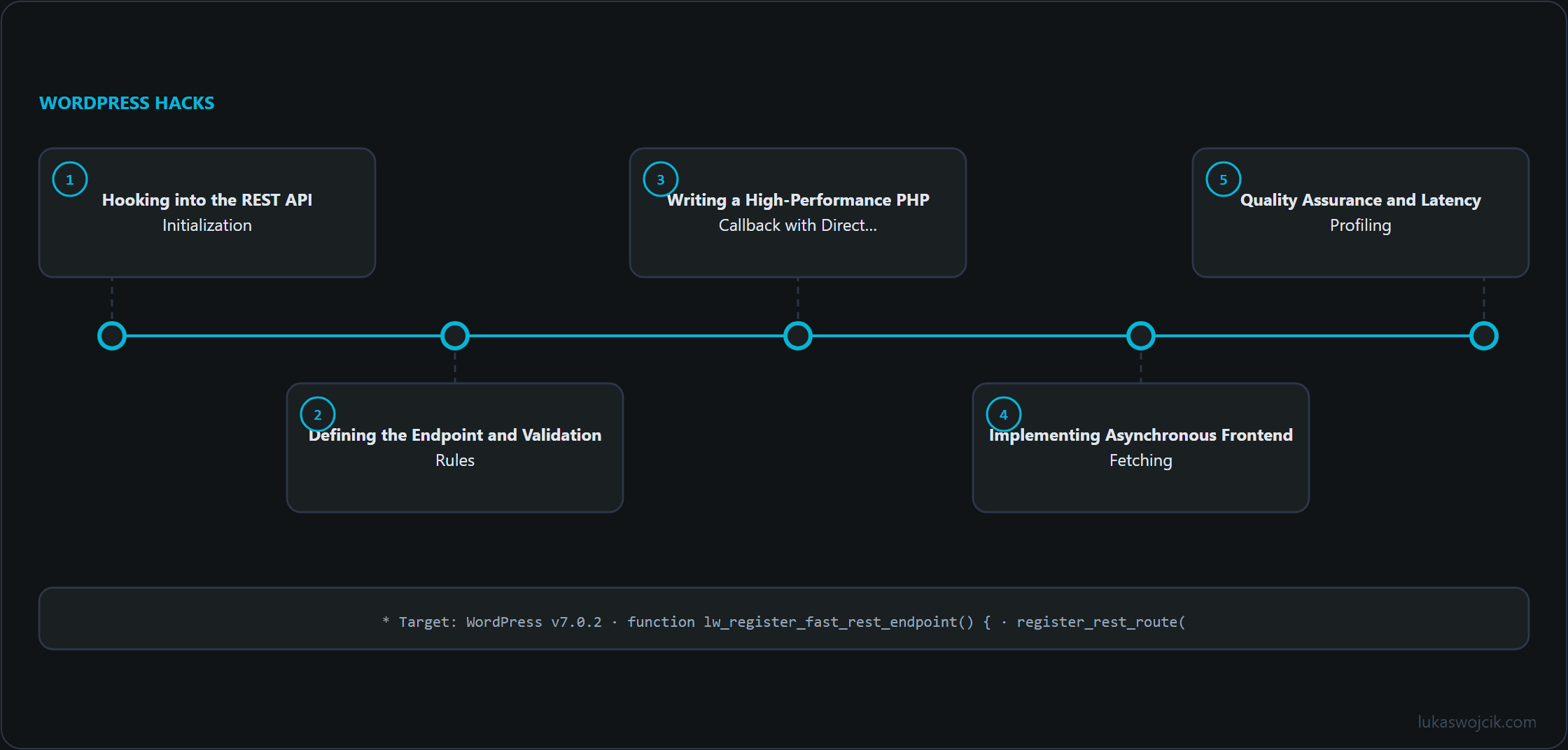
Step 1: Hooking into the REST API Initialization
Custom REST endpoints must be registered exclusively during the rest_api_init action hook. Attempting to register routes earlier or later in the WordPress bootstrap process will result in routing errors or 404 HTTP responses.
Every endpoint requires a unique namespace (typically structured as vendor/v1) and a specific route path.
Step 2: Defining the Endpoint and Validation Rules
The registration procedure requires declaring HTTP methods (such as GET or POST), a security callback (permission_callback), and argument validation rules (validate_callback and sanitize_callback).
Strict parameter sanitization at the API layer prevents SQL injection through the parameters before payload processing begins; it does not protect against Cross-Site Scripting (XSS) in the output.
Step 3: Writing a High-Performance PHP Callback with Direct SQL
To maximize performance for simple data retrieval (e.g., fetching a list of recent custom events or logs), direct database queries via $wpdb->prepare() should be used instead of WP_Query. This eliminates metadata overhead and post-object instantiation.
The following production-ready architecture registers a high-speed endpoint at /wp-json/lw-toolbox/v1/latest-logs:
/**
 * High-Performance REST API Endpoint Architecture
 * Target: WordPress v7.0.2
 */
add_action( 'rest_api_init', 'lw_register_fast_rest_endpoint' );

function lw_register_fast_rest_endpoint() {
    register_rest_route(
        'lw-toolbox/v1',
        '/latest-logs',
        array(
            'methods'             => WP_REST_Server::READABLE, // GET method
            'callback'            => 'lw_get_fast_logs_callback',
            'permission_callback' => 'lw_verify_rest_permission',
            'args'                => array(
                'limit' => array(
                    'default'           => 10,
                    'validate_callback' => function( $param ) {
                        return is_numeric( $param ) && $param > 0 && $param <= 100;
                    },
                    'sanitize_callback' => 'absint',
                ),
            ),
        )
    );
}

/**
 * Access Control: Public Read or Authenticated Token Verify
 */
function lw_verify_rest_permission( WP_REST_Request $request ) {
    // Return true for public endpoints, or enforce capability checks:
    // return current_user_can( 'edit_posts' );
    return true;
}

/**
 * Lightweight Callback using direct SQL execution
 */
function lw_get_fast_logs_callback( WP_REST_Request $request ) {
    global $wpdb;

    $limit = $request->get_param( 'limit' );
    $table_name = $wpdb->prefix . 'posts';

    // Direct SQL execution avoiding WP_Query overhead
    $query = $wpdb->prepare(
        "SELECT ID, post_title, post_date_gmt
         FROM {$table_name}
         WHERE post_status = 'publish' AND post_type = 'post'
         ORDER BY post_date_gmt DESC
         LIMIT %d",
        $limit
    );

    $results = $wpdb->get_results( $query, ARRAY_A );

    if ( empty( $results ) ) {
        return new WP_REST_Response( array(), 200 );
    }

    // Set browser HTTP caching header (60 seconds)
    $response = new WP_REST_Response( $results, 200 );
    $response->header( 'Cache-Control', 'public, max-age=60' );

    return $response;
}
Step 4: Implementing Asynchronous Frontend Fetching
On the frontend, requests to the newly created endpoint can be executed asynchronously via modern JavaScript using the fetch() API without requiring jQuery or admin nonces (for public endpoints):
/**
 * Frontend Asynchronous Data Loader
 */
document.addEventListener( 'DOMContentLoaded', () => {
    const targetContainer = document.getElementById( 'lw-fast-data-box' );
    if ( ! targetContainer ) return;

    fetch( 'https://lukaswojcik.com/wp-json/lw-toolbox/v1/latest-logs?limit=5', {
        method: 'GET',
        headers: {
            'Content-Type': 'application/json'
        }
    } )
    .then( response => {
        if ( ! response.ok ) {
            throw new Error( 'Network response was not ok: ' + response.statusText );
        }
        return response.json();
    } )
    .then( data => {
        targetContainer.innerHTML = '<ul>' +
            data.map( item => `<li><strong>${item.post_title}</strong> (${item.post_date_gmt})</li>` ).join( '' ) +
            '</ul>';
    } )
    .catch( error => {
        console.error( 'REST API Load Error:', error );
    } );
} );
Step 5: Quality Assurance and Latency Profiling
To verify the performance benefits, the endpoint must be evaluated using browser developer tools:
- Network Waterfall Analysis: Execute a request to
/wp-json/lw-toolbox/v1/latest-logsand verify that the TTFB remains below 60 ms. - HTTP Cache Verification: Inspect the response headers to confirm that
Cache-Control: public, max-age=60is present, enabling downstream proxy and browser caching. - Parameter Testing: Supply an invalid argument (e.g.,
?limit=999or a non-numeric string) to confirm that the REST server immediately returns a HTTP400 Bad Requestwithout executing database operations.
Summary and Measurable Added Value
What is achieved: Replacement of legacy admin-ajax.php routines and heavy WP_Query loops with a dedicated, schema-validated REST JSON endpoint that executes direct database queries.
Resulting added value:
- Drastic Latency Reduction: Time to First Byte (TTFB) decreases by 60–80%, delivering JSON responses in tens of milliseconds rather than half a second.
- Minimal Server Resource Consumption: Bypassing the WordPress admin bootstrap significantly lowers memory footprint and database query overhead on high-traffic pages.
- Native Security and Validation: Built-in
permission_callbackand parameter sanitization ensure robust protection against SQL injection and unauthorized data access.
Questions and answers
Why does current_user_can() fail inside the endpoint even though the person is logged in?
Because WordPress does not accept the login cookie on its own for REST requests. If a request arrives with the cookie but without a nonce, WordPress sets the current user to 0 for that request, which means not logged in. This protects against cross-site request forgery: otherwise a foreign site could make the browser send requests to the endpoint with the logged-in person’s cookie.
As soon as the check with current_user_can( 'edit_posts' ) replaces return true, the frontend call therefore needs a nonce for the wp_rest action. It is created on the server with wp_create_nonce( 'wp_rest' ), handed to the page and sent along in the X-WP-Nonce header. Without it the endpoint answers with 401, with an expired or wrong nonce with 403.
Is Cache-Control: public also right for an endpoint with a permission check?
No. public explicitly allows shared caches such as a proxy or a CDN to store the response and serve it for 60 seconds to everyone requesting the same URL. For a public list of published posts that is intended. If the response depends on who is asking, the header should say private or no-store instead, or a response meant for a logged-in person can end up with others.
Does the parameter validation also protect against XSS in the output?
No, it only checks what goes into the endpoint, here the limit parameter. The post titles come from the database and pass through unchecked: the frontend example inserts post_title into the page via innerHTML, and a title containing HTML markup is interpreted as markup there; an attribute such as onerror then runs script. On a single-site installation, roles with the unfiltered_html capability, such as administrators and editors, may put markup in titles. A single compromised editorial account is then enough to inject code into every page that shows this list.
It is safer to build the list items with document.createElement and insert the title through textContent. Every character then appears as text, angle brackets included.
Does a REST endpoint also bypass plugins and the theme?
No. A request to /wp-json/ goes through the normal WordPress bootstrap: all active plugins and the theme’s functions.php are loaded, and everything hooked to init runs as well. Only the administration layer that admin-ajax.php loads on top is skipped. A plugin that does expensive work on every request therefore slows the endpoint down just as much as any other page.
Sources
Related articles