English
 Deutsch
 Polski
Automated Database Cleanup via WP-CLI and Server Cron Jobs

Contents
Architectural Overview: Database Fragmentation in WordPress
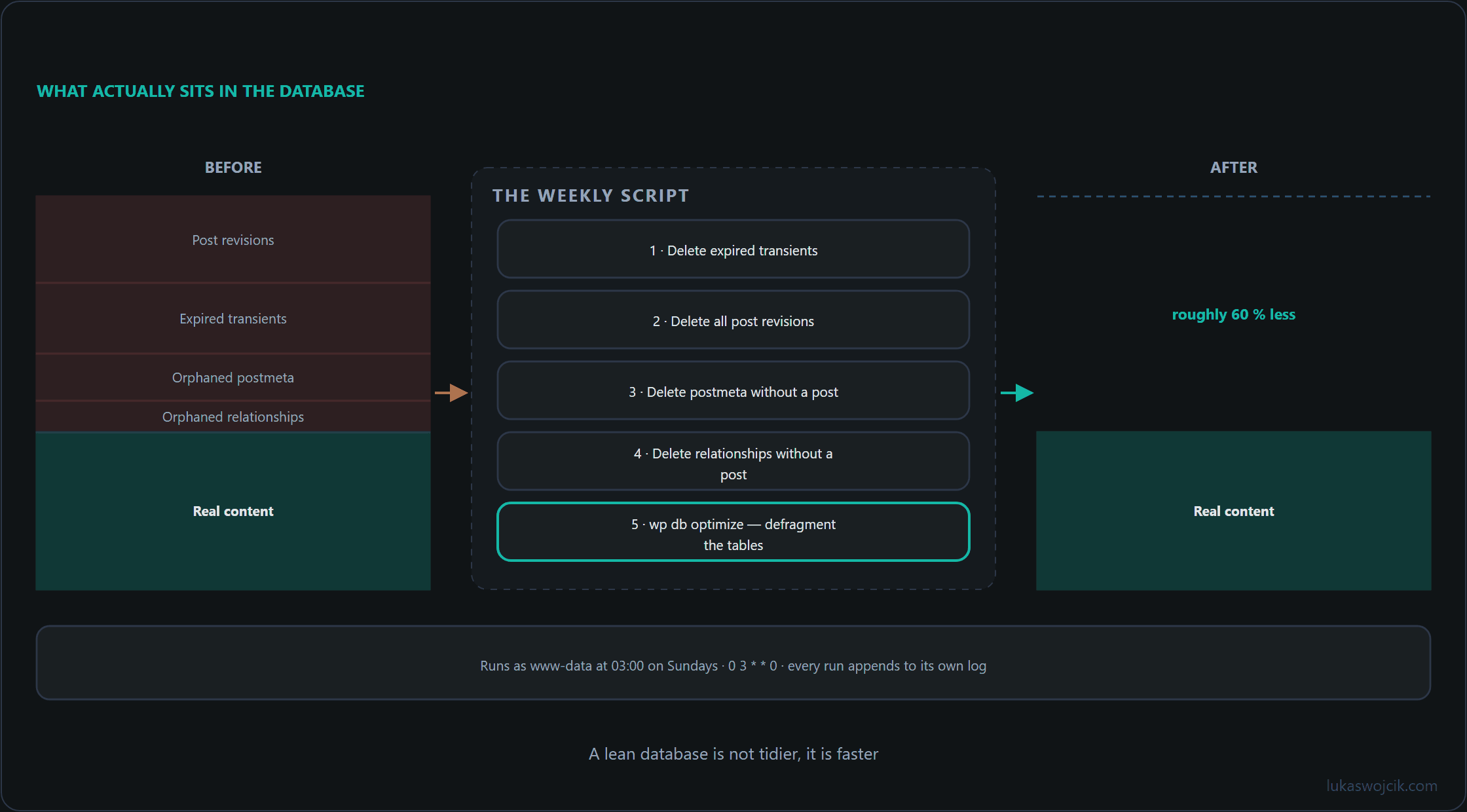
As a WordPress v7.0.2 installation matures, its underlying MySQL or MariaDB database undergoes significant fragmentation and data bloat. Every editorial save generates a new row in the wp_posts table as a post revision. Concurrently, plugins and themes frequently write temporary cache data to the wp_options table as transients. When these transients expire, WordPress relies on lazy-deletion mechanisms during HTTP requests, often leaving thousands of obsolete entries behind.
Additionally, deleting posts or custom post types without explicit cleanup routines results in orphaned metadata inside the wp_postmeta table. Over time, this uncontrolled accumulation inflates index sizes, slows down SQL execution times for complex SELECT queries, and increases server memory consumption. Automating regular maintenance via WP-CLI and server-level cron jobs bypasses the web server stack entirely, ensuring high-speed, non-blocking cleanup without hitting PHP execution time limits.
Step-by-Step Implementation Guide
Step 1: Identifying Database Bloat and Performing an Initial CLI Audit
Before executing deletion routines, the current size and structure of the database should be inspected using WP-CLI via an SSH terminal. The following command displays an overview of all tables sorted by their total size in megabytes:
wp db size --tables --human-readableTo quantify the exact number of expired transients currently lingering in the options table, an initial inspection query can be executed:
wp db query "SELECT COUNT(*) FROM wp_options WHERE option_name LIKE '_transient_timeout_%' AND option_value < UNIX_TIMESTAMP();"Step 2: Designing the Automated Maintenance Script
To safely eliminate dead data without relying on third-party WordPress plugins, a dedicated shell script utilizing WP-CLI and direct database queries is optimal. The script addresses four primary sources of bloat:
- Expired Transients: Flushes all outdated transient entries from
wp_options. - Old Post Revisions: Purges historical revision objects from
wp_posts. - Orphaned Postmeta: Executes a relational
DELETEquery to remove metadata whose parent post ID no longer exists. - Orphaned Term Relationships: Removes taxonomy assignments in
wp_term_relationshipswhose referenced object no longer exists. With Polylang, or with taxonomies registered for other object types, the query also deletes assignments that do not belong to a post at all, such as the language assignments of categories and tags; details under “Questions and answers”.
The following production-ready script can be saved on the server as /opt/scripts/wp-db-cleanup.sh:
#!/usr/bin/env bash
# ============================================================================
# High-Performance WordPress Database Cleanup Script
# Target: WordPress v7.0.2 via WP-CLI
# ============================================================================

WP_PATH="/var/www/lukaswojcik.com/htdocs"
LOG_FILE="/var/log/wp_db_cleanup.log"

echo "[$(date +'%Y-%m-%d %H:%M:%S')] Starting maintenance cycle..." >> "$LOG_FILE"

# 1. Purge all expired transients
wp transient delete --expired --path="$WP_PATH" >> "$LOG_FILE" 2>&1

# 2. Delete all post revisions (optional: keep latest 3 revisions per post if needed)
REVISIONS=$(wp post list --post_type=revision --format=ids --path="$WP_PATH")
if [ -n "$REVISIONS" ]; then
    wp post delete $REVISIONS --force --path="$WP_PATH" >> "$LOG_FILE" 2>&1
fi

# 3. Remove orphaned postmeta entries via direct relational SQL
wp db query "DELETE pm FROM wp_postmeta pm LEFT JOIN wp_posts wp ON wp.ID = pm.post_id WHERE wp.ID IS NULL;" --path="$WP_PATH" >> "$LOG_FILE" 2>&1

# 4. Remove orphaned term relationships
# Caution: with Polylang this also deletes term language assignments (object_id = term ID)
wp db query "DELETE tr FROM wp_term_relationships tr LEFT JOIN wp_posts wp ON wp.ID = tr.object_id WHERE wp.ID IS NULL;" --path="$WP_PATH" >> "$LOG_FILE" 2>&1

# 5. Defragment and optimize MySQL/MariaDB storage engines
wp db optimize --path="$WP_PATH" >> "$LOG_FILE" 2>&1

echo "[$(date +'%Y-%m-%d %H:%M:%S')] Maintenance completed successfully." >> "$LOG_FILE"
Step 3: Enforcing Strict Script Permissions
To prevent unauthorized execution, the shell script must be assigned appropriate Unix filesystem permissions. Execution rights should be restricted strictly to the administrative user or the web server service account:
chmod 700 /opt/scripts/wp-db-cleanup.sh
chown www-data:www-data /opt/scripts/wp-db-cleanup.sh
Step 4: Automating Execution via Server Cron Job
Unlike WP-Cron, which depends on incoming HTTP web traffic and can be delayed on low-traffic sites, a native Linux system cron job guarantees execution at precise intervals. To schedule the cleanup routine to run every Sunday at 03:00 AM, the crontab configuration must be edited:
crontab -e -u www-dataThe following schedule expression is appended to the cron configuration file:
0 3 * * 0 /bin/bash /opt/scripts/wp-db-cleanup.sh >/dev/null 2>&1Step 5: Quality Assurance and Verification
After manual invocation of the shell script, verification should be performed via terminal commands:
- Check Execution Logs: Review `/var/log/wp_db_cleanup.log` to confirm zero syntax errors or database locks occurred.
- Validate Table Optimization: Execute `wp db size –human-readable` and observe the reduced storage footprint of `wp_postmeta` and `wp_posts`.
- Inspect Frontend Integrity: Verify that active pages, custom toolbox tools, and Polylang language relations load seamlessly without missing metadata.
Summary and Measurable Added Value
What is achieved: Replacement of manual database maintenance and resource-heavy optimization plugins with an autonomous, server-level maintenance pipeline using WP-CLI and Linux cron jobs.
Resulting added value:
- Permanent Database Leanings: Relational tables remain defragmented and free of orphaned metadata, reducing overall database size by up to 40–60% on active publishing sites.
- Accelerated SQL Query Speed: Cleaned indexes lead to significantly lower query execution latencies for dynamic dashboard requests and complex JOIN operations.
- Zero PHP Resource Overhead: Executing maintenance directly via CLI eliminates HTTP timeouts, memory spikes, and backend slowdowns for frontend visitors.
Questions and answers
Why does the script run cleanly by hand but not from the cron job?
Usually because of a different environment. Cron starts commands with a minimal environment, and three differences are the most common causes:
- The search path. Cron usually sets PATH to just /usr/bin:/bin. If WP-CLI lives at /usr/local/bin/wp, as it often does, the script cannot find the wp command. A full path in the script or a PATH line at the top of the crontab fixes this.
- Write access to the log file. The script runs as www-data and writes to /var/log/wp_db_cleanup.log, in a directory www-data normally cannot write to. If the redirection to the log fails, the shell does not run the command in question at all, so the database is never touched. The file therefore has to be created beforehand and handed to www-data, or the log has to live somewhere www-data may write.
- The swallowed output. The crontab line sends everything to /dev/null. The error messages from the failed redirections disappear there, and the run looks silently successful.
A test run under the same conditions exposes these errors in advance, for example with sudo -u www-data env -i PATH=/usr/bin:/bin /bin/bash /opt/scripts/wp-db-cleanup.sh. If the script completes that way, the most common causes are ruled out.
Is the query for orphaned term relationships safe on every installation?
No. The wp_term_relationships table does not only link terms to posts. A taxonomy can be registered for other object types, such as users or the old links in wp_links, and then object_id does not hold a post ID. Multilingual plugins such as Polylang also assign categories and tags to their language and translations through this table, with the term ID as object_id.
The query in the script deletes every row whose object_id is missing from wp_posts and thus hits exactly these assignments. The treacherous part is that it does not hit all of them: a term ID that happens to exist as a post ID as well survives. The result is scattered categories without a language or without a translation, which are hard to explain.
It is safer to restrict the query to the taxonomies actually attached to posts, via a JOIN on wp_term_taxonomy and a list such as category and post_tag. Every deletion run should also be preceded by a backup, for example with wp db export, and a dry run with SELECT COUNT(*) instead of DELETE shows how many rows would be affected.
What does wp db optimize do to InnoDB tables?
InnoDB has no optimization of its own. MySQL and MariaDB rebuild the table instead and update its statistics; the message reads “Table does not support optimize, doing recreate + analyze instead”. For the rebuild the server temporarily needs about as much free disk space as the table occupies, and large tables take correspondingly long.
The file only shrinks if every table has a file of its own (innodb_file_per_table, the default in current versions). If the tables sit in the shared system tablespace, its file stays the same size. After a large deletion the rebuild is worthwhile; as a weekly routine it achieves little, because InnoDB reuses freed space within the table anyway.
Can the number of revisions be capped instead of deleting them all every week?
Yes, with the WP_POST_REVISIONS constant in wp-config.php, for example define( 'WP_POST_REVISIONS', 3 );. WordPress then removes a post’s oldest revisions beyond the limit the next time that post is saved. The version history is kept that way, while the script deletes it completely every week.
Related articles