WAN Failover: What Happens to Open Connections When the Line Switches

Contents
Failover is usually described in seconds: the health check notices, the router switches, the line is back. That description is accurate about the line and silent about everything that was using it, which is the part anyone in the middle of a call will notice first.
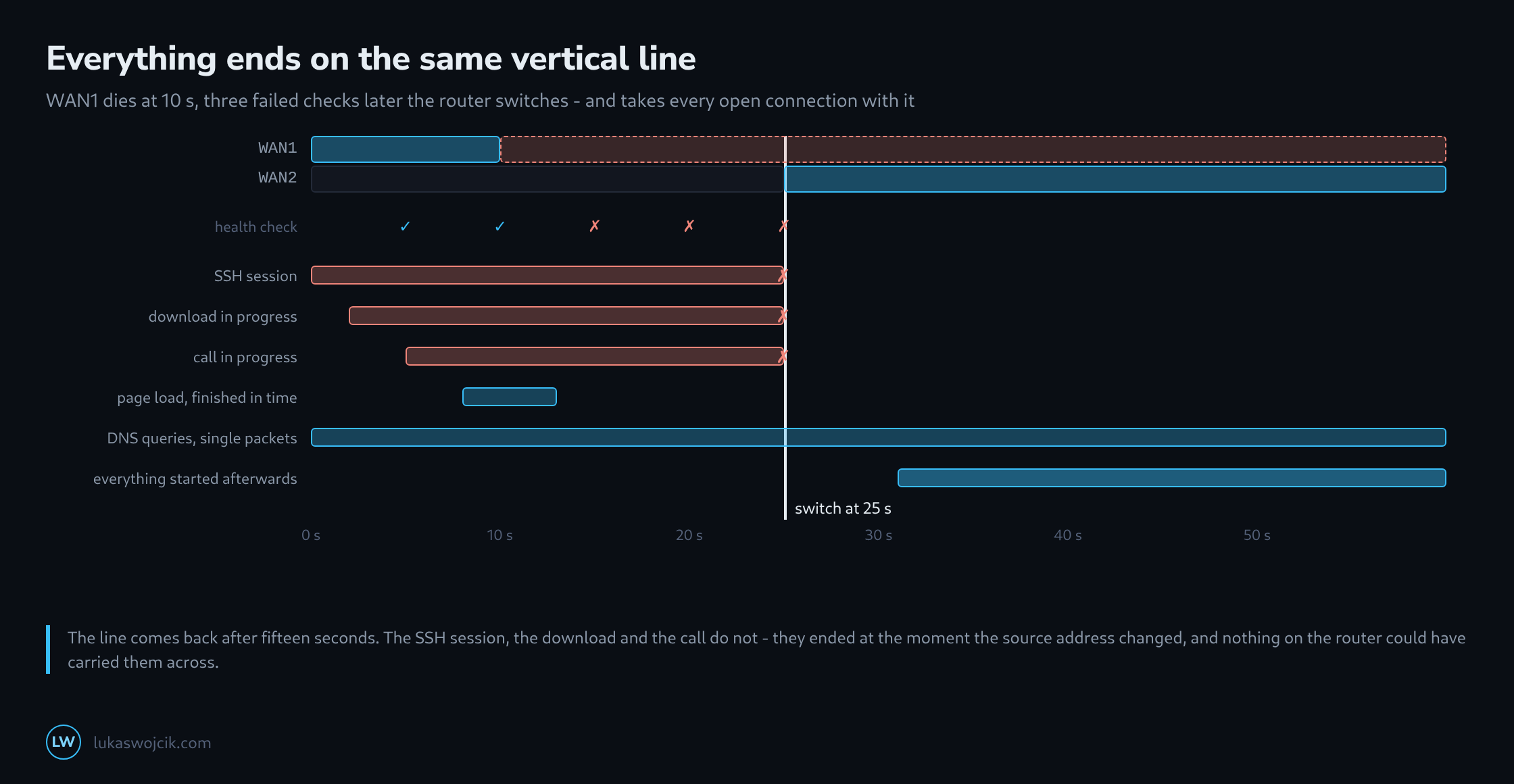
What happens at the moment of the switch is not a brief interruption of existing connections. It is the end of them.
Why Every Connection Dies
A TCP connection is identified by four values: both addresses and both ports. Traffic leaving through WAN1 carries WAN1’s public address, and the server on the other side has that address in its half of the connection.
After the switch the same traffic leaves through WAN2 and arrives with a different source address. To the server that is not the same connection – it is packets belonging to nothing, which get a reset or get dropped. The router cannot help: the translation state that mapped the internal connection to WAN1’s address belongs to an interface that is down.
Which is why the phrase to avoid is seamless failover on this class of hardware. What is seamless is the availability of a path. Sessions are not carried across it, and no timer setting changes that.
How Long the Switch Actually Takes
The visible part is the health check arithmetic – the interval multiplied by the number of failures tolerated. The invisible part comes before it: the line can be dead for almost a full interval before the first check even notices, because the check that just succeeded ran a moment before the failure.
worst case  = interval × (failures + 1)
typical     = interval × (failures + 0.5)

interval 5 s, 3 failures
  best   15 s
  typical 17.5 s
  worst  20 s

plus the time the applications need to notice their sessions are gone,
which for a TCP timeout is far longer than any of the above
The last line is the one that decides what a person experiences. The router is back after fifteen seconds; a download that has not yet realised its connection is dead sits in a TCP retransmission timeout for considerably longer, and a browser tab looks frozen the whole time.
What Survives and What Does Not
| Traffic | Survives? | Why |
|---|---|---|
| SSH, database connections | no | long-lived TCP, tied to the address pair |
| Downloads over HTTP/1.1 and HTTP/2 | no | TCP; restarts from the beginning without range requests |
| HTTP/3 (QUIC) | often | a connection ID identifies the session, not the address |
| A call in progress | no | the media stream is addressed to the old public address |
| DNS queries | yes | single packets, retried as a matter of course |
| A VPN tunnel | briefly gone | notices and rebuilds itself, carrying its own sessions |
The QUIC row is the genuine exception and worth knowing about, because it is quietly becoming the common case: a connection identifier that does not depend on the address is exactly the property that makes a path change survivable, and both ends have to support it.
The VPN row points at the one arrangement that helps in practice. A tunnel that reconnects by itself turns one failover into one reconnect, and everything inside the tunnel sees a short pause rather than a dead connection – because inside the tunnel the addresses never changed.
Switching Back Costs the Same Again
The switch back to the primary line is a second switch, with a second round of dead sessions. That is the reason the two timers should not be symmetric: switching over quickly limits the outage, switching back slowly avoids paying the price twice for a line that is not yet stable.
A flapping connection with equal timers is the worst case in the whole subject. Every flap costs two rounds of broken sessions, and a line that flaps every few minutes is materially worse than a line that is simply down – because a line that is down fails over once and then stays put.
What Can Be Done About It
Not much at the router, and that is worth saying plainly rather than tuning settings in the hope that one of them is the trick. Three things do help.
Distinct health check targets on the two uplinks, so that an outage at the target is not mistaken for an outage of both lines. A return timer several times longer than the failover timer, so that flapping costs one switch instead of ten. And, for anything that genuinely must not drop, a tunnel that survives the path change and carries the sessions inside it.
Beyond that the honest position is to plan for the interruption rather than to deny it: know that the calls will drop, that the backup will restart, and that the fifteen seconds in the configuration are the smaller half of what the outage actually costs.
Related articles