Self-Hosted Large Language Model (LLM) with Ollama Behind an Auth Proxy

Contents
Sending proprietary corporate documents, customer records, and source code to public Large Language Model (LLM) APIs such as OpenAI, Anthropic, or Google Gemini creates severe data sovereignty risks and potential GDPR violations. Hosting open-weight LLMs—such as Llama 3.1, Mistral, or CodeLlama—on internal enterprise hardware guarantees complete data isolation. However, because the popular inference server Ollama exposes its REST API on port 11434 without native authentication, deploying it safely inside an enterprise network requires an architectural wrapper: an Nginx reverse proxy enforcing strict API token authentication and TLS encryption.
1. Architectural Framework: Secure Edge Inference Pipeline
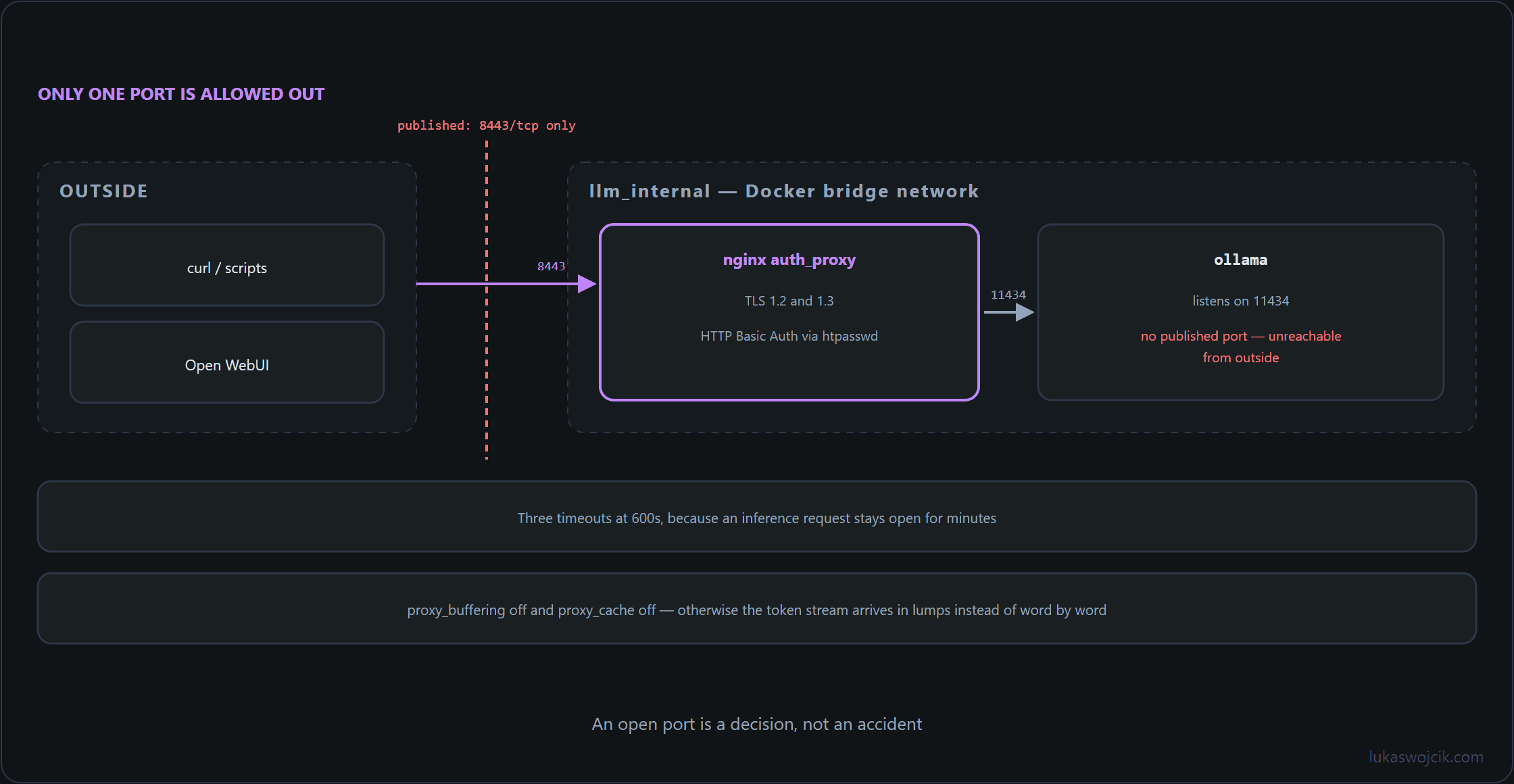
An enterprise-grade local LLM deployment decouples model execution from network exposure by layering three isolated services within a containerized environment:
- Ollama Inference Backend: Executes open-weight LLM weights using NVIDIA GPU acceleration (via NVIDIA Container Toolkit) or high-thread CPU quantization, bound strictly to internal container network interfaces.
- Nginx Authentication & TLS Reverse Proxy: Acts as the single entry point, intercepting all HTTP requests, terminating SSL/TLS encryption, and validating secret Bearer tokens or HTTP Basic Authentication credentials before proxying requests to Ollama.
- OpenAI-Compatible Frontend / Scripts: Internal web UIs (such as Open WebUI) or automated Python scripts interact with the secured endpoint using standard OpenAI SDK syntaxes without ever bypassing the proxy security layer.
2. Step-by-Step Container & GPU Provisioning
To launch Ollama alongside a dedicated Nginx reverse proxy, deploy the following production-ready docker-compose.yml file configured for GPU passthrough and isolated networking:
services:
  ollama:
    image: ollama/ollama:latest
    container_name: enterprise_ollama
    restart: always
    environment:
      - OLLAMA_HOST=0.0.0.0
      - OLLAMA_ORIGINS=*
    volumes:
      - ./ollama_data:/root/.ollama
    deploy:
      resources:
        reservations:
          devices:
            - driver: nvidia
              count: all
              capabilities: [gpu]
    networks:
      - llm_internal

  auth_proxy:
    image: nginx:alpine
    container_name: ollama_auth_proxy
    restart: always
    ports:
      - "8443:443"
    volumes:
      - ./nginx.conf:/etc/nginx/nginx.conf:ro
      - ./certs:/etc/nginx/certs:ro
      - ./htpasswd:/etc/nginx/.htpasswd:ro
    depends_on:
      - ollama
    networks:
      - llm_internal

networks:
  llm_internal:
    driver: bridge
3. Step-by-Step Nginx Auth Proxy Configuration
To restrict API access exclusively to authorized enterprise applications, configure Nginx to require HTTP Basic Authentication or API token validation. The following nginx.conf script enforces authentication and manages streaming timeouts for large LLM inference responses:
events {
    worker_connections 1024;
}

http {
    upstream ollama_backend {
        server ollama:11434;
    }

    server {
        listen 443 ssl;
        server_name llm.internal.domain;

        ssl_certificate /etc/nginx/certs/server.crt;
        ssl_certificate_key /etc/nginx/certs/server.key;
        ssl_protocols TLSv1.2 TLSv1.3;

        # Enforcing HTTP Basic Auth (Generate via: htpasswd -c ./htpasswd api_user)
        auth_basic "Enterprise LLM Secure Gateway";
        auth_basic_user_file /etc/nginx/.htpasswd;

        # Mandatory timeout extensions for long-running streaming inference
        proxy_read_timeout 600s;
        proxy_connect_timeout 600s;
        proxy_send_timeout 600s;

        location / {
            proxy_pass http://ollama_backend;
            proxy_set_header Host $host;
            proxy_set_header X-Real-IP $remote_addr;
            proxy_set_header X-Forwarded-For $proxy_add_x_forwarded_for;
            proxy_set_header X-Forwarded-Proto $scheme;

            # Streaming support for Server-Sent Events (SSE)
            proxy_buffering off;
            proxy_cache off;
        }
    }
}
4. Step-by-Step Script & Web UI Verification
Once the proxy is active, the inference engine can be queried safely via standard scripts or integrated into chat UIs:
- Downloading Models: Execute the initial model pull inside the container via Docker command-line execution:
docker exec -it enterprise_ollama ollama run llama3.1 - Python API Verification: Send an authenticated HTTPS REST request to the proxy using HTTP Basic credentials or authorization headers:
curl -k -u "api_user:SecretPassword123" https://localhost:8443/api/generate -d '{"model": "llama3.1", "prompt": "Summarize the company privacy policy.", "stream": false}' - Connecting Open WebUI: Deploy the
open-webuiDocker container on the same network and assign the endpoint environment variable:OLLAMA_BASE_URL=https://api_user:SecretPassword123@auth_proxy:443
5. Summary & Architectural Value
What this tutorial achieves: The deployment of a self-hosted, GPU-accelerated open-weight Large Language Model server using Ollama, shielded by an Nginx authentication and SSL/TLS reverse proxy pipeline.
Resulting value: A private, high-performance “ChatGPT”-equivalent is established for corporate workflows, internal software scripts, and employee web UIs without any data leakage to external commercial AI APIs. Complete data sovereignty and GDPR compliance are guaranteed, while mandatory authentication headers prevent unauthorized network access to the inference compute resources.
Sources
Related articles