English
 Deutsch
 Polski
Performance Optimization via functions.php: Selective Dequeuing of WordPress Plugin Scripts

Contents
Architectural Overview: The WordPress Asset Pipeline
Modern WordPress installations often suffer from CSS and JavaScript bloat caused by third-party plugins. By default, many complex plugins—such as e-commerce suites, form builders, or syntax highlighters—register and enqueue their static assets globally across every frontend URL. This unconditional loading inflates the Document Object Model (DOM), increases HTTP request counts, and degrades critical Core Web Vitals metrics including Largest Contentful Paint (LCP) and Interaction to Next Paint (INP).
In WordPress v7.0.2, the asset management lifecycle relies on the WP_Scripts and WP_Styles classes. Assets are queued during the wp_enqueue_scripts action hook. To prevent unnecessary files from reaching the browser without disabling plugin functionality, selective dequeuing must be implemented via the active theme’s functions.php or an architectural Must-Use (MU) plugin.
Step-by-Step Implementation Guide
Step 1: Inspecting and Auditing Registered Handles
Before an asset can be dequeued, its unique internal handle must be identified. WordPress assigns a specific identifier string to every stylesheet and script file upon registration via wp_register_script() or wp_register_style().
To audit currently enqueued handles on any specific frontend route, the following diagnostic snippet can be temporarily executed within functions.php to log all active handles to the PHP server log:
add_action( 'wp_print_scripts', function() {
    if ( ! is_admin() ) {
        global $wp_scripts;
        error_log( 'Enqueued Scripts: ' . implode( ', ', $wp_scripts->queue ) );
    }
}, 9999 );

add_action( 'wp_print_styles', function() {
    if ( ! is_admin() ) {
        global $wp_styles;
        error_log( 'Enqueued Styles: ' . implode( ', ', $wp_styles->queue ) );
    }
}, 9999 );
Step 2: Understanding Hook Priorities and Execution Context
Attempting to remove an asset before a plugin has enqueued it will fail silently. Most standard plugins attach their enqueue functions to wp_enqueue_scripts using the default priority of 10.
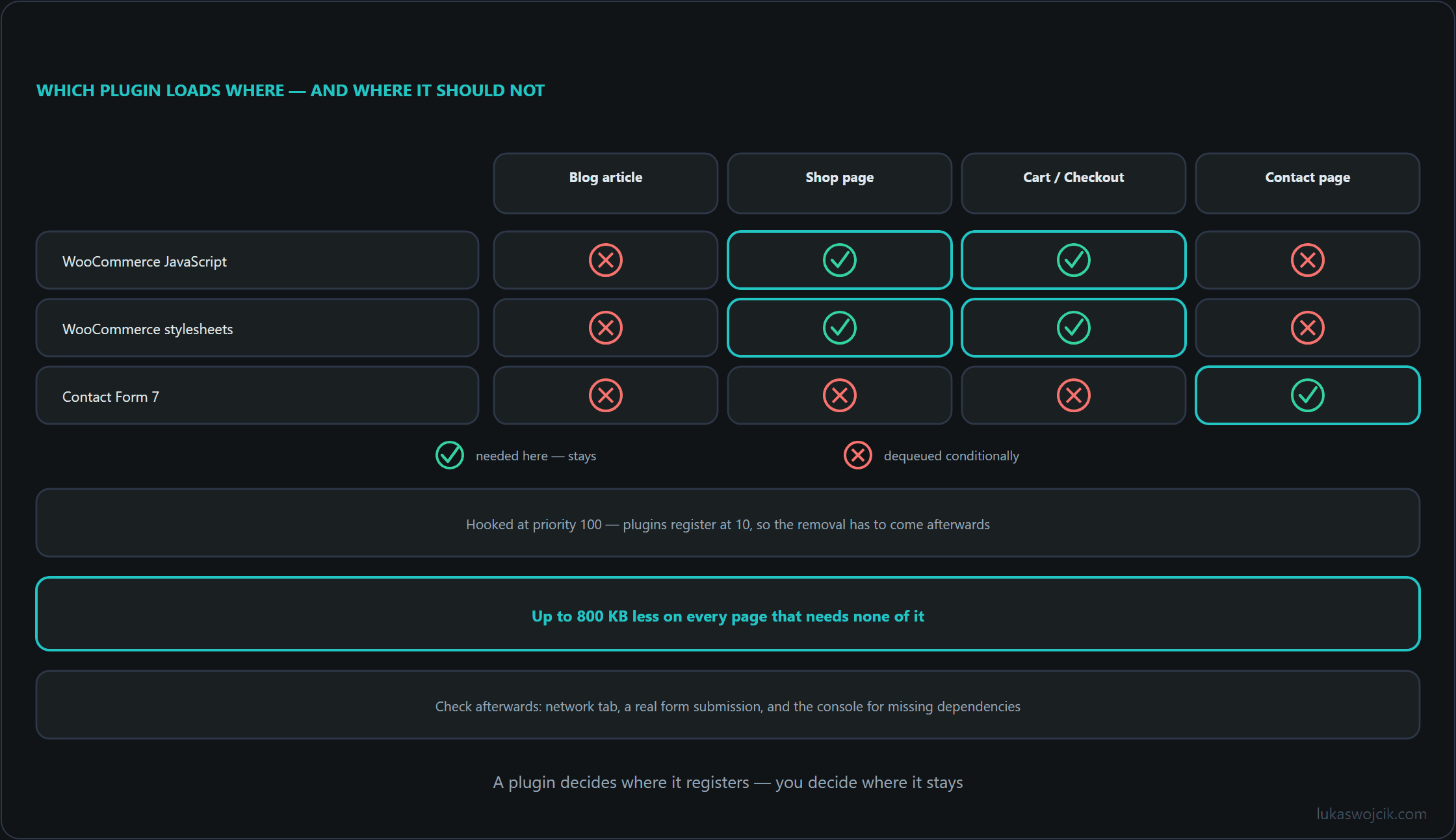
Therefore, a dequeuing function must be hooked to wp_enqueue_scripts with a significantly higher numerical priority (e.g., 100 or 999) to ensure execution occurs strictly after all third-party registrations have completed.
Step 3: Writing the Selective Dequeuing Logic
The core functions for removing assets from the execution queue are:
wp_dequeue_script( $handle )– Removes a JavaScript file from the queue.wp_deregister_script( $handle )– Unregisters the script handle completely.wp_dequeue_style( $handle )– Removes a CSS stylesheet from the queue.wp_deregister_style( $handle )– Unregisters the style handle completely.
Combining dequeue and deregister operations guarantees that dependent scripts cannot accidentally re-trigger the loading of the parent asset; the dependent scripts themselves are then no longer output either.
Step 4: Production Code Pattern for WooCommerce and Form Assets
The following production-ready architecture demonstrates how to prevent WooCommerce assets and form-builder scripts from loading on standard technical blog posts and informational pages:
/**
 * Selective Asset Dequeuing Architecture
 * Target: WordPress v7.0.2
 */
add_action( 'wp_enqueue_scripts', 'lw_selective_asset_cleanup', 100 );

function lw_selective_asset_cleanup() {
    // Abort execution inside the WordPress admin dashboard
    if ( is_admin() ) {
        return;
    }

    // 1. Strip E-Commerce Assets from standard blog articles and content pages
    if ( function_exists( 'is_woocommerce' ) && ! is_woocommerce() && ! is_cart() && ! is_checkout() ) {
        // Remove WooCommerce JavaScript
        wp_dequeue_script( 'woocommerce' );
        wp_deregister_script( 'woocommerce' );
        wp_dequeue_script( 'wc-add-to-cart' );
        wp_deregister_script( 'wc-add-to-cart' );
        wp_dequeue_script( 'wc-cart-fragments' );
        wp_deregister_script( 'wc-cart-fragments' );

        // Remove WooCommerce Stylesheets
        wp_dequeue_style( 'woocommerce-general' );
        wp_deregister_style( 'woocommerce-general' );
        wp_dequeue_style( 'woocommerce-layout' );
        wp_deregister_style( 'woocommerce-layout' );
        wp_dequeue_style( 'woocommerce-smallscreen' );
        wp_deregister_style( 'woocommerce-smallscreen' );
    }

    // 2. Strip Contact Form scripts/styles from pages without forms
    if ( ! is_page( 'contact' ) && ! is_page( 'support' ) ) {
        wp_dequeue_script( 'contact-form-7' );
        wp_deregister_script( 'contact-form-7' );
        wp_dequeue_style( 'contact-form-7' );
        wp_deregister_style( 'contact-form-7' );
    }
}
Step 5: Quality Assurance and Regression Testing
After deploying the snippet, validation must be conducted across different content types:
- Network Tab Inspection: Open the browser developer tools (F12) on a standard blog post and verify that the target
.jsand.cssfiles are entirely absent from the network waterfall. - Functional Verification: Visit an isolated route where the assets are legitimately required (e.g., the checkout URL or contact page) to confirm that conditional tags evaluate correctly and scripts execute without errors.
- Console Error Monitoring: Ensure no secondary JavaScript routines break due to missing global dependencies (such as undefined
jQuery.fnextensions).
Summary and Measurable Added Value
What is achieved: Unconditional global asset enqueuing is replaced by strict, route-aware conditional loading. Third-party stylesheets and scripts are systematically isolated to the specific URLs where their functional dependencies are required.
Resulting added value:
- Drastic Payload Reduction: Total transfer size on content pages is reduced by up to 300–800 KB depending on plugin stack complexity.
- Elimination of Unused Code: Audits in Google PageSpeed Insights immediately show resolved warnings for “Reduce unused JavaScript” and “Reduce unused CSS”.
- Optimized Core Web Vitals: Faster JavaScript main-thread idle times lead to significantly lower Total Blocking Time (TBT) and superior INP scores, elevating organic search ranking potential.
Questions and answers
Why can wp_deregister_script() remove more scripts than intended?
Because WordPress only outputs a script when every handle it depends on is registered. Deregistering a handle therefore also drops every script that lists it as a dependency, including those of other plugins, and in normal operation the page shows no error for it. The network tab inspection from step 5 makes it visible: a file missing after the change that was not on the list depended on the removed handle.
What needs attention with the contact form condition on a multilingual site?
is_page() compares against the ID, slug or title of the requested page. On a multilingual site every translation is a page of its own, with its own ID and usually its own slug. The condition from step 4 therefore only recognizes the page with the slug contact; on /de/kontakt/ or /pl/kontakt/ the form script is removed, and the form there runs without the script it relies on.
Two approaches fix this:
- is_page() also accepts a list, such as
is_page( array( 'contact', 'kontakt', 'support' ) ). That is simple, but it has to be updated for every new language or form page. - The condition asks instead whether the content contains the shortcode:
is_singular() && has_shortcode( get_post()->post_content, 'contact-form-7' ). That follows the form rather than the address, but it does not detect forms placed in a widget or in a theme template.
Which approach fits is decided by the functional verification from step 5, carried out on every language version of the form pages, not just the first.
Related articles