GA4 Hostname Include Filter: Allowlist, Empty Hostnames Blocked, Measurement Protocol Exempt

Contents
Since 21 September 2026 the hostname filter in GA4 has a second mode. Until then it could only exclude: the filter of 11 June 2026 dropped events whose hostname was on a list. The new Include mode turns the direction around. The list now names the approved domains, and every event with any other hostname is dropped.
Google describes the benefit as less upkeep. Anyone excluding spam and test systems one by one has to add every new foreign domain; an allowlist only needs the own domains. The price is a different risk: a missing domain costs real traffic, and a dropped event is gone for good.
What the release note defines
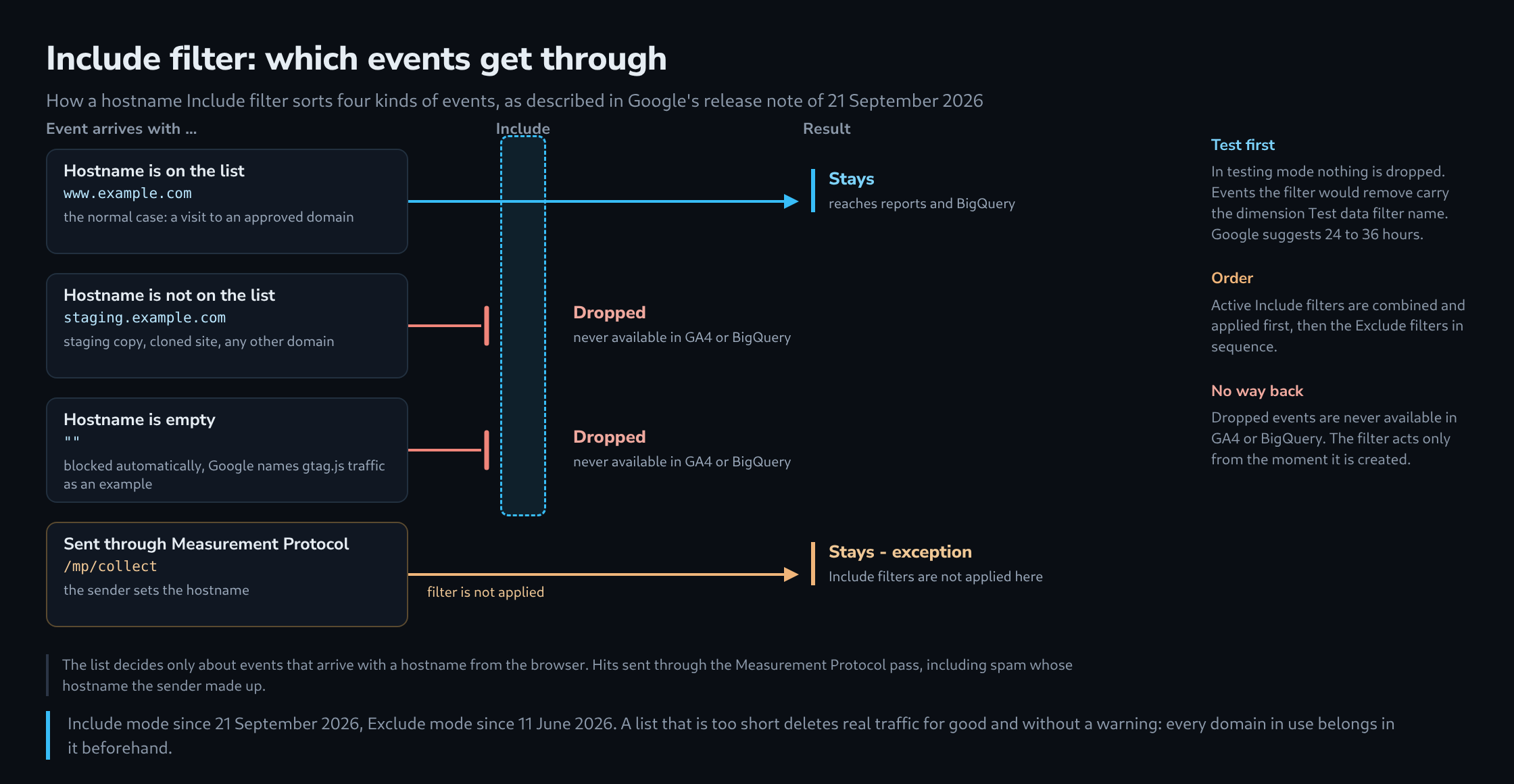
The note of 21 September and the Analytics Help page on data filters set out five rules.
- Allowlist. Events whose hostname is not on the list are dropped.
- Empty hostnames. An Include filter blocks events without a hostname automatically. Google’s reason is that a missing hostname usually points to spam or abnormal traffic; gtag.js traffic is named as an example.
- Measurement Protocol. Include filters are not applied to events sent through the Measurement Protocol; that data stays unblocked.
- Order. All active Include filters are combined and applied first as a group, then any active Exclude filters in sequence.
- Permanent and forward only. A data filter is evaluated from the moment it is created and does not touch historical data. What it drops is never processed and is never available in GA4 or BigQuery.
What this means in practice
The route of ghost spam stays open. Ghost spam arises when someone reads a measurement ID from the page source and sends hits straight to the collector, usually through the Measurement Protocol; the sender then sets the hostname. That is exactly the route Include filters skip. An allowlist keeps out traffic from wrong hostnames in the browser – test systems, clones of the site, proxies that carry the tag along – but not necessarily the spam that is usually meant when hostname filters come up. The release note states the exemption for Include filters only; how an Exclude filter behaves there is not described.
Every domain in use belongs on the list. Not just the main domain, but also subdomains for shop, blog or landing pages, checkout and booking services that run under a foreign domain with the same measurement ID, and domains joined by cross-domain measurement. If one is missing, its events disappear without a message. With a checkout on a partner domain, those are the purchases.
Empty hostnames are not settled by the note. The bracket in Google’s sentence leaves open whether ordinary gtag.js events carry a hostname or only certain malformed ones lack it. The note does not say whether regular page views ever arrive without a hostname; testing mode shows that in the property’s own data.
What the note leaves open
Two points are not described, and both decide whether a list works as intended.
- Matching. Google’s guide names the options “Exactly matches” and “Contains”. Whether a list entry for
example.comalso admitswww.example.comis not described. With “Contains” a substring is enough, so a hostname such asexample.com.other.examplewould pass a list containingexample.com; with “Exactly matches” every spelling needs an entry of its own. - Combination. The Help page fixes the order, but the note does not say whether an Include and an Exclude filter for hostnames can exist side by side in one property, nor how filters behave for app data streams.
An order of steps that avoids a deletion
Include filter: steps before it is made active

  1  open a report with the dimension hostname and list every
     value of the past 90 days
  2  assign each name: own domain, partner or checkout,
     test system, foreign
  3  build the list of approved hostnames from the first
     two groups
  4  create the filter in testing mode and leave it for
     24 to 36 hours
  5  in a free exploration, look at Test data filter name,
     Event name and Event count by hostname
  6  only then make it active, and note the day

  Step 5 is the check: a revenue event such as purchase among
  the events the filter would remove means a domain is missing.
Include or Exclude
| Aspect | Exclude | Include |
|---|---|---|
| The list contains | unwanted hostnames | approved hostnames |
| A new foreign domain | stays in the data until it is added | is dropped automatically |
| A new own domain | no effect | is dropped until it is entered |
| Empty hostname | not described | blocked automatically |
| Measurement Protocol | exemption not named in the note | exempt |
| Consequence of a mistake | too little removed: the data stays polluted | too much removed: real data is gone for good |
Assessment
Include suits a property with few, fixed domains, where every host is known and new ones are rare. With many changing domains – campaign sites, partner systems, agencies – the list itself becomes the source of errors, because every addition depends on someone remembering it. In every case the filter is no substitute for looking at where Measurement Protocol hits come from, since that route stays outside it.
This article rests on Google’s documentation and release notes, not on a measurement in a property of its own. Where the documentation is silent, it says so; testing mode is the way to settle those questions with real data before anything is deleted.
Related articles