English
 Deutsch
 Polski
Tutorial: Reading a Minified Third-Party Script Before It Goes on the Site

Contents
A vendor sends a snippet, somebody pastes it into the tag manager, and from that moment a file nobody has read runs on every page with full access to everything the page contains.
Reading it properly is a job for a security review. Reading it well enough to decide is six searches through a formatted copy, and it takes about twenty minutes.
What Beautifying Restores and What It Does Not
Minification removes line breaks and indentation, shortens local variable names to one or two characters, and drops comments. Formatting reverses the first of those and nothing else.
Which is enough, because the parts that matter keep their names. A property on a browser object – localStorage, fetch, navigator – cannot be renamed, since the browser would no longer recognise it. Every capability a script has is therefore still spelled out in full, surrounded by variables called a, t and e.
# fetch a copy and format it
curl -s https://cdn.anbieter.example/widget.js -o widget.min.js
npx js-beautify widget.min.js -o widget.js

# size before and after says how heavily it was compressed
wc -c widget.min.js widget.js
The browser can do the same without any tooling: the sources panel has a formatting button that expands the file in place, which is the faster route for a quick look and the wrong one for a documented review, because it leaves no file to compare against next time.
The Six Things Worth Searching For
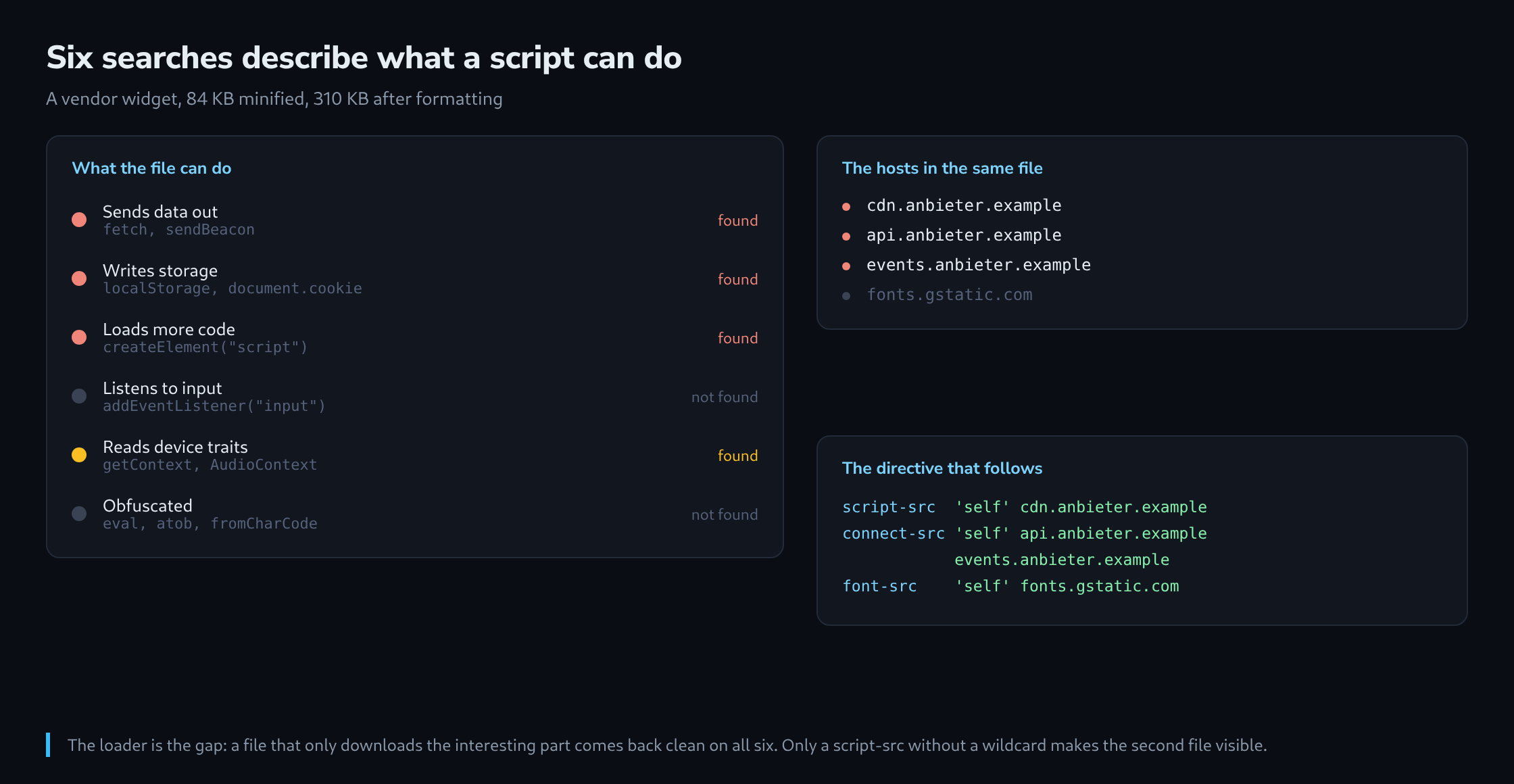
Each of these answers one question, and together they describe what the script is able to do.
# 1 does it send anything out?
grep -nE 'fetch\(|XMLHttpRequest|sendBeacon|new Image|WebSocket' widget.js

# 2 does it write anything persistently?
grep -nE 'localStorage|sessionStorage|document\.cookie|indexedDB' widget.js

# 3 does it load further code?
grep -nE "createElement\(['\"]script|\\.src\\s*=|import\\(" widget.js

# 4 does it listen to input?
grep -nE "addEventListener\\(['\"](input|keydown|keyup|change|submit)" widget.js

# 5 does it collect device traits?
grep -nE 'getContext|AudioContext|navigator\.(plugins|hardwareConcurrency)|RTCPeerConnection' widget.js

# 6 where does it go?
grep -oE 'https?://[a-z0-9.-]+' widget.js | sort -u
The first two are the ones that decide whether a consent category is needed at all. A script that neither stores anything nor sends anything is a rendering helper; one that does both is a data processor, and that difference belongs in the privacy notice rather than in a ticket.
The fourth deserves particular attention on anything embedded near a form. A listener on input is not automatically a keylogger – a chat widget legitimately listens to its own field – but the check is which element it is bound to, and that is readable a few lines further down.
The fifth is the fingerprinting group. A canvas call in a widget that draws something is expected; a canvas call in an analytics snippet that renders nothing visible has one purpose, and that purpose has consent implications regardless of what the vendor calls it.
Telling Minified From Obfuscated
These are different things, and the difference is a decision point rather than a detail.
Minification is a size optimisation and leaves readable structure. Obfuscation is designed to prevent reading, and it has recognisable markers: a large array of hex-encoded strings at the top of the file, an index function that looks them up, String.fromCharCode in a loop, atob around something that is not an image, and above all eval or new Function on an assembled string.
grep -nE 'eval\(|new Function\(|atob\(|String\.fromCharCode|\\\\x[0-9a-f]{2}' widget.jsA hit here does not prove bad intent – some vendors obfuscate to protect their own logic. It does mean the six searches above no longer answer the question, because the capabilities can be assembled at runtime from strings that do not exist in the file.
The practical consequence is that an obfuscated third-party script cannot be audited by reading. What remains is behaviour: load it in a test page, record the network panel and the storage panel, and compare against what the vendor says it does. If that is not acceptable, the answer is not a better search – it is a different vendor.
Extracting the Host List
The sixth search produces the most immediately useful output: every domain the file mentions. That list is what belongs in the content security policy, and building the policy from the file rather than from the documentation catches the endpoints the documentation forgot.
grep -oE 'https?://[a-z0-9.-]+' widget.js | sort -u

https://cdn.anbieter.example
https://api.anbieter.example
https://events.anbieter.example
https://fonts.gstatic.com
Two of those four are the interesting ones. A host that only appears in a comment or a documentation string is noise; a host in a fetch call is a destination. Checking which is which takes one more search per host and is the difference between a policy that works and one that is copied from a blog post.
Content-Security-Policy:
  script-src  'self' https://cdn.anbieter.example;
  connect-src 'self' https://api.anbieter.example https://events.anbieter.example;
  font-src    'self' https://fonts.gstatic.com;
Starting in report-only mode is worth the extra week. The reports name every host the analysis missed – and there is always one, because a script that loads a second script inherits its destinations, and those are not in the first file.
Pinning It, and Where That Fails
Everything above describes one version of one file. The vendor can replace it tomorrow, and nothing about the site would notice.
For a static file, subresource integrity closes that gap: a hash in the script tag, and the browser refuses a file that does not match. A changed file then fails to load rather than running unexamined, which is the correct failure.
<script src="https://cdn.anbieter.example/widget.js"
        integrity="sha384-oqVuAfXRKap7fdgcCY5uykM6+R9GqQ8K/uxy9rx7HNQlGYl1kPzQho1wx4JwY8wC"
        crossorigin="anonymous"></script>
For a tag container it does not work, and the reason is structural: the container is supposed to change whenever somebody publishes. A hash would have to be updated on every publication, which nobody does, so a container is either loaded without integrity or not at all.
What replaces it there is a policy question rather than a technical one: who may publish, and does a second person look at the change. That is the honest answer, and it is worth writing down as such instead of pretending a header covers it.
What Only Monitoring Reveals
Three things escape a reading of the file, and all three surface in monitoring rather than in analysis.
The first is the second-stage script. A loader that fetches its real payload at runtime contains none of the capabilities that payload has, and the six searches come back clean on a file that does nothing except download the interesting part. A script-src directive without a wildcard makes that visible, because the second file needs its own entry.
The second is conditional behaviour. A script that only collects on certain pages, in certain countries or after a certain date is fully readable and gives no reason to look at the branch that matters. Behaviour over time is the only observation that finds it, and a weekly diff against the stored copy is the cheapest form of that.
curl -s https://cdn.anbieter.example/widget.js | sha256sum
# compare against the stored value, weekly
The third is what the vendor does with the data after it arrives, which no file on this side can answer. That belongs in the contract, and the technical review is what makes the contract specific enough to be worth signing: it names the endpoints, the storage keys and the events, and it turns a general assurance into a list somebody can be held to.
Questions and answers
Does subresource integrity also protect the script a loader fetches at runtime?
No. The hash applies only to the one script tag it sits in. When the loader creates a new script element at runtime, the browser checks that file only if the loader itself supplies an integrity attribute, and as a rule it does not. The pinned loader can therefore stay unchanged while the payload it fetches may be a different one every day.
At this point the gap is closed by the content security policy, not by the hash: a script-src directive without a wildcard lets the second file load only from a host that has been entered explicitly. The payload is then a file in its own right: it goes through the same six searches as the loader, and its hash joins the weekly comparison.
What is the crossorigin attribute for in the script tag that carries the hash?
A file from another host can only be checked if the browser fetches it via CORS; without that mode its content stays inaccessible to the check, and the browser refuses the script. crossorigin="anonymous" switches that mode on and sends no cookies with the request. It requires the vendor to serve the file with a matching Access-Control-Allow-Origin header; without it, the script does not load despite a correct hash.
What should happen when the weekly hash comparison reports a difference?
A different hash only says that the file changed, not what changed. A fixed order makes sense:
- Fetch the new version, format it and store it next to the old one. A line-by-line diff of the two formatted copies helps only so far, because a fresh minification run can reassign the short variable names even for a small change and so alter almost every line.
- Repeat the six searches and the obfuscation search on the new version and compare the hits with those of the old one. A new capability, such as a
sendBeaconor adocument.cookieaccess appearing for the first time, is the finding that matters. - Extract the host list again and compare it with the content security policy. A new host either goes into the policy or is a question for the vendor.
- Store the new value and record when and why it was accepted.
If the script is included with subresource integrity, it stops loading after the change anyway until the hash in the script tag has been updated. Whether it gets updated is then decided by this review.
Sources
Related articles